AD0-E902 Exam Questions & Answers
Adobe Workfront Fusion Developer Professional • Adobe
100% money-back guarantee
Sample AD0-E902 Questions
Practice with real exam-style questions, each with the verified correct answer and explanation.
Given the array below, a user wants a comma-separated string of all stat names.
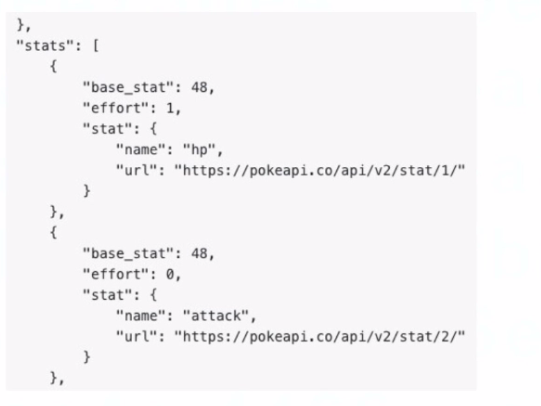
What is the correct expression?
A.

B.

C.

D.

Understanding the Requirement:
The input is an array containing objects, and the goal is to extract all the stat.name values into a comma-separated string.
Example Input:
[
{
'base_stat': 48,
'effort': 1,
'stat': {
'name': 'hp',
'url': 'https://pokeapi.co/api/v2/stat/1/'
}
},
{
'base_stat': 48,
'effort': 0,
'stat': {
'name': 'attack',
'url': 'https://pokeapi.co/api/v2/stat/2/'
}
}
]
Example Output: 'hp, attack'
Why Option B is Correct:
The expression join(map(2.data: stats[]; stats.stat.name); ', '):
map: Iterates through each object in the array (2.data: stats[]) and extracts the stat.name field.
join: Combines the extracted values into a single string, separated by a comma and space (', ').
Breaking it down:
map(2.data: stats[]; stats.stat.name) Creates an array of names: ['hp', 'attack'].
join(...; ', ') Converts the array into the string 'hp, attack'.
Why the Other Options are Incorrect:
Option A: join(2.data: stats[]; stat.name; ', ')
This syntax is incorrect because it attempts to directly access stat.name within the join function without first mapping the values.
Option C: join(map(2.data: stats[]; stat.name); ', ')
The mapping references stat.name directly but does not account for the nested structure (stats.stat.name).
Option D: join(flatten(2.data: stats[]); ', ')
The flatten function is unnecessary here as the data is already structured. It would not properly extract the stat.name values.
Steps to Implement in Workfront Fusion:
Add a Mapping/Transformation Module.
Use the join(map(...)) function as described to transform the input array into a comma-separated string.
Test the output to ensure it correctly generates the desired format.
How This Solves the Problem:
The map function ensures the proper extraction of nested stat.name values.
The join function combines these values into the desired format efficiently.
Reference and Supporting Documentation:
Adobe Workfront Fusion Functions Documentation
Workfront Community: Using Map and Join Functions
The combination of map and join ensures that the stat names are extracted and formatted into a single comma-separated string, as required.
In scenario settings, which two fields can be adjusted to affect how a scenario is executed once running? (Choose two.)
Key Scenario Settings:
Adobe Workfront Fusion provides settings to control the execution of scenarios. These settings impact how the scenario behaves when it runs, especially under conditions such as errors or long-running processes.
Explanation of Correct Options:
Option A ('Number of consecutive errors'):
This setting determines the maximum number of consecutive errors allowed before the scenario execution halts.
By adjusting this value, users can define how resilient the scenario is to temporary failures in modules or external systems.
Option B ('Max number of cycles'):
This setting limits the maximum number of cycles (iterations) the scenario performs in a single run.
It prevents scenarios from running indefinitely or consuming excessive resources in cases of large datasets.
Why the Other Options are Incorrect:
Option C ('Number of bundles per run'): This value is not adjustable in the scenario settings. Instead, the system dynamically determines how many bundles (data packets) are processed per cycle.
Option D ('Number of consecutive runs'): Workfront Fusion does not have a setting for the number of consecutive runs. Scenarios are executed based on schedules, triggers, or manual execution.
Steps to Adjust Scenario Settings:
Open the scenario in Adobe Workfront Fusion.
Click the gear icon in the top-right corner to access Scenario Settings.
Locate and adjust the following fields:
Number of consecutive errors: Set a value based on acceptable failure tolerance.
Max number of cycles: Specify the maximum number of iterations allowed.
Save and activate the scenario.
Reference and Supporting Documentation:
Adobe Workfront Fusion Official Documentation: Scenario Settings
Workfront Community: Best Practices for Scenario Optimization
According to Workfront's training on scenario testing, what are three of the essential elements of a test plan? (Choose three.)
Workfront's training on scenario testing emphasizes the importance of a well-structured test plan to ensure scenario reliability and accuracy. The three essential elements include:
B . Description of Expected Behavior:
This provides clarity on what the scenario is supposed to achieve when executed successfully.
It serves as a benchmark for evaluating the outcome of test executions.
C . Specific Event/Trigger per Scenario:
Identifying and testing specific triggers ensures that the scenario starts under the correct conditions.
This is crucial for verifying the proper configuration of the scenario's start point.
D . Description of Testing Steps:
Outlining step-by-step instructions for the testing process ensures that all aspects of the scenario are tested systematically.
It helps identify potential bottlenecks or areas for improvement in the scenario's configuration.
Why Not Other Options?
A . Roadmap requirements: This pertains to project planning and is not directly relevant to scenario testing.
Workfront Training Materials: Best Practices for Scenario Testing
Experience League Documentation: How to Design and Execute a Test Plan for Workfront Fusion Scenarios
To meet compliance standards, a user must include a process that tracks every Workfront project update created by Fusion.
What can they do to address this business requirement?
Step by Step Comprehensive Detailed Explanation:
Problem Summary:
The organization requires a process to track every project update made by Fusion to meet compliance standards.
This process must provide a clear audit trail of updates, including details like user and timestamp.
Option Analysis:
A . Use reporting on the Last Updated by ID and Last Update Date:
While this provides basic reporting, it only reflects the most recent update and does not maintain a comprehensive history of changes over time.
B . Update the External Reference ID with User ID and Timestamp:
Updating the External Reference ID could cause issues if this field is used for other purposes. It is not designed for logging multiple updates.
C . Create a Note record related to the record updated:
Correct. Creating a Note record for each update ensures that every change is logged with relevant details (e.g., user, timestamp, update reason). This approach creates a full audit trail that is easily accessible and reportable.
Why Note Records are Best:
Audit Trail: Notes provide a clear and searchable history of updates for each project.
Compliance: Ensures compliance by documenting who made what changes and when.
Flexibility: Notes can include custom details such as update reasons or additional context, making them more robust than standard fields.
Implementation:
In the Fusion scenario, add a module to create a Note record after each update.
Populate the Note with relevant details, such as:
User ID ({lastUpdatedBy})
Timestamp ({lastUpdateDate})
Description of the change.
A web service provides the following array named "Colors":
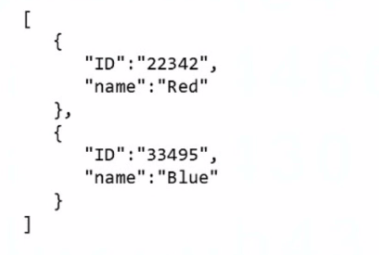
Which expression returns the first ID in the array?
A.

B.

C.

Understanding the Array and the Task:
Input Array (Colors):
[
{ 'ID': '22342', 'name': 'Red' },
{ 'ID': '33495', 'name': 'Blue' }
]
Goal: Extract the first ID from the array, which is '22342'.
Why Option B is Correct:
The expression get(map(2.Colors; ID); 1):
map(2.Colors; ID): Iterates over the array 2.Colors and extracts the ID field from each object. This creates a new array containing just the IDs: ['22342', '33495'].
get(...; 1): Retrieves the first element of the newly created array, which is '22342'.
Why the Other Options are Incorrect:
Option A (map(2.Colors; ID; ID; 1)):
This syntax is invalid because the additional ID and 1 parameters are misplaced. The map function requires only two arguments: the array and the field to map.
Option C (map(get(2.Colors; ID); 1)):
This incorrectly attempts to use get inside map. The get function does not return a field for mapping, so the syntax is invalid.
How the Expression Works:
Step 1: map(2.Colors; ID)
Extracts the ID field from each object in the Colors array.
Output: ['22342', '33495'].
Step 2: get(...; 1)
Retrieves the first element of the mapped array.
Output: '22342'.
Use Case in Workfront Fusion:
This approach is commonly used when processing arrays in Fusion scenarios, ensuring specific elements are accessed without additional looping or complex logic.
Reference and Supporting Documentation:
Adobe Workfront Fusion Functions Documentation
Workfront Community: Using Map and Get Functions
By combining map and get, this expression efficiently extracts the first ID from the array, ensuring correct and reliable results.
Get access to all 51 verified questions with detailed answers.
Unlock All AD0-E902 Questions