Limited-Time Offer: Enjoy 50% Savings! - Ends In 0d 00h 00m 00s Coupon code: 50OFF
Free Exam Questions

1Y0-403 Exam Questions & Answers

Citrix Virtual Apps and Desktops 7 Assessment. Design and Advanced Configurations  •  Citrix

99 Questions 120 min Updated Jul 2026 99% Pass Rate
Get Full Access

100% money-back guarantee

About 1Y0-403 Exam

The 1Y0-403 exam, officially known as the Citrix Virtual Apps and Desktops 7 Assessment for Design and Advanced Configurations, is a comprehensive certification that validates your expertise in designing and implementing advanced Citrix solutions. This exam covers critical topics including architectural design principles, security implementations, performance optimization, disaster recovery planning, and advanced configuration techniques for virtual applications and desktops. Candidates must demonstrate proficiency in assessing business requirements, designing scalable infrastructure, and troubleshooting complex Citrix environments. Professionals aiming to achieve the Citrix Certified Associate (CCA) or Citrix Certified Professional (CCP) certification should prioritize this assessment as it establishes advanced technical competency in enterprise-level Citrix deployments.

IT professionals, system architects, and Citrix administrators seeking to advance their careers should consider taking the 1Y0-403 exam. Utilizing updated exam dumps and comprehensive practice tests significantly enhances preparation by familiarizing candidates with actual exam question formats, time management strategies, and critical knowledge gaps. Quality study materials provide detailed explanations, real-world scenarios, and hands-on simulations that reinforce learning and build confidence. By combining official Citrix training resources with reliable practice exams and dumps, candidates can achieve higher success rates and demonstrate their mastery of virtual application and desktop technologies in modern IT infrastructure environments.

Exam Topics & Objectives

Section 1: Methodology and Assessmen
Section 2: User Layer
Section 3: Access Layer
Section 4: Resource Layer –Images
Section 5: Resource Layer -Applications and Personalization

4-Week Study Plan for 1Y0-403

Week 1: Methodology, Assessment Fundamentals, and User Layer Basics

  • Study assessment methodologies including CODIMA framework and Citrix assessment best practices
  • Review the 5 phases of assessment: current state analysis, stakeholder interviews, risk assessment, gap analysis, and recommendations
  • Learn documentation requirements for assessments and key metrics to capture
  • Complete practice questions on assessment approaches and methodologies
  • Introduction to User Layer components: user profiles, roaming profiles, and profile management strategies
  • Study FSLogix containers and profile container configuration options
  • Review user environment manager (UEM) policies and personalization settings
  • Take practice quiz on assessment and user layer concepts (target: 75%+)

Week 2: Access Layer, Authentication, and Advanced User Layer

  • Study Access Layer architecture including NetScaler Gateway and StoreFront components
  • Review authentication methods: SAML, OIDC, certificate-based, and multi-factor authentication integration
  • Learn session policies, app-level policies, and security policies configuration
  • Study load balancing, failover, and high availability for Access Layer
  • Advanced User Layer: profile caching, profile optimization, and profile versioning
  • Review UEM session sharing and workspace environment management advanced features
  • Study roaming profile exclusions and personalization best practices
  • Complete hands-on lab simulations for NetScaler Gateway configuration
  • Practice exam questions covering Access Layer security and User Layer personalization (target: 80%+)

Week 3: Resource Layer - Images, Machine Catalogs, and Desktop Groups

  • Study master image creation best practices and optimization techniques
  • Review image preparation including drivers, agents, and baseline software installation
  • Learn image layering strategies and AppStack implementation
  • Study machine catalog types: pooled, dedicated, and RemotePC
  • Review provisioning methods: MCS, PVS, and hybrid scenarios
  • Learn desktop group configuration, assignment policies, and delivery models
  • Study capacity planning and resource allocation for images
  • Review image update strategies including maintenance windows and versioning
  • Complete practice labs on master image creation and machine catalog setup
  • Take practice exam on Resource Layer - Images (target: 78%+)

Week 4: Resource Layer - Applications, Personalization, and Final Comprehensive Review

  • Study application delivery methods: published applications, application groups, and session sharing
  • Review application layering technologies and AppStack advanced configurations
  • Learn application prioritization and performance optimization techniques
  • Study personalization strategies: application preferences, user data persistence, and application entitlements
  • Review group policy objects (GPOs) and Citrix policies for application control
  • Learn monitoring and troubleshooting applications in production environments
  • Study application compatibility and testing procedures
  • Comprehensive review of all 5 sections with emphasis on integration scenarios
  • Complete 3 full-length practice exams covering all domains
  • Review weak areas from practice exams and complete targeted remediation
  • Final review of exam tips, time management strategies, and question analysis techniques

Sample 1Y0-403 Questions

Practice with real exam-style questions. Reveal answers to verify your knowledge.

Q1 MultipleChoice

Scenario: A Citrix Architect is designing a new Citrix Virtual Apps and Desktops Service environment in Citrix Cloud. During the kickoff meeting, management advised that they need a robust, scalable image-provisioning strategy that allows for easy image and application maintenance to deploy a large number of applications to users. This should include company-wide applications and departmental applications to be used only by specific sets of users. Some applications will require run-once scripts at system startup for product licensing.

Which image provisioning strategy should the architect use for this deployment?

Q2 MultipleChoice

Scenario: A Citrix Architect is designing a new Citrix Virtual Apps and Desktops environment. As part of the graphics-mode design considerations, the architect determined that one User Group requires pixel-perfect images at all times.

Which graphics mode should the architect recommend be configured for this specific group?

Q3 MultipleChoice

Scenario: A Citrix Architect is designing a pod-based architecture in a Citrix Virtual Apps and Desktops environment. The plan is to create three pods for different Resource Layer types:

- Windows 10 VDI (non-persistent)

- Windows Server 2016 hosted shared desktops (non-persistent)

- Windows 10 VDI (persistent)

Which three components can be shared between the three pods? (Choose three.)

Q4 MultipleChoice

Scenario: A Citrix Architect is designing a new Citrix Virtual Apps and Desktops environment. During the assessment, the architect determined the applications and characteristics.

Click the Exhibit button to view the list of applications and characteristics.
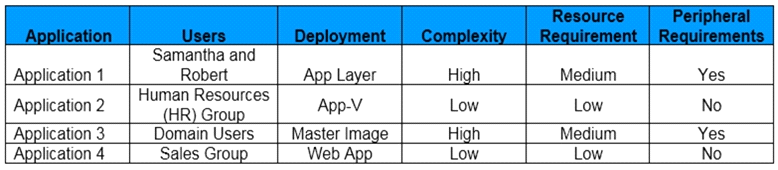
To which application category does Application 1 belong, based on the information in the exhibit?

Q5 MultipleChoice

Scenario: A Citrix Architect is designing a new Citrix Virtual Apps and Desktops environment. While performing the capabilities assessment for the existing infrastructure, the architect discovered substantial issues with packet loss and latency, and no current Quality-of-Service (QoS) technology is in place to manage these issues.

Which capability risk will the architect need to investigate to address these issues?

Get access to all 99 verified questions with detailed answers.

Unlock All 1Y0-403 Questions

Frequently Asked Questions

The 1Y0-403 exam validates your ability to assess, design, and implement advanced configurations for Citrix Virtual Apps and Desktops 7 environments. It tests your expertise in architecting solutions, optimizing performance, and managing complex deployments across enterprise infrastructures.

The exam covers advanced topics including Citrix architecture design, StoreFront configuration, NetScaler Gateway implementation, user environment management, performance optimization, and security best practices. It also includes scenarios related to troubleshooting, capacity planning, and multi-site deployments.

Citrix recommends that candidates have foundational knowledge of Citrix Virtual Apps and Desktops 7, ideally by passing the 1Y0-402 exam first. You should also have hands-on experience with designing and implementing Citrix solutions in production environments.

The exam typically consists of 50-65 questions and you have 120 minutes to complete it. The passing score is generally around 65-70%, though Citrix may adjust this threshold based on question difficulty and exam updates.

Citrix offers official training courses, study guides, and hands-on labs through their learning portal. Additionally, there are third-party study materials, practice tests, and community forums available to help you prepare for this advanced-level certification.
Exam Details
  • Exam Code1Y0-403
  • VendorCitrix
  • Total Questions99
  • Duration120 min
  • LanguageEnglish
  • Last UpdatedJul 21, 2026
4.9/5

Pass 1Y0-403 First Time

Get all 99 exam questions with verified answers and 90-day free updates.

Buy Now & Pass
  • PDF + Practice Test Bundle
  • 90-Day Free Updates
  • 100% Money-Back Guarantee
  • Instant Download
  • 24/7 Customer Support
99% Pass Rate Trusted by 50,000+ IT professionals