D-PDD-OE-01 Exam Questions & Answers
Dell PowerProtect Data Domain Operate • Dell
Sample D-PDD-OE-01 Questions
Practice with real exam-style questions, each with the verified correct answer and explanation.
Refer to the exhibit.
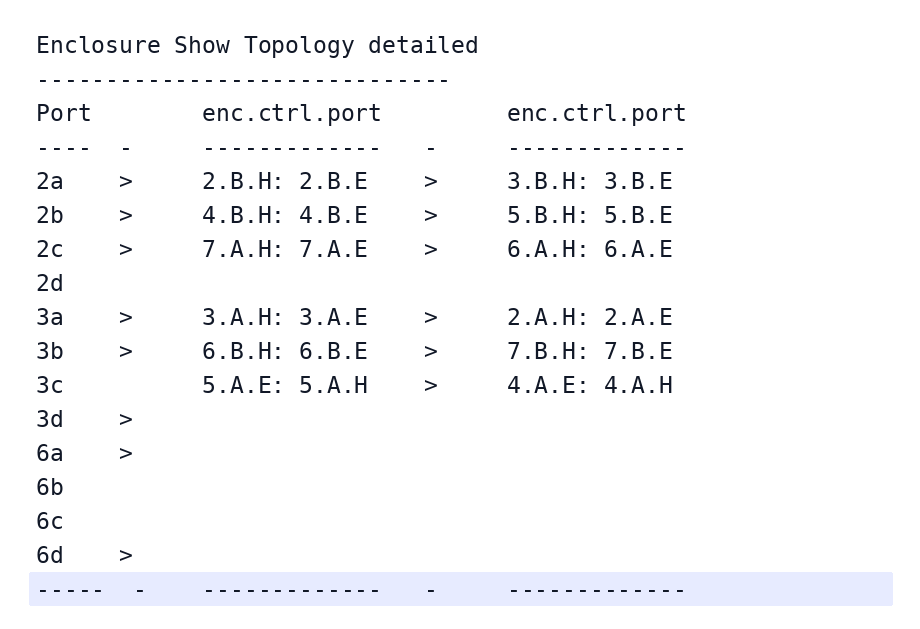
Which port is the cable misconfiguration identified in the command output?
Comprehensive and Detailed Explanation From PowerProtect Data Domain Deploy
The enclosure show topology command displays the Serial Attached SCSI (SAS) connectivity between the Data Domain controller and its attached expansion shelves. The command identifies the controller's SAS ports, connected enclosure numbers, shelf controllers, and the Host (H) and Expansion (E) port relationships.
In a correctly configured SAS daisy chain, the controller communicates with the Host port of the first expansion shelf. The Expansion port then provides the connection to the Host port of the next shelf. Normal topology output therefore follows the H: E sequence, representing the expected direction of connectivity.
The exhibit shows that ports 2a, 2b, 2c, 3a, and 3b consistently display their connections using this sequence.
However, port 3c displays:
5.A.E: 5.A.H > 4.A.E: 4.A.H
This reverses the expected Host-to-Expansion port ordering. The controller path is associated with expansion-side connections rather than the normal host-side entry points, indicating incorrect SAS cabling.
Dell's SAS cabling troubleshooting procedures recommend inspecting the physical connections, checking enclosure show topology, and running enclosure test topology to validate connectivity after correcting cabling problems.
Dell Canada+1
Therefore, port 3c is the misconfigured connection because its enclosure port sequence violates the expected SAS topology.
References: Dell PowerProtect Data Domain Deploy --- Post-Deployment, Storage Validation and Enclosure Connectivity; Dell Data Domain SAS Cable Configuration, Topology Checks, and Testing --- Topology Verification and Cabling Troubleshooting.
A PowerProtect DD appliance has been installed at a company's location for several months and has reached a steady state.
As a best practice, at what percentage of disk utilization should action be taken?
What information does the daily Autosupport report contain?
The autosupport command manages system reports. Command options enable administrative users to manage two reports that describe the state of a Data Domain system: the autosupport report and the daily alert summary.
An administrator has retained snapshots for a single MTree and is trying to create a new one. An error message is received.
What is the reason for the failure?
The maximum number of snapshots allowed per MTree is 750. Warnings are sent when the number of snapshots per MTree reaches 90% of the maximum allowed number (from 675 to 749 snapshots), and an alert is generated when the maximum number is reached. To clear the warning, expire snapshots and then run the file system cleaning operation.
Note: To identify an MTree that is nearing the maximum number of snapshots, check the Snapshots panel of the MTree page regarding viewing MTree snapshot information.
An administrator is migrating their old cloud tier-enabled Data Domain to a new PowerProtect DD appliance with cloud tier. During migration, the administrator recognizes that file system cleaning on the source system is not possible.
What is the most likely cause of this behavior?
Get access to all 54 verified questions with detailed answers in our D-PDD-OE-01 exam dumps.
Unlock All D-PDD-OE-01 Questions