InsuranceSuite-Developer Exam Questions & Answers
Associate Certification - InsuranceSuite Developer - Mammoth Proctored Exam • Guidewire
100% money-back guarantee
Sample InsuranceSuite-Developer Questions
Practice with real exam-style questions, each with the verified correct answer and explanation.
Succeed Insurance needs to implement a number of Gosu functions. Select the options that follow best practices. Select Two
In Guidewire development, code organization is paramount for maintainability and scalability. According to the Gosu best practices taught in the InsuranceSuite Developer Fundamentals course, UI-related logic should be separated from the visual definition of the page. While PCF files have a "Code" tab, placing extensive logic there (Option E) is considered a "coding anti-pattern." Instead, developers should create UI helper classes (Option A). This separation of concerns allows for easier unit testing of the logic and ensures that the PCF files remain focused on UI layout and widget configuration.
Furthermore, when introducing custom architectural components like interfaces, developers must manage namespaces correctly to ensure upgrade safety. If a developer creates a new interface within a dedicated customer package---such as si.insurance.util---Guidewire best practices (Option D) state that the _Ext suffix is not strictly required on the interface name itself because the package name already distinguishes it as a custom component. This differs from entity extensions where the suffix is mandatory because entities share a global namespace.
Options B and F violate standard Gosu naming conventions. Gosu methods should use lower camelCase (e.g., modifyAddressInformation), and while Impl is a common Java pattern, Guidewire prefers more descriptive naming or standard package-based organization. Option C is incorrect because entities should ideally contain business logic related to the data itself, not specific UI state or manipulation logic, which is better handled in helper classes.
Business analysts have provided a requirement to store contacts' usernames in the Click-Clack social media website in a single field on the Contact entity. Which solution follows best practices and fulfills the requirement?
In Guidewire InsuranceSuite, extending the data model to accommodate custom business requirements must follow strict architectural standards to ensure the application remains upgradeable and compliant with Cloud Delivery Standards.
1. The Importance of the Naming Suffix (The _Ext rule)
The primary rule in Guidewire configuration is that any customer-added element (entities, fields, or typelists) must be suffixed with _Ext. As specified in the InsuranceSuite Developer Fundamentals course, this suffix serves as a "namespace" that prevents naming collisions with future base-product updates provided by Guidewire. If you were to name a field simply ClickClack (as in Options B and C), and a future Guidewire update introduced a field with the exact same name, the application server would fail to start due to metadata conflict. Therefore, the field must be named ClickClack_Ext.
2. Selecting the Correct Data Type
For a social media username, the developer must choose the most efficient and semantically appropriate data type.
shorttext (Option D): This is the standard type for strings up to 60 characters. It is the most appropriate for a username, as it is indexed efficiently by the database and provides enough space for almost any social media handle.
addressline (Option A): While this is also a string type (typically 60 characters), it is semantically intended for physical street addresses. Using it for social media handles is poor practice as it makes the metadata confusing for other developers.
blob (Option B): This is used for "Binary Large Objects," such as images or documents. Using a blob for a simple text username would cause massive performance issues during searches and consume unnecessary database storage.
By choosing Option D, the developer ensures that the field is clearly identified as a custom extension and uses the most performant data type for the specific information being stored. This follows the "KISS" (Keep It Simple, Stupid) principle and Guidewire's automated quality gates for Cloud deployments.
What are two types of Guidewire Profiler? (Select two)
The Guidewire Profiler is the primary tool used by developers to diagnose performance issues in InsuranceSuite. It functions by instrumenting "stacks" of code execution and reporting the time spent in various operations like database queries or Gosu rules. According to the System Health and Quality documentation, the Profiler is categorized by how it is triggered and what it monitors.
The Web Profiler (Option A) is used to analyze performance within the user interface. When enabled, it captures the execution of a single web request (a page load or a button click), allowing the developer to see exactly which PCF widgets or page-level Gosu expressions are causing latency.
The Entry-point Profiler (Option D) is a broader category that includes profiling for non-UI operations. Entry points are the "doors" through which the application begins a task. Common entry points that can be profiled include Batch Processes, Work Queue Executors, and Web Services (API calls). By selecting an entry-point profiler, a developer can monitor the performance of background jobs or external integrations that do not have a direct UI component.
Options like Database Performance (Option B) are not specific types of the Profiler itself, but rather outcomes or areas of analysis that the profiler provides. Exit-point (Option C) and Worksheet (Option E) are not recognized classifications of the profiling tool in the Guidewire developer curriculum. Understanding these two types allows developers to strategically apply performance monitoring across the entire application stack.
An insurer has extended the ABContact entity in ContactManager with an array of Notes to capture information of interest about the contact over time. A developer has been asked to write a function to process all the notes for a given contact. Which code satisfies the requirement and follows best practices?
Gosu is a powerful, statically typed language designed to work seamlessly with the Guidewire data model. When a developer needs to iterate over an Entity Array---such as the Notes array on an ABContact---following the most readable and efficient syntax is a core requirement of InsuranceSuite Developer Fundamentals.
The for..in loop (Option B) is the idiomatic "best practice" in Gosu for iterating through collections. This syntax is clean, prevents "off-by-one" errors common in index-based loops, and automatically handles the iterator logic behind the scenes. In this example, note serves as the element variable that represents a single Note entity in each iteration of the loop. This approach is highly optimized for the Guidewire Bundle and Query API, ensuring that the system can efficiently manage the memory objects as the loop progresses.
Other options represent suboptimal or incorrect patterns:
Option A: Uses a while loop with an exists check, which is syntactically incorrect for iterating through an entire list and would likely lead to an infinite loop or a compilation error.
Option C: Uses a range-based loop with an index. This is less readable and more prone to error, especially since arrays in Gosu are 0-indexed, but the range starts at 1.
Option D: Uses the firstWhere enhancement, which only returns the first matching element rather than processing all notes as required by the business analyst.
By using the standard for loop, the developer ensures that the code is maintainable, follows Gosu Coding Standards, and is easily understood by other Guidewire developers.
Given the following screen showing a DetailView in Guidewire Studio highlighted in red:
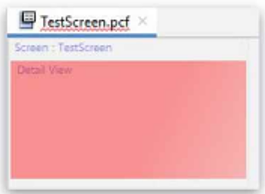
Which single item added directly to the detail view will correct the error shown, with no further errors?
In Guidewire InsuranceSuite PCF (Page Configuration File) Configuration, the hierarchy and structural requirements of container widgets are strictly enforced by the Studio compiler and visual editor. A DetailView (DV) is a specific type of container designed to display and edit individual fields (atomic widgets) in a column-based layout.
When a developer adds a DetailView to a PCF, Studio will initially display it in red, indicating a validation error. This occurs because, according to the PCF Architecture standards, a DetailView is not a direct container for input widgets like TextInput or RangeInput. Instead, it requires a layout-specific child element to define how those widgets are organized. The mandatory child for a standard DetailView is the InputColumn.
An InputColumn provides the necessary structure to align labels and their corresponding input widgets. Without at least one InputColumn defined directly under the DetailView, the DV is considered incomplete and structurally invalid. Adding an InputColumn (Option D) satisfies the minimum container requirement, effectively clearing the validation error and allowing the developer to then place field-level widgets within that column.
Regarding the other options: A RowIterator (Option A) is a component specifically used within a ListView to iterate over a collection of data and is not a direct child of a DetailView. While a ListView (Option C) can be displayed within a DV, it must be wrapped in a ListViewInput or placed inside an InputSet, and simply adding a "list view" does not satisfy the core structural requirement for an input-based DV layout as directly as an InputColumn. A Toolbar (Option B) is typically associated with a Screen, PanelRef, or ListView, rather than being a structural correction for a DetailView. Therefore, the InputColumn is the fundamental architectural element required to make the DV valid.
Get access to all 154 verified questions with detailed answers.
Unlock All InsuranceSuite-Developer Questions