NSK300 Exam Questions & Answers
Netskope Certified Cloud Security Architect • Netskope
100% money-back guarantee
Sample NSK300 Questions
Practice with real exam-style questions, each with the verified correct answer and explanation.
Users in your network are attempting to reach a website that has a self-signed certificate using a GRE tunnel to Netskope. They are currently being blocked by Netskope with an SSL error. How would you allow this traffic?
You are building an architecture plan to roll out Netskope for on-premises devices. You determine that tunnels are the best way to achieve this task due to a lack of support for explicit proxy in some instances and IPsec is the right type of tunnel to achieve the desired security and steering.
What are three valid elements that you must consider when using IPsec tunnels in this scenario? (Choose three.)
When using IPsec tunnels, especially in the context of deploying Netskope for on-premises devices, several factors must be considered to ensure a secure and efficient architecture:
Cipher support on tunnel-initiating devices (A): It is crucial to ensure that the devices initiating the IPsec tunnels support the ciphers used by Netskope. This compatibility is necessary for establishing secure connections.
Bandwidth considerations (B): The bandwidth available for the IPsec tunnels will affect the data throughput and performance of the connection. Adequate bandwidth must be allocated to handle the expected traffic without causing bottlenecks.
The impact of threat scanning performance (D): The performance of threat scanning can be affected by the encryption and decryption processes in IPsec tunnels. It is important to consider how the threat scanning capabilities will perform under the additional load of encrypted traffic.
You want to enable the Netskope Client to automatically determine whether it is on-premises or off-premises. Which two options in the Netskope Ul would you use to accomplish this task? (Choose two.)
To enable the Netskope Client to automatically determine whether it is on-premises or off-premises, you can use the following options in the Netskope UI:
Enable Dynamic Steering:
This option is available in theSteering Configurationsection of the UI.
By enabling dynamic steering, the Netskope Client can intelligently determine the appropriate data plane (on-premises or cloud) based on the user's location and network conditions.
It ensures that traffic is directed to the optimal data plane for improved performance and security.
On Premises Detection:
This option is available under theClient Configurationsection of the UI.
By configuring on-premises detection, the Netskope Client can identify whether it is connected to the local network (on-premises) or accessing resources from outside (off-premises).
It helps in applying relevant policies and steering traffic accordingly.
Review the exhibit.
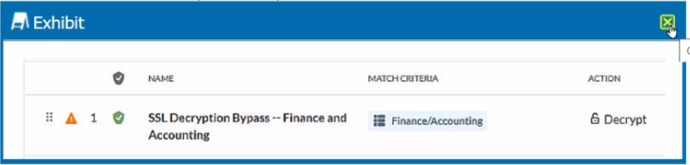
You created an SSL decryption policy to bypass the inspection of financial and accounting Web categories. However, you still see banking websites being inspected.
Referring to the exhibit, what are two possible causes of this behavior? (Choose two.)
The issue described in the exhibit is that banking websites are still being inspected despite creating an SSL decryption policy to bypass the inspection of financial and accounting web categories.
Possible Causes:
An incorrect category has been selected (Option B):
If the SSL decryption policy is configured to bypass the wrong category (e.g., not the actual financial and accounting category), it won't effectively exclude banking websites from inspection.
An incorrect action has been specified (Option D):
If the action specified in the policy is not set to ''Bypass,'' it won't achieve the desired behavior. The policy should explicitly bypass SSL inspection for the selected category.
Solution:
Verify that the correct category (financial and accounting) is selected in the policy, and ensure that the action is set to ''Bypass.''
You have multiple networking clients running on an endpoint and client connectivity is a concern. You are configuring co-existence with a VPN solution in this scenario, what is recommended to prevent potential routing issues?
To prevent potential routing issues and ensure that the Netskope agent consistently sees the traffic first, it is recommended tomodify the VPN to operate in full tunnel mode at Layer 3.
In full tunnel mode, all traffic from the endpoint is routed through the VPN, including traffic destined for Netskope. This ensures that the Netskope agent can inspect and apply policies to all traffic, regardless of the destination.
Layer 3 full tunnel mode provides better visibility and control over the traffic flow, reducing the risk of routing conflicts or bypassing the Netskope inspection.Reference:
The answer is based on general knowledge of VPN configurations and their impact on traffic routing.
Get access to all 60 verified questions with detailed answers.
Unlock All NSK300 Questions