PPAN01 Exam Questions & Answers
Certified Threat Protection Analyst Exam • Proofpoint
100% money-back guarantee
Sample PPAN01 Questions
Practice with real exam-style questions, each with the verified correct answer and explanation.
Refer to the exhibit.
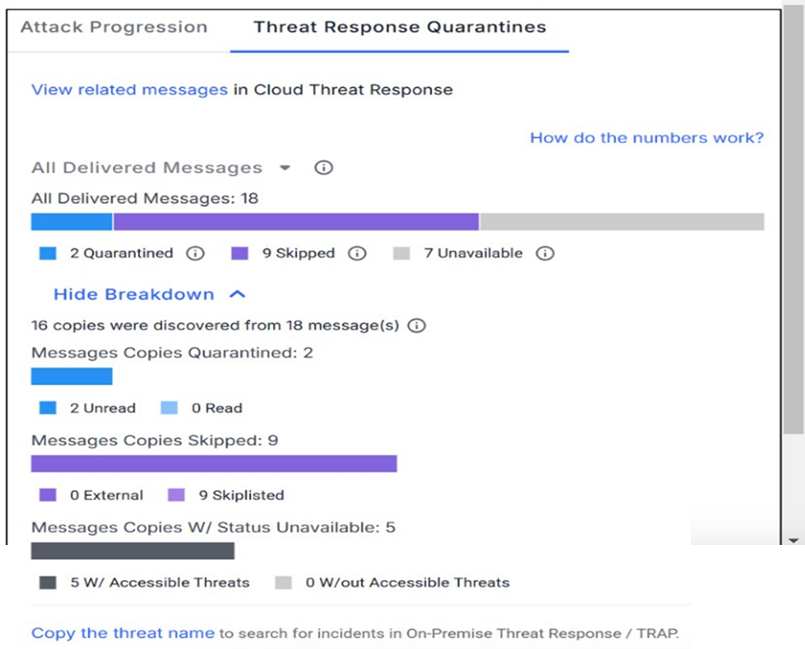
How many messages were sent to a mailbox configured to bypass quarantine for monitoring purposes?
A ''bypass quarantine for monitoring'' mailbox is typically a controlled testing/observation mailbox used by security teams to validate detection efficacy and to safely observe threat traffic patterns without impacting end-user productivity. In Proofpoint email security operations, these mailboxes are configured so that messages that would normally be quarantined are instead delivered to a designated mailbox for review, allowing analysts to (1) validate classifier accuracy, (2) capture full artifacts for analysis (.eml, headers, URLs/attachments), and (3) measure how controls behave over time (policy hits, spam/phish/malware scoring). Based on the exhibit, the correct count of messages routed to that bypass/quarantine-monitoring mailbox is 9 (option C). Operationally, this metric is useful for confirming whether the monitoring workflow is receiving enough samples to be meaningful and whether policy changes unexpectedly increase or reduce quarantined traffic. In IR scenarios, it can also be used to safely test blocklist effectiveness and confirm retroactive remediation actions without exposing production users.
An analyst is reviewing the Threats page in the TAP Dashboard.
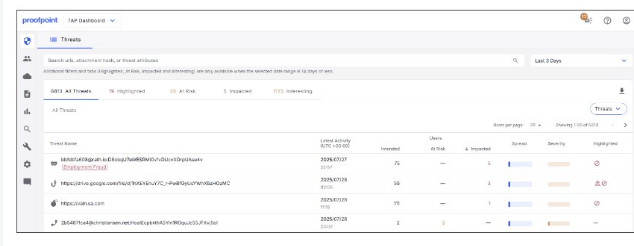
Which of the top four threats seen in the exhibit should be prioritised for investigation?
In Proofpoint-driven triage, threats are prioritized by likelihood of immediate compromise and blast radius. Credential phishing typically ranks highest because a single successful credential submission can lead to account takeover (ATO), which then enables follow-on attacks: internal phishing, mailbox rule abuse, OAuth consent abuse, wire-fraud/BEC escalation, and data access. Proofpoint TAP surfaces credential phishing with strong indicators (URL defense verdicts, rewritten URL clicks, campaign clustering, and known phishing kits/landing pages), making it actionable for containment. Compared to malware delivery, credential theft often bypasses endpoint controls and produces fewer immediate artifacts, so rapid response is critical: password reset, token revocation, MFA enforcement, and mailbox audit. TOAD and BEC can be high impact, but in many environments they require human interaction outside email controls (phone/social steps) and may not always show definitive technical IOCs early. The TAP ''Threats'' view is designed for quick pivoting (Intended/At Risk/Impacted) and credential phishing typically correlates strongly with ''Impacted'' activity (clicks/submissions), which is why it should be investigated first when competing items are present.
Where can a user access ''Smart Search''? (Select two.)
Smart Search is a message-tracing and investigation capability used to locate and analyze email messages processed by Proofpoint email security components. Practically, responders use it to pivot on sender, recipient, subject, message ID, IPs, URLs, and dispositions to rapidly scope incidents (who received what, what action was taken, whether it was quarantined/rejected/delivered) and to support response actions (block, release, or escalate). In Proofpoint deployments, Smart Search is accessible in the Protection Server administrative interface (on-prem PPS) and in the Email Protection cloud administrative experience (Proofpoint Email Protection / PoD admin), aligning to where message processing and policy decisions are recorded. TAP Dashboard is primarily threat-focused telemetry (URLs, attachments, campaigns, user exposure), while TRAP/Threat Response consoles are centered on post-delivery remediation and orchestration. For IR, knowing the correct consoles matters because message trace data is authoritative for chain-of-events reconstruction: it provides time stamps, policy hits, verdicts, and routing outcomes needed for incident timelines and validation of false positives/negatives. Correct access points ensure analysts can quickly confirm whether the gateway acted as expected and whether any delivered mail requires retroactive remediation.
An analyst is reviewing the Threat Response Quarantines card for a message in TAP Dashboard, as shown in the exhibit.
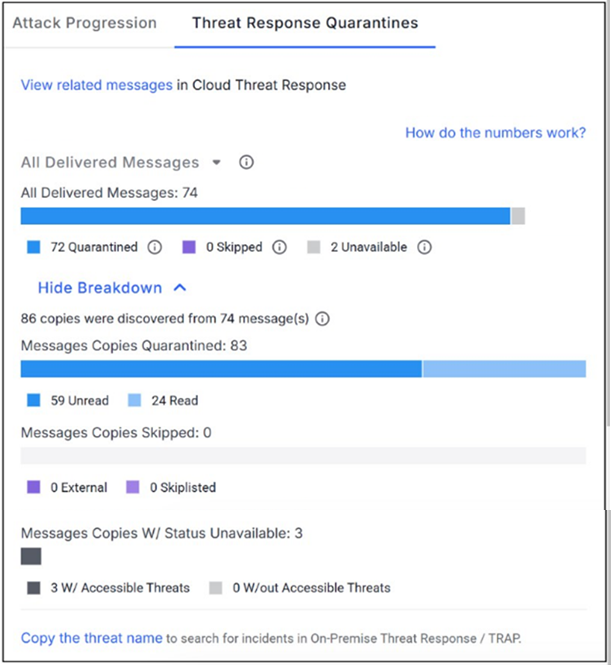
Why might a message be flagged with status ''unavailable''?
In Proofpoint Threat Response / post-delivery remediation workflows, a quarantine action depends on the message still existing in the target mailbox (Inbox or other folders where the connector searches). A status of ''unavailable'' commonly indicates the system could not locate the message to apply the action---most often because it was deleted or otherwise removed before quarantine occurred (A). This can happen if the user manually deletes it, an automated mailbox rule moves it to Deleted Items and empties it, retention policies purge it, or another remediation tool removes it first. From an IR containment perspective, ''unavailable'' is important because it changes the response plan: if the message cannot be pulled, you must pivot to containment through other controls (blocklist URLs/domains, disable sender delivery, enforce URL Defense blocking, reset credentials if interaction occurred) and expand scoping (search for duplicates in other mailboxes). Best practice is to correlate ''unavailable'' with click telemetry (Impacted users), authentication results, and mailbox audit logs to confirm whether exposure occurred and whether compensating actions are required to prevent recurrence.
Under what circumstances will TAP generate an email notification alert?
TAP notification alerting is most valuable when there is meaningful risk to users---especially when a threat has been delivered and may require immediate investigation and response. A delivered malicious impostor message (B) is a high-priority condition because it can indicate BEC/executive impersonation or supplier impersonation, which often lacks malware indicators and can lead directly to financial fraud or credential theft. Proofpoint workflows emphasize alerting on delivered threats because ''blocked at the gateway'' events are already contained, while delivered impostor threats demand rapid action: validate recipient exposure, check user interaction (reply/forward/click), execute post-delivery remediation (TRAP pull/quarantine), and coordinate business verification steps (finance call-back procedures). While blocked clicks can be telemetry, the alert scenario in TAP training contexts typically highlights delivered impostor threats as the condition warranting immediate attention since the attacker reached the user. TAP's design aligns with IR triage: prioritize what is active, delivered, and likely to cause harm if not rapidly contained.
Get access to all 52 verified questions with detailed answers.
Unlock All PPAN01 Questions