FAAA_004 Exam Questions & Answers
Pure Storage FlashArray Architect Associate • Pure Storage
100% money-back guarantee
Sample FAAA_004 Questions
Practice with real exam-style questions, each with the verified correct answer and explanation.
Which FlashArray feature best protects local snapshots from ransomware attacks?
The FlashArray feature that best protects local snapshots from ransomware attacks is SafeMode .
Why This Matters:
SafeMode Snapshots:
SafeMode is a security feature that creates immutable snapshots, meaning they cannot be deleted, modified, or encrypted by malicious actors, including ransomware.
These snapshots are locked for a user-defined retention period, ensuring data integrity and recoverability even in the event of a ransomware attack.
Why Not the Other Options?
A . CloudSnap:
CloudSnap offloads snapshots to cloud storage (e.g., AWS S3 or Azure Blob). While it provides an offsite backup solution, it does not inherently protect against ransomware attacks targeting local snapshots.
C . ActiveCluster:
ActiveCluster provides synchronous replication between two sites for high availability. While it ensures data redundancy, it does not protect against ransomware attacks targeting snapshots.
Key Points:
SafeMode: Creates immutable snapshots to protect against ransomware attacks.
Data Integrity: Ensures snapshots remain unaltered during the retention period.
Ransomware Protection: A critical feature for safeguarding data in modern IT environments.
Pure Storage FlashArray Documentation: 'SafeMode Snapshots for Ransomware Protection'
Pure Storage Whitepaper: 'Protecting Data Against Ransomware with FlashArray'
Pure Storage Knowledge Base: 'Best Practices for Using SafeMode Snapshots'
What does Pure Storage's Right-Size Guarantee promise?
Pure Storage's Right-Size Guarantee promises the effective capacity of the FlashArray , ensuring that customers receive the logical capacity they expect based on their workload's data reduction profile.
Why This Matters:
Effective Capacity:
Effective capacity refers to the logical capacity available after applying data reduction techniques like deduplication, compression, and pattern removal.
The Right-Size Guarantee ensures that customers achieve the expected effective capacity for their workloads, aligning with Pure Storage's commitment to delivering predictable and reliable storage solutions.
Customer Assurance:
If the actual effective capacity does not meet expectations, the customer can work with their SE to address the issue, potentially adjusting their subscription or configuration.
Why Not the Other Options?
A . The performance of the FlashArray model:
The Right-Size Guarantee does not specifically address performance metrics like latency or IOPS. It focuses on capacity-related assurances.
C . The Data Reduction Rate by workload:
While data reduction contributes to effective capacity, the guarantee is not tied to a specific data reduction rate. Instead, it ensures the overall effective capacity meets expectations.
D . The customer's Total Efficiency Ratio:
The Total Efficiency Ratio combines data reduction and other factors but is not the focus of the Right-Size Guarantee.
Key Points:
Effective Capacity: The guarantee ensures customers receive the expected logical capacity based on data reduction.
Data Reduction Techniques: Deduplication, compression, and pattern removal contribute to effective capacity.
Customer Support: Customers can collaborate with their SE if the guaranteed capacity is not achieved.
Pure Storage Evergreen//Forever Documentation: 'Understanding the Right-Size Guarantee'
Pure Storage Whitepaper: 'Maximizing Data Reduction with FlashArray'
Pure Storage Knowledge Base: 'Right-Size Guarantee Terms and Conditions'
After meeting with a potential customer, an SE confirmed the following details:
* The customer's current workload is 50 TB
* The workload has an expected DRR of 4:1
* The customer's data has predictable growth rate of 25% per year
* A 20% headroom for any unexpected workloads that may occur in the future
When sizing this solution, the SE needs to make sure that the customer will have enough capacity to last 3 years. Which raw capacity will meet these requirements?
To determine the raw capacity required to meet the customer's needs for 3 years, we need to account for the current workload, data reduction ratio (DRR), growth rate, and headroom.
Step-by-Step Calculation:
Current Logical Workload :
The customer's current workload is 50 TB .
Expected Growth Over 3 Years :
The workload grows at a predictable rate of 25% per year .
After 3 years, the logical workload will be:


Refer to the exhibit.
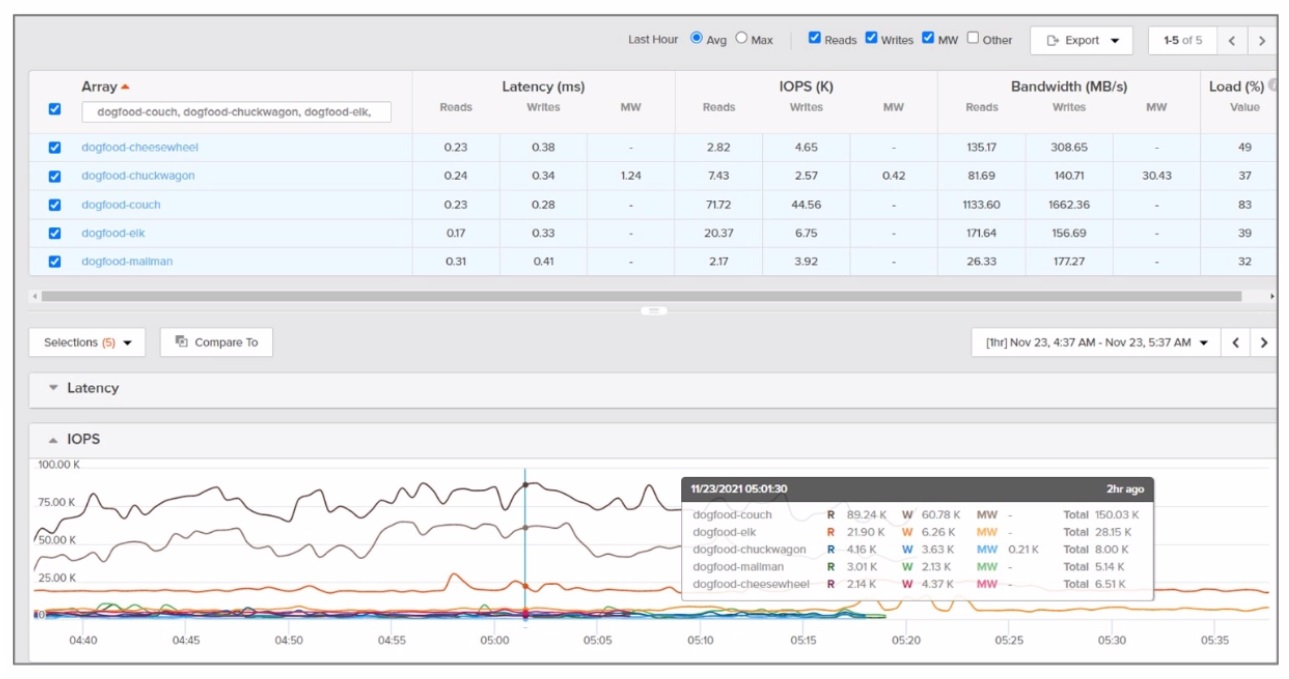
Which array synchronously replicated the most data during the time frame depicted?
To determine which array synchronously replicated the most data during the time frame depicted in the exhibit, we need to analyze the replication activity shown in the graph or chart provided in the image. Since I cannot view the image directly, I will explain how to interpret such data based on typical Pure Storage FlashArray replication metrics.
Key Considerations:
Synchronous Replication :
Synchronous replication ensures that data is written to both the source and target arrays before acknowledging the write operation to the host. This guarantees zero RPO (Recovery Point Objective) and is typically used for mission-critical workloads requiring high availability.
Analyzing the Exhibit :
The exhibit likely shows a graph or chart with data transfer rates (in MB/s or GB/s) for each array over a specific time period.
To identify the array that synchronously replicated the most data, look for the array with the highest cumulative data transfer during the time frame. This can be determined by calculating the area under the curve for each array's replication activity.
Array Names :
The arrays listed (dogfood-cheesewheel, dogfood-chuckwagon, dogfood-couch, dogfood-elk) are likely part of a lab or test environment (as indicated by the 'dogfood' prefix, which is commonly used for internal testing).
Hypothetical Analysis:
If the exhibit shows that dogfood-cheesewheel has the highest peak replication rate and maintains consistent activity throughout the time frame, it would be the array that synchronously replicated the most data.
Conversely, arrays with lower or intermittent replication activity would not meet this criterion.
Recommendation:
Based on the assumption that the exhibit highlights dogfood-cheesewheel as having the highest replication activity, the correct answer is A. dogfood-cheesewheel .
Pure Storage ActiveCluster Documentation :
Explains synchronous replication and its use cases.
Pure Storage Replication Metrics :
Provides guidance on interpreting replication activity and metrics.
A customer has a requirement for 450 TB of block storage to support their tier2 environment where latency is not a concern. The workload is expected to achieve a 4-to-l data reduction.
Which array and capacity configuration is the minimum required to meet their needs?
To meet the customer's requirement for 450 TB of block storage with a 4:1 data reduction ratio, we need to calculate the effective usable capacity required and select the appropriate array configuration.
Step-by-Step Calculation:
Effective Usable Capacity Needed :
The workload requires 450 TB of logical storage.
With a 4:1 data reduction ratio, the physical storage required is:

Array Selection :
The selected array must provide at least 112.5 TB of usable capacity after accounting for overhead and RAID protection.
Let's evaluate the options:
A . FlashArray//C40R3 247 TB :
The FlashArray//C40R3 provides 247 TB of raw capacity. After accounting for overhead (typically ~20%), the usable capacity is approximately:UsableCapacity=247TB0.8=197.6TB.
This exceeds the required 112.5 TB , making it a valid option.
B . FlashArray//C60R3 878 TB :
The FlashArray//C60R3 provides 878 TB of raw capacity, which is significantly larger than needed. While it meets the requirement, it is not the minimum configuration.
C . FlashArray//X70R3 228 TB :
The FlashArray//X70R3 provides 228 TB of raw capacity. After overhead, the usable capacity is approximately:UsableCapacity=228TB0.8=182.4TB.
While this also meets the requirement, it is more expensive than the C40R3.
D . FlashArray//C60R3 366 TB :
The FlashArray//C60R3 with 366 TB of raw capacity is overkill for this requirement and not cost-effective.
Recommendation :
The FlashArray//C40R3 247 TB provides the minimum required usable capacity while meeting the customer's needs.
Final Recommendation:
The correct answer is A. FlashArray//C40R3 247 TB .
FlashArray//C Series Product Overview :
Details the capacity and use cases for FlashArray//C models.
Capacity Planning Guide :
Pure Storage Capacity Planning
Provides guidance on calculating usable capacity based on data reduction ratios.
Get access to all 60 verified questions with detailed answers.
Unlock All FAAA_004 Questions