RCWA Exam Questions & Answers
RUCKUS Certified Wi-Fi Associate • RUCKUS
100% money-back guarantee
Sample RCWA Questions
Practice with real exam-style questions, each with the verified correct answer and explanation.
Review the exhibit. What can be determined about this SmartZone? (Choose three.)
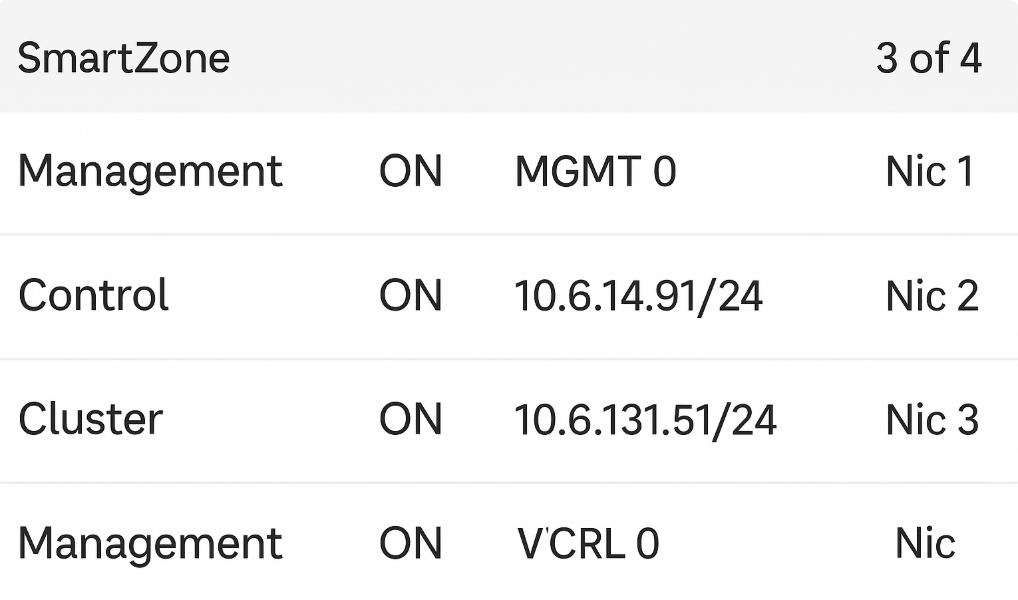
The exhibit shows a virtual SmartZone (vSZ) configuration running in a VMware environment with three separate virtual NICs (vNICs), each mapped to a different port group: Management, Control, and Cluster.
According to RUCKUS One Online Help -- SmartZone Interface Configuration and RUCKUS AI Documentation -- SmartZone High-Scale Architecture, this design is specific to vSZ-H (High-Scale) deployments, which require three distinct network interfaces for distributed control, management, and cluster synchronization.
The three NIC mappings confirm physical or virtual separation of traffic for scalability and redundancy (A and E). vSZ-E (Essentials) requires only two interfaces (Management and Control) and does not use a dedicated cluster interface, distinguishing it from vSZ-H (D).
There is no indication of a four-node cluster in the exhibit, and SmartZone appliances typically show node counts under the Cluster Dashboard, not at the NIC configuration stage.
Thus, based on the configuration, this is a vSZ-H system with three NICs and three port groups, each serving a dedicated function.
RUCKUS One Online Help -- SmartZone vSZ-H Network Interface Roles
RUCKUS Analytics 3.5 User Guide -- Controller Connectivity and Cluster Interfaces
RUCKUS AI Documentation -- vSZ-H Deployment Topologies and Port Group Mapping
When generating a DPSK in SmartZone, which type of key allows multiple devices to use a single passphrase?
DPSK (Dynamic Pre-Shared Key) technology in RUCKUS SmartZone provides individual or group-based pre-shared keys to enhance WLAN security while maintaining user simplicity.
According to the RUCKUS One Online Help -- DPSK Configuration and SmartZone WLAN Authentication Guide, a Group DPSK allows multiple devices to authenticate using a single passphrase while still maintaining encryption isolation per device. This feature is typically used in shared-device environments such as classrooms, labs, or conference rooms.
The Bound DPSK type is assigned to specific devices or user accounts, ensuring individual control, while Unbound DPSKs are not tied to any particular user or MAC address.
Group DPSKs balance security and convenience by permitting shared access under one key but with independent encryption sessions, which prevents data leakage among group members.
RUCKUS One Online Help -- WLAN Configuration: DPSK and Group Key Options
RUCKUS Analytics 3.5 User Guide -- Client Authentication and DPSK Monitoring
RUCKUS AI Documentation -- Dynamic PSK and Secure Key Distribution Overview
An admin has created a RUCKUS GRE tunnel profile in SmartZone.
Why is the new tunnel unavailable in the GRE Tunnel Profile dropdown when configuring the WLAN?
In SmartZone, Generic Routing Encapsulation (GRE) tunnels are used to encapsulate client traffic and forward it to a remote gateway, typically for security or centralized routing.
As described in RUCKUS One Online Help -- GRE Tunneling Configuration, a tunnel profile becomes available for WLAN association only when it is explicitly linked to an AP Zone. This ensures that all APs in the zone can apply the correct tunnel endpoint and keying parameters.
If a GRE profile is not mapped to a zone, it will not appear in the WLAN configuration dropdown, even if successfully created.
Other options are incorrect because SmartZone supports GRE for WLANs by design, split-tunnel profiles are optional, and tunnel count limitations are far higher than typical enterprise use.
RUCKUS One Online Help -- GRE Tunnel Profile Configuration and Zone Binding
RUCKUS Analytics 3.5 User Guide -- Tunnel Status and Performance Metrics
RUCKUS AI Documentation -- GRE Tunneling Architecture and Troubleshooting
When designing for a high-density large public venue (LPV) deployment such as a stadium, which three considerations need to be taken into account? (Choose three.)
Designing Wi-Fi for Large Public Venues (LPV) such as stadiums, arenas, or convention centers requires a highly strategic RF approach to handle extreme client density and dynamic environmental factors.
According to RUCKUS One Online Help -- High-Density Design Best Practices and RUCKUS AI Documentation -- LPV Deployment Planning, three critical considerations are:
Expected number of devices (B): Determines AP count, bandwidth capacity, and airtime utilization. LPV environments often exceed one device per seat, requiring precise capacity planning.
Effect of human bodies on RF propagation (D): Human absorption of 2.4 GHz and partial reflection of 5 GHz signals dramatically affects coverage. RUCKUS recommends directional antennas and elevated AP placement to overcome this.
Other factors like WAN speed and charging stations are operational but not primary design variables in LPV RF engineering.
RUCKUS One Online Help -- High-Density Wi-Fi Design and Capacity Planning
RUCKUS Analytics 3.5 User Guide -- Client Density and Capacity Metrics
RUCKUS AI Documentation -- Stadium and LPV RF Deployment Guidelines
Which three external proxy and non-proxy authentication services are available in SmartZone? (Choose three.)
SmartZone controllers support a range of external authentication services for both proxy (via controller) and non-proxy (direct-to-AAA) authentication mechanisms. According to the RUCKUS One Online Help -- Authentication Services Configuration, the supported external services include:
Active Directory (AD) (A): Used for domain-based user authentication and group policy enforcement.
Lightweight Directory Access Protocol (LDAP) (B): Provides user authentication through directory lookup, commonly used for enterprise identity systems.
RADIUS (E): A widely used AAA protocol that integrates with external servers such as FreeRADIUS, Cisco ISE, or Microsoft NPS for centralized authentication and accounting.
While SAML and OAuth are used in RUCKUS Cloud and RUCKUS One for SSO (Single Sign-On) and API authentication, they are not used for WLAN or AAA authentication within SmartZone. TACACS+ is not supported as an external client authentication method in SmartZone (it is only used for admin login on some platforms).
Therefore, the correct authentication services are A (AD), B (LDAP), and E (RADIUS).
RUCKUS One Online Help -- WLAN Authentication and AAA Integration
RUCKUS Analytics 3.5 User Guide -- Authentication Logs and Proxy Mode Analysis
RUCKUS AI Documentation -- SmartZone AAA and External Authentication Architecture
Get access to all 78 verified questions with detailed answers.
Unlock All RCWA Questions