C_THR92_2505 Exam Questions & Answers
SAP Certified Associate - SAP SuccessFactors People Analytics: Reporting • SAP
100% money-back guarantee
About C_THR92_2505 Exam
The C_THR92_2505 certification exam validates your expertise in SAP SuccessFactors People Analytics: Reporting, a critical skill for HR professionals and data analysts. This SAP Certified Associate credential demonstrates proficiency in designing, building, and optimizing reports within the SuccessFactors platform. Key topics covered include report creation, data visualization, advanced analytics, dashboard development, and integration of HR metrics. Candidates will master essential functionalities such as employee data analysis, workforce planning metrics, and performance management reporting. The exam is ideal for HR business analysts, reporting specialists, and SuccessFactors administrators seeking to advance their careers and enhance organizational decision-making capabilities.
Preparing for the C_THR92_2505 exam requires comprehensive study materials and hands-on practice. Updated exam dumps and practice tests are invaluable resources that simulate real examination scenarios, helping candidates identify knowledge gaps and build confidence. Quality practice tests familiarize you with the exam format, question types, and time management strategies essential for success. These resources provide detailed explanations for each question, reinforcing your understanding of SuccessFactors reporting concepts and best practices. By utilizing current exam dumps alongside official SAP documentation and training courses, candidates significantly improve their pass rates and develop practical expertise applicable to real-world HR analytics challenges.
Exam Topics & Objectives
4-Week Study Plan for C_THR92_2505
Week 1: Foundations and Story Reports
- Review C_THR92_2505 exam blueprint and weightings
- Study Story Reports fundamentals (31-40% of exam)
- Learn Story Report creation and configuration
- Practice building basic stories with different visualizations
- Understand story report navigation and filtering
- Complete hands-on labs for Story Report design patterns
- Review Report Consumers basics (11-20% of exam)
- Study user roles and consumer permissions in SuccessFactors
Week 2: Reporting Tools and Advanced Concepts
- Study Detailed Reporting Tool with Live Data concepts
- Learn report query building and filtering techniques
- Practice creating custom reports using live data
- Explore Table Reports creation and configuration
- Understand table report formatting and drill-down functionality
- Study Advanced Reporting Tool with Replicated Data
- Learn data replication concepts and refresh cycles
- Compare live data vs replicated data use cases
Week 3: Dashboard and Provisioning Infrastructure
- Study Provisioning Settings for Reporting (≤10%)
- Learn user provisioning and access control setup
- Understand report access configuration
- Study Tile-Based Dashboard Framework (≤10%)
- Learn dashboard tile creation and configuration
- Practice designing dashboard layouts
- Study Canvas Reports and Page Designer (≤10%)
- Learn canvas-based reporting capabilities
- Practice page designer functionality and customization
Week 4: Integration, Practice Exams, and Final Review
- Review Report Consumers advanced topics (11-20%)
- Study consumer preferences and personalization
- Learn report distribution and scheduling
- Integrate knowledge across all reporting tools
- Practice scenario-based questions combining multiple topics
- Take full-length practice exams
- Review weak areas and reinforce knowledge gaps
- Study exam tips and time management strategies
- Final review of all Story Report scenarios
Sample C_THR92_2505 Questions
Practice with real exam-style questions. Reveal answers to verify your knowledge.
You are creating a query for a historical compensation story report in Query Designer. You have added the Job Information table to the query, configured a scope filter, and previewed the result to verify you are returning the appropriate employees. You add the related table Compensation to the query.
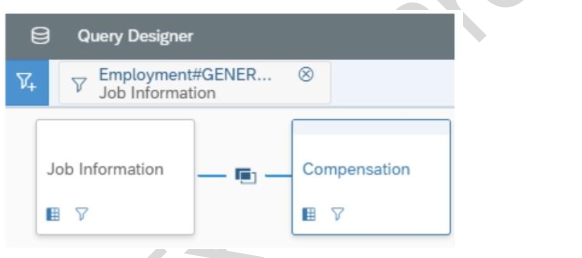
When you preview the query, you only get the current compensation information for the employees. Why do you only receive the current records? Note: There are 2 correct answers to this question.
Which actions can you permit the report consumer to perform by your configuration of interactive widgets? Note; There are 3 correct answers to this question.
When you use a column of type text as a measure in a pivot query, which of the following pivot functions are available? Note: There are 2 correct answers to this question.
User A creates a dashboard with four tiles. When User B accesses the dashboard, only three tiles are visible. Why can User B see only three tiles?
A table report is shared with a user. That user CANNOT see the table report in the Report Center list. Which role-based permission has NOT been set correctly for this user?
Get access to all 80 verified questions with detailed answers.
Unlock All C_THR92_2505 Questions