A00-215 Exam Questions & Answers
SAS 9.4 Programming Fundamentals Exam • SAS
100% money-back guarantee
Sample A00-215 Questions
Practice with real exam-style questions, each with the verified correct answer and explanation.
Which PROC MEANS step generates the report below?
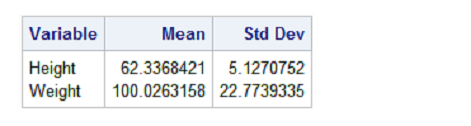
The correct syntax for generating the mean and standard deviation for specified variables using PROC MEANS is shown in option A. The PROC MEANS statement specifies the dataset to analyze (data=class) and includes the options (mean std) directly in the PROC statement. The VAR statement then lists the variables for which the statistics should be calculated (Height and Weight). The other options listed in B, C, and D are not correct syntax for PROC MEANS.
You submit a program and the SAS log is shown below:
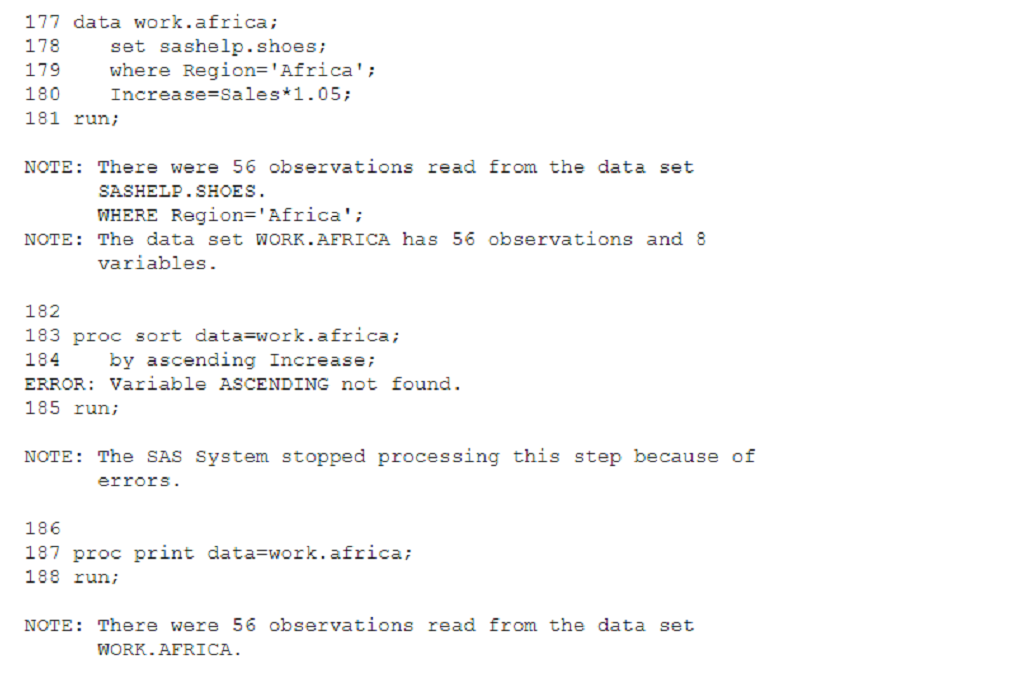
Which statement is true regarding the submitted program?
The correct answer is C. The DATA step and PROC PRINT steps ran without errors. In the SAS log shown, there is a clear error in the PROC SORT step because of the use of an incorrect option by ascending Increase which caused the 'Variable ASCENDING not found' error. However, the DATA step completed successfully, as indicated by the 'NOTE' that follows it, confirming that 56 observations were read from the SASHELP.SHOES data set where Region is Africa. Additionally, the PROC PRINT step also completed successfully, indicated by the 'NOTE' at the bottom of the log which confirms that 56 observations were read from the WORK.AFRICA data set, implying the PROC PRINT step executed without issue.
A is incorrect because the error in PROC SORT did not cause the program to stop; SAS continued processing the next steps. B is incorrect because the PROC SORT step did not run successfully. D is incorrect because the PROC PRINT step did not fail; it ran successfully.
SAS documentation on error messages.
Understanding the SAS log and error messages.
Which iterative DO statement is invalid?
In SAS, iterative DO statements are used to repeat a block of statements a specified number of times. These DO statements have a specific syntax that includes initializing a variable, setting an ending value, and specifying an increment (or decrement). The syntax generally follows the pattern: DO variable = start TO end BY increment;
Let's evaluate each option provided:
A) Do 100 to 1200 by 100; This statement is syntactically incorrect because it lacks a variable to iterate over. An iterative DO loop must specify a variable that will take on each value in the specified range. The correct form should be something like do i = 100 to 1200 by 100;.
B) Do num = 1.1 to 1.9 by 0.1; This statement is valid. It initializes the variable num at 1.1 and increments by 0.1 until it reaches 1.9. This is a typical use of the iterative DO loop for non-integer increments.
C) Do year = 2000 to 2016 by 2; This statement is also valid. It initializes year at 2000 and increments by 2, going through values like 2002, 2004, etc., up to and including 2016. This is a standard use for iterating over years or other sequentially numbered items.
D) Do reverse = 10 to 1 by -1; This statement is valid. It initializes reverse at 10 and decrements by 1 until it reaches 1. Using negative increments is a legitimate approach for counting downwards.
Reference
SAS 9.4 Statements: Reference, 'DO Statement.'
SAS Support: DO Loop Documentation
Understanding how to properly format DO loops in SAS is fundamental for effectively managing repetitive tasks in your data analysis. Mistakes like those seen in option A can lead to syntax errors, preventing your code from executing. Always ensure that your loops are correctly structured and that each component of the loop is clearly defined.
Fill in blank
____ steps typically report, manage, or analyze data.
Enter your answer in the space above. Case is ignored.
In SAS, the DATA step is a powerful tool that allows programmers to perform a variety of tasks such as reporting, managing, and analyzing dat
a. The DATA step processes data one observation at a time, making it highly efficient for data manipulation tasks. It enables the creation of new datasets, modification of existing ones, and complex data transformations. Additionally, within a DATA step, you can use a wide range of programming statements and functions to calculate new variables, merge or sort datasets, and perform conditional processing. The flexibility and functionality provided by DATA steps make them a fundamental part of SAS programming for handling and preparing data for further analysis or reporting.
Given the SAS data set WORK PRODUCTS:
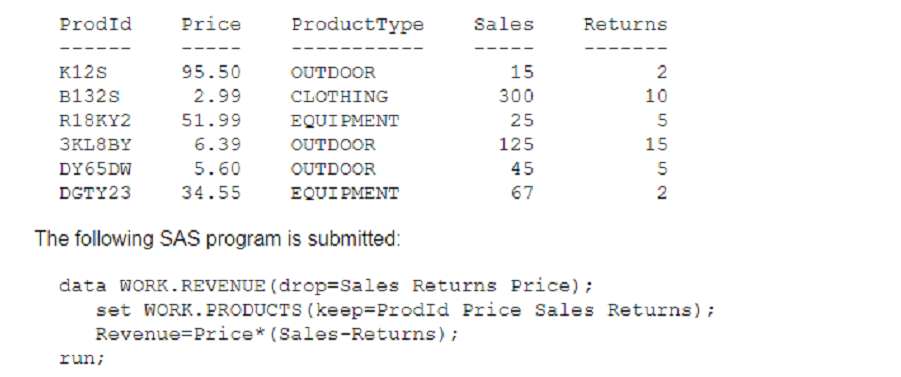
How many variables does the WORK REVENUE data set contains?
The resulting WORK.REVENUE data set contains 3 variables. In the provided SAS program, the set statement uses a (keep=) option to keep only 3 variables from WORK.PRODUCTS, which are ProdId, Price, and Sales. The drop= data set option in the data statement specifies to drop the Sales and Returns variables from the output data set. However, Returns was not included in the keep= option, so it won't be part of WORK.REVENUE to begin with. Finally, a new variable Revenue is calculated and included in the data set. Therefore, the final data set contains the variables ProdId, Price, and Revenue.
SAS documentation on keep= and drop= data set options.
Get access to all 78 verified questions with detailed answers.
Unlock All A00-215 Questions