WCNA Exam Questions & Answers
Wireshark Certified Network Analyst Exam • Wireshark
100% money-back guarantee
About WCNA Exam
The Wireshark Certified Network Analyst (WCNA) examination is the gold standard credential for IT professionals seeking to master network packet analysis and troubleshooting. This rigorous certification validates your expertise in using Wireshark, the industry-leading network protocol analyzer, to capture, inspect, and analyze network traffic. The WCNA exam covers essential topics including packet capture fundamentals, protocol analysis, network troubleshooting techniques, Wireshark interface navigation, and advanced filtering methods. Network administrators, security professionals, IT support specialists, and system engineers should pursue this certification to demonstrate their practical knowledge and enhance their career prospects in an increasingly competitive job market.
Proper exam preparation is crucial for success, and updated exam dumps combined with comprehensive practice tests significantly increase your passing potential. Quality study materials help candidates familiarize themselves with the exam format, question types, and time management strategies required to perform under pressure. Practice tests simulate real exam conditions, allowing you to identify knowledge gaps and reinforce weak areas before attempting the actual certification. By utilizing current, verified exam dumps alongside structured practice questions, candidates can build confidence, master complex networking concepts, and achieve the WCNA certification efficiently, ultimately advancing their professional credentials and earning potential in network analysis and cybersecurity fields.
Exam Topics & Objectives
4-Week Study Plan for WCNA
Week 1: Network Analysis Fundamentals and Wireshark Essentials
- Install Wireshark on Windows, macOS, and Linux; verify packet capture permissions and driver installation
- Complete Wireshark interface tour: menu bar, toolbar, packet list, packet details, packet bytes panes
- Capture packets on localhost using loopback adapter; capture traffic from active network interface
- Practice stopping, pausing, and resuming packet captures
- Learn capture buffer management and file size limitations
- Study OSI model layers and how Wireshark displays each layer
- Analyze first 10 captured packets manually; identify source, destination, and protocol types
- Review Wireshark documentation on supported protocols and versions
- Set up color coding rules for different packet types (TCP, UDP, DNS, HTTP)
- Practice saving capture files in .pcap, .pcapng formats and opening previous captures
Week 2: Capture Configuration, Display Filters, and Statistics Analysis
- Configure capture options: interface selection, buffer size, packet length (snaplen), and file rotation
- Set up ring buffers for continuous capture with automatic file rotation
- Learn capture filters syntax: host, port, protocol, logical operators (and, or, not)
- Write 15 different capture filters for specific traffic scenarios
- Master display filter syntax and operators: ==, !=, <, >, contains, matches regex
- Create 20 complex display filters combining multiple conditions (ip.addr AND tcp.port)
- Generate Protocol Hierarchy Statistics; analyze packet count and byte distribution by protocol
- Use Conversations window to identify communication patterns between hosts
- Generate Endpoints statistics; identify top talkers and listeners on network
- Create custom statistics using I/O graphs showing traffic over time
- Export statistics data to CSV format for external analysis
Week 3: TCP/IP, Transport Layer, and Application Protocol Analysis
- Analyze TCP three-way handshake (SYN, SYN-ACK, ACK) in captured traffic
- Examine TCP sequence numbers, acknowledgment numbers, and window sizes
- Identify TCP connection states: ESTABLISHED, TIME_WAIT, CLOSE_WAIT using flags
- Analyze TCP retransmissions and duplicate ACKs; correlate with packet loss
- Study UDP header structure; identify connectionless nature in traffic patterns
- Compare TCP vs UDP performance characteristics in network traces
- Decode DNS queries and responses; identify query types (A, AAAA, MX, CNAME)
- Analyze HTTP/HTTPS traffic; identify requests, responses, status codes, headers
- Follow TCP stream for HTTP request/response examination
- Decode SMTP, POP3, and IMAP protocols in email traffic captures
- Analyze FTP control and data connections; understand active vs passive mode
- Examine SSH handshake and encrypted session characteristics
Week 4: Wireless, VoIP, Forensics, Performance, and Advanced Tools
- Capture wireless traffic using monitor mode; analyze 802.11 beacon frames
- Examine wireless authentication frames and WPA/WPA2 handshakes
- Analyze RTP (Real-time Transport Protocol) streams in VoIP captures
- Decode SIP (Session Initiation Protocol) for VoIP call setup and teardown
- Extract and export RTP streams; play back audio from captured VoIP calls
- Perform baselining by creating baseline captures of normal network traffic
- Create performance metrics comparing current traffic against baseline
- Identify anomalies: unusual port usage, protocol violations, suspicious packet sizes
- Perform network forensics: extract files from HTTP/FTP streams
- Analyze malware indicators: suspicious DNS queries, command-and-control traffic patterns
- Use tshark command-line tool to capture and filter traffic from scripts
- Use editcap for time-based file splitting and pcap manipulation
- Use capinfos to analyze pcap file properties and statistics
- Practice dumpcap for packet capture with advanced filtering and rotation options
- Take two full-length practice exams; review incorrect answers and weak topic areas
Sample WCNA Questions
Practice with real exam-style questions. Reveal answers to verify your knowledge.
POP requests consist of a Request Command and Request Parameter.
During an ideal data transfer process, the TCP Time-Sequence graph plot points should run from the lower left corner to the upper right corner in a diagonal line of i-bars.
Refer to the exhibit.
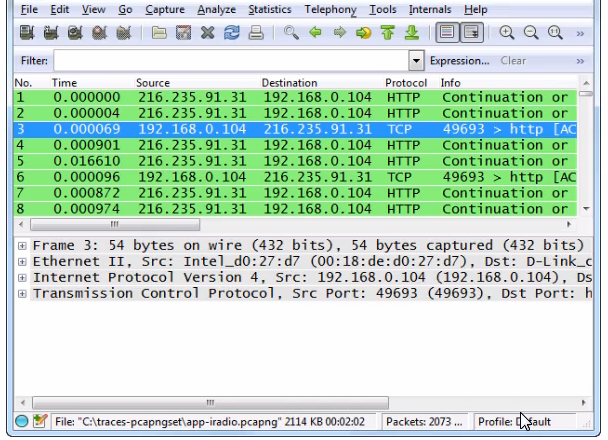
Which statement about this Wireshark image is correct?
The IPv4 Total Length field defines the length of the IP header, valid data and data link padding.
A host has just booted up. This host is allowed to send ARP queries for the MAC address of the local DNS server before sending gratuitous ARPs to test for duplicate IP addresses on the network.
Get access to all 100 verified questions with detailed answers.
Unlock All WCNA Questions