Workday-Pro-Integrations Exam Questions & Answers
Workday Pro Integrations Certification Exam • Workday
100% money-back guarantee
Sample Workday-Pro-Integrations Questions
Practice with real exam-style questions, each with the verified correct answer and explanation.
Refer to the following scenario to answer the question below.
An external system needs a file containing data for recent worker job changes. They would like to receive a file routinely at 5:00 PM Eastern Standard Time, every 48 hours. The file should show job changes since the last integration run.
What is the recurrence type of the integration schedule?
The requirement is to run the integration every 48 hours at a fixed time. In schedule configuration terms, 48 hours is equivalent to every two days. Therefore, the correct recurrence type is ''Recurs every 2 day(s).'' ''Recurs every 48 hours'' sounds mathematically equivalent, but it is not the schedule recurrence type shown for this configuration. Custom Recurrence would only be needed if the schedule pattern could not be represented by the standard recurrence options. Dependent Recurrence is used when an integration should run based on another process or dependency, which is not stated here. Since the file must include changes since the last run, the two-day recurrence controls how often incremental job changes are extracted.
The following XML code was generated using Core Connector: Location.
You need to produce a fixed length file to enforce a 25-character length for the locc:Location_Name, padded with * on the left if shorter, and issue a warning if it exceeds this length.
What combination of XSLT attributes and values do you use?
This requirement is fixed-width formatting, so the Workday XTT attributes are the correct family of attributes. xtt:fixedLength='25' enforces a 25-character output length. xtt:paddingCharacter='*' defines the padding character. To pad on the left, the value must be right-aligned, so xtt:align='right' is required. If the value exceeds the allowed length, xtt:reportTruncation='warning' issues a warning rather than silently truncating or raising an error. The etv attributes are used for validation-style behavior, not fixed-width text formatting. maxLength is also not the same as fixedLength because it sets a maximum rather than enforcing a padded fixed-width output. Therefore, option A matches the required transformation behavior exactly.
You are configuring a Core Connector: Worker integration to send data to a new external compliance and certification tracking vendor. You have begun to configure the connector with the Data Initialization Service (DIS) enabled. Your goal is to extract worker qualification data, but the vendor has three specific requirements:
The file must only include Active workers who are in the ''Clinical Staff'' job family.
The vendor has specified that for each worker's Education data, they want to receive the Institution Name, Institution Type, and Degrees.
The vendor requires a custom ''License ID'' that must combine the Certification Name and Issuing State, for example ''RN-CA''. A Calculated Field that provides this custom ''License ID'' already exists in the tenant.
What configuration step should you modify to ensure the integration only includes Active workers in the Clinical Staff job family?
The requirement is population filtering, not output formatting. In a Core Connector: Worker integration, Integration Population Eligibility determines which workers qualify for extraction before the connector produces the output file. To include only active workers in the Clinical Staff job family, the eligibility rule must evaluate worker status and job family together. Integration Field Overrides are used when replacing or adding output values, such as a calculated License ID. Integration Attributes control connector-level configuration and do not restrict the worker population. Transaction Log configuration controls which transaction types are detected for change processing, not whether a worker belongs to the desired eligible population. Therefore, the correct configuration step is Integration Population Eligibility.
Refer to the following XML to answer the question below.
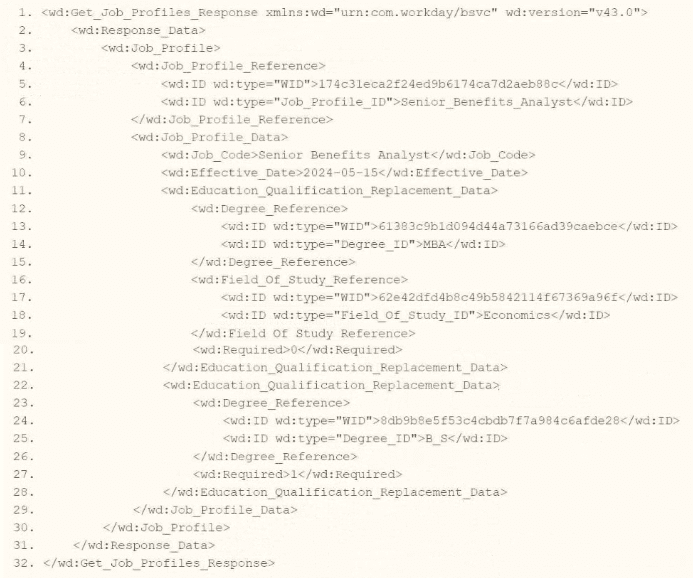
You are an integration developer and need to write XSLT to transform the output of an EIB which is making a request to the Get Job Profiles web service operation. The root template of your XSLT matches on the
As an integration developer working with Workday, you are tasked with transforming the output of an Enterprise Interface Builder (EIB) that calls the Get_Job_Profiles web service operation. The provided XML shows the response from this operation, and you need to write XSLT to select the value of the <wd:ID> element where the wd:type attribute equals 'Job_Profile_ID.' The root template of your XSLT matches on <wd:Get_Job_Profiles_Response> and applies templates to <wd:Job_Profile>. Within this template, you use the <xsl:value-of> element to extract the value. Let's analyze the XML structure, the requirement, and each option to determine the correct XPath syntax.
Understanding the XML and Requirement
The XML snippet provided is a SOAP response from the Get_Job_Profiles web service operation in Workday, using the namespace xmlns:wd='urn:com.workday/bsvc' and version wd:version='v43.0'. Key elements relevant to the question include:
The root element is <wd:Get_Job_Profiles_Response>.
It contains <wd:Response_Data>, which includes <wd:Job_Profile> elements.
Within <wd:Job_Profile>, there is <wd:Job_Profile_Reference>, which contains multiple <wd:ID> elements, each with a wd:type attribute:
<wd:ID wd:type='WID'>1740d3eca2f2ed9b6174ca7d2ae88c8c</wd:ID>
<wd:ID wd:type='Job_Profile_ID'>Senior_Benefits_Analyst</wd:ID>
The task is to select the value of the <wd:ID> element where wd:type='Job_Profile_ID' (e.g., 'Senior_Benefits_Analyst') using XPath within an XSLT template that matches <wd:Job_Profile>. The <xsl:value-of> element outputs the value of the selected node, so you need the correct XPath path from the <wd:Job_Profile> context to the specific <wd:ID> element with the wd:type attribute value 'Job_Profile_ID.'
Analysis of Options
Let's evaluate each option based on the XML structure and XPath syntax rules:
Option A: wd:Job_Profile_Reference/wd:ID/wd:type='Job_Profile_ID'
This XPath attempts to navigate from wd:Job_Profile_Reference to wd:ID, then to wd:type='Job_Profile_ID'. However, there are several issues:
wd:type='Job_Profile_ID' is not valid XPath syntax. In XPath, to filter based on an attribute value, you use the attribute selector [@attribute='value'], not a direct comparison like wd:type='Job_Profile_ID'.
wd:type is an attribute of <wd:ID>, not a child element or node. This syntax would not select the <wd:ID> element itself but would be interpreted as trying to match a nonexistent child node or property, resulting in an error or no match.
This option is incorrect because it misuses XPath syntax for attribute filtering.
Option B: wd:Job_Profile_Reference/wd:ID/@wd:type='Job_Profile_ID'
This XPath navigates to wd:Job_Profile_Reference/wd:ID and then selects the @wd:type attribute, comparing it to 'Job_Profile_ID' with =@wd:type='Job_Profile_ID'. However:
The =@wd:type='Job_Profile_ID' syntax is invalid in XPath. To filter based on an attribute value, you use [@wd:type='Job_Profile_ID'] as a predicate, not an equality comparison in this form.
This XPath would select the wd:type attribute itself (e.g., the string 'Job_Profile_ID'), not the value of the <wd:ID> element. Since <xsl:value-of> expects a node or element value, selecting an attribute directly would not yield the desired 'Senior_Benefits_Analyst' value.
This option is incorrect due to the invalid syntax and inappropriate selection of the attribute instead of the element value.
Option C: wd:Job_Profile_Reference/wd:ID[@wd:type='Job_Profile_ID']
This XPath navigates from wd:Job_Profile_Reference to wd:ID and uses the predicate [@wd:type='Job_Profile_ID'] to filter for <wd:ID> elements where the wd:type attribute equals 'Job_Profile_ID.'
In the XML, <wd:Job_Profile_Reference> contains:
<wd:ID wd:type='WID'>1740d3eca2f2ed9b6174ca7d2ae88c8c</wd:ID>
<wd:ID wd:type='Job_Profile_ID'>Senior_Benefits_Analyst</wd:ID>
The predicate [@wd:type='Job_Profile_ID'] selects the second <wd:ID> element, whose value is 'Senior_Benefits_Analyst.'
Since the template matches <wd:Job_Profile>, and <wd:Job_Profile_Reference> is a direct child of <wd:Job_Profile>, this path is correct:
<wd:Job_Profile> <wd:Job_Profile_Reference> <wd:ID[@wd:type='Job_Profile_ID']>.
When used with <xsl:value-of select='wd:Job_Profile_Reference/wd:ID[@wd:type='Job_Profile_ID']'/>, it outputs 'Senior_Benefits_Analyst,' fulfilling the requirement.
This option is correct because it uses proper XPath syntax for attribute-based filtering and selects the desired <wd:ID> value.
Option D: wd:Job_Profile_Reference/wd:ID/[@wd:type='Job_Profile_ID']
This XPath is similar to Option C but includes an extra forward slash before the predicate: wd:ID/[@wd:type='Job_Profile_ID']. In XPath, predicates like [@attribute='value'] are used directly after the node name (e.g., wd:ID[@wd:type='Job_Profile_ID']), not separated by a slash. The extra slash is syntactically incorrect and would result in an error or no match, as it implies navigating to a child node that doesn't exist.
This option is incorrect due to the invalid syntax.
Why Option C is Correct
Option C, wd:Job_Profile_Reference/wd:ID[@wd:type='Job_Profile_ID'], is the correct XPath syntax because:
It starts from the context node <wd:Job_Profile> (as the template matches this element) and navigates to <wd:Job_Profile_Reference/wd:ID>, using the predicate [@wd:type='Job_Profile_ID'] to filter for the <wd:ID> element with wd:type='Job_Profile_ID'.
It correctly selects the value 'Senior_Benefits_Analyst,' which is the content of the <wd:ID> element where wd:type='Job_Profile_ID'.
It uses standard XPath syntax for attribute-based filtering, aligning with Workday's XSLT implementation for web service responses.
When used with <xsl:value-of>, it outputs the required value, fulfilling the question's requirement.
Practical Example in XSLT
Here's how this might look in your XSLT:
<xsl:template match='wd:Job_Profile'>
<xsl:value-of select='wd:Job_Profile_Reference/wd:ID[@wd:type='Job_Profile_ID']'/>
</xsl:template>
This would output 'Senior_Benefits_Analyst' for the <wd:ID> element with wd:type='Job_Profile_ID' in the XML.
Verification with Workday Documentation
The Workday Pro Integrations Study Guide and SOAP API Reference (available via Workday Community) detail the structure of the Get_Job_Profiles response and how to use XPath in XSLT for transformations. The XML structure shows <wd:Job_Profile_Reference> containing <wd:ID> elements with wd:type attributes, and the guide emphasizes using predicates like [@wd:type='value'] to filter based on attributes. This is a standard practice for navigating Workday web service responses.
Workday Pro Integrations Study Guide Reference
Section: XSLT Transformations in EIBs -- Describes using XSLT to transform web service responses, including selecting elements with XPath and attribute predicates.
Section: Workday Web Services -- Details the Get_Job_Profiles operation and its XML output structure, including <wd:Job_Profile_Reference> and <wd:ID> with wd:type attributes.
Section: XPath Syntax -- Explains how to use predicates like [@wd:type='Job_Profile_ID'] for attribute-based filtering in Workday XSLT.
Workday Community SOAP API Reference -- Provides examples of XPath navigation for Workday web service responses, including attribute selection.
Option C is the verified answer, as it correctly selects the <wd:ID> value with wd:type='Job_Profile_ID' using the appropriate XPath syntax within the <wd:Job_Profile> template context.
What are the two valid data source options for an Outbound EIB?
An Outbound EIB (Enterprise Interface Builder) requires a data source to extract information from Workday. The two valid data source types are:
Custom Report (Advanced or Simple)
Workday Web Service (WWS)
From Workday documentation:
''Outbound EIBs support either a Custom Report marked as Web Service Enabled, or a Workday Public Web Service (WWS) operation, as the data source.''
Custom Reports allow user-defined data with filtering.
Web Services allow access to standard operations like Get_Workers.
Why the other options are incorrect:
A . Business Process is not a data source type.
B . XpressO Reports are not supported for integrations.
C . Business Processes cannot feed EIBs directly as data sources.
Get access to all 109 verified questions with detailed answers.
Unlock All Workday-Pro-Integrations Questions