AD0-E134 Exam Questions & Answers
Adobe Experience Manager Sites Developer Exam • Adobe
100% money-back guarantee
Sample AD0-E134 Questions
Practice with real exam-style questions, each with the verified correct answer and explanation.
A developer is using sling context-aware configuration trying to get the configuration resource using:

This works as intended in author and in publish when logged in lo publish as admin. However this gives a null when run as anonymous. Which method is going to fix the issue?
The issue arises because the anonymous user does not have the necessary read permissions for the /content directory. When using Sling context-aware configurations, access to the configuration resource is required. If the anonymous user lacks read permissions, the configuration cannot be retrieved, resulting in a null value.
To fix this issue, you need to grant read permissions to the anonymous user for the /content directory.
Steps to apply read permissions:
Access CRXDE Lite: Log into your AEM instance and navigate to CRXDE Lite (http://localhost:4502/crx/de).
Navigate to the /content Directory: In the CRXDE Lite interface, browse to the /content directory.
Set Permissions:
Right-click on the /content directory and select 'Permissions'.
Add the anonymous user (if not already present).
Grant read permissions to the anonymous user.
Save Changes: Apply the changes and ensure that they are saved correctly.
Test the Configuration: Log out of the AEM instance and test the context-aware configuration as an anonymous user to ensure that the configuration resource can now be retrieved.
By granting read permissions to the anonymous user for the /content directory, you allow access to the necessary configuration resources, resolving the issue.
A developer needs to create a project based on AEM Project Archetype with a specific AEM as a Cloud Service SDK version on the local environment.
Which two properties must be defined when creating this project? (Choose two.)
Refer to the exhibit.

The current page has three children.
What is the final rendered html output for the code snippet?
A)
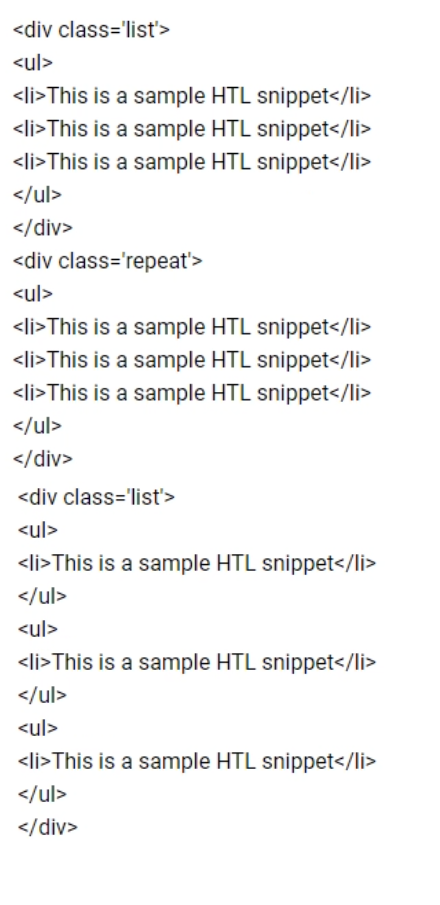
B)
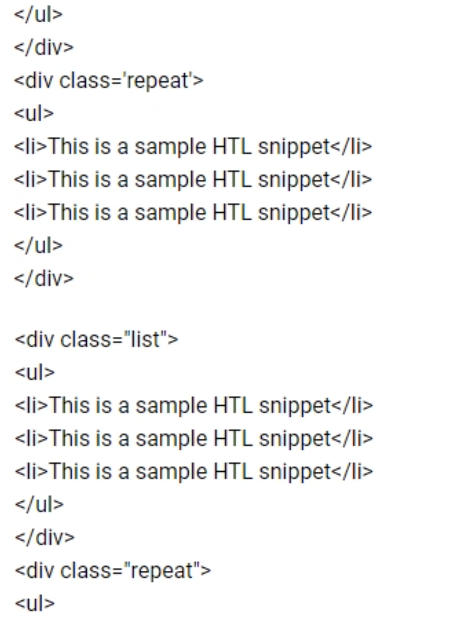
C)
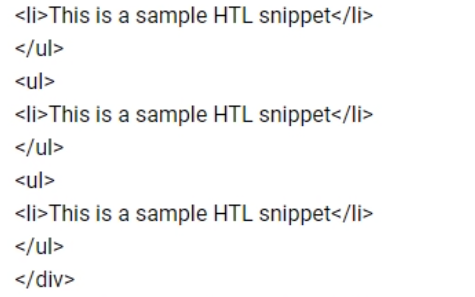
Where should an AEM Developer add a front end dependency?
An AEM Developer should add a front-end dependency in the package.json file. The package.json file is a standard configuration file for managing dependencies in JavaScript projects, including those using npm or Yarn as package managers.
Here's how to add a front-end dependency:
Open the package.json File: This file is typically located at the root of your project.
Add the Dependency: Add the required front-end dependency under the dependencies or devDependencies section. For example, to add lodash as a dependency:
{
'name': 'my-aem-project',
'version': '1.0.0',
'dependencies': {
'lodash': '^4.17.21'
}
}
Install the Dependency: Run the following command to install the new dependency:
npm install
Verify Installation: Ensure that the dependency has been added to the node_modules directory and is listed in the package-lock.json file.
The package.json file is the central place to manage all front-end dependencies, making it easy to track, update, and share dependencies across the development team.
Managing Dependencies in AEM Projects
These steps ensure that the front-end dependencies are managed efficiently and consistently within the AEM project.
A customer adds third-party client libraries to add some features in an existing AEM application, which will significantly reduce
performance.
How should the developer optimize the site?
Get access to all 50 verified questions with detailed answers.
Unlock All AD0-E134 Questions