AD0-E903 Exam Questions & Answers
Adobe Workfront Project Manager Professional • Adobe
100% money-back guarantee
Sample AD0-E903 Questions
Practice with real exam-style questions, each with the verified correct answer and explanation.
Refer to the exhibit.
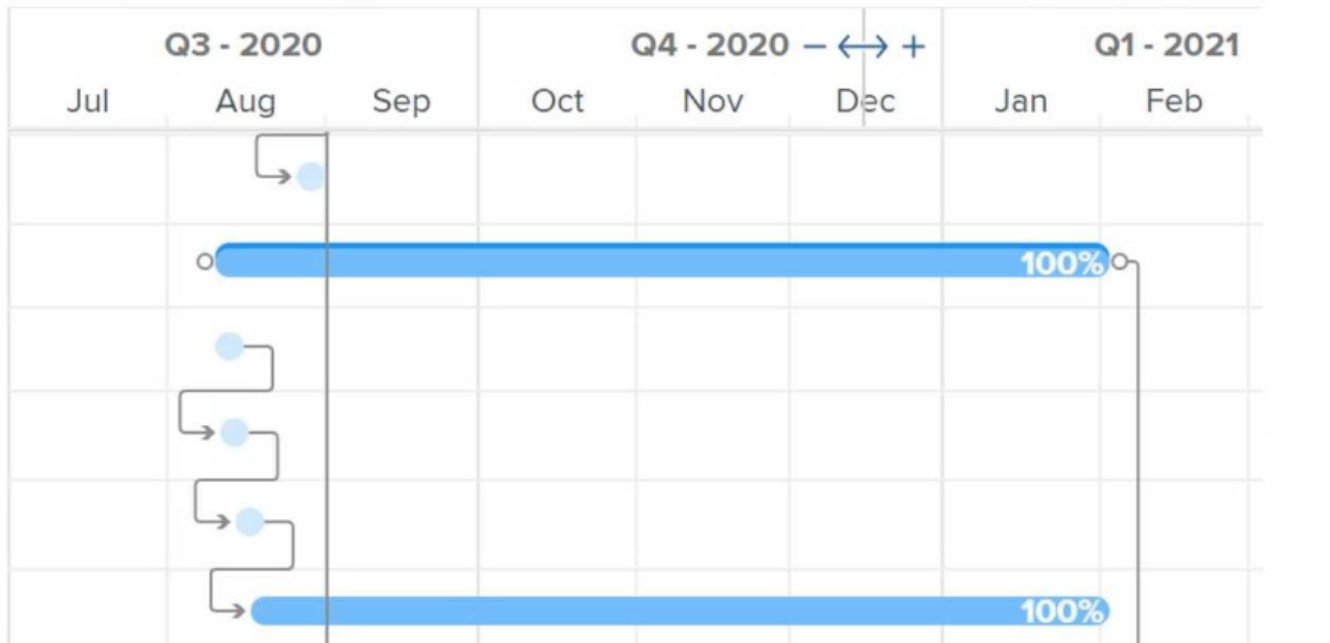
What do the connector lines between tasks in a Gantt chart represent?
In Workfront, the connector lines in a Gantt chart represent the predecessor relationships between tasks. These lines show how one task depends on another, indicating the order in which tasks need to be completed. This helps project managers visualize task dependencies and how changes in one task can affect others in the timeline.
A project manager checks an Incomplete Tasks report and notices that several tasks are listed even though the items are marked as 100% complete. What column can the project manager add to the view to understand why those tasks are included in the report?
Even though tasks may be marked as 100% complete, their Status may still be listed as incomplete in reports if the task's status has not been updated to 'Completed.' The Status column provides insight into the current state of the task, which helps identify if the task is still listed as 'In Progress' or another incomplete status despite being marked as fully complete. Adding this column clarifies why the task appears in the Incomplete Tasks Report.
A project manager needs to see specific tasks and issues across all of their projects in a single view. The project manager only needs to see tasks and issues that are currently pending approval, and the results should be grouped by project. What steps should the project manager take to create this view?
The most comprehensive approach is to create two separate reports---one for tasks and one for issues---with filters set for 'Pending Approval.' Grouping the results by project name ensures that the project manager can see all relevant tasks and issues organized per project. Adding these reports to a dashboard consolidates the information into a single view, providing easy access for tracking pending approvals.
The marketing team should begin working on a task on September 23, complete it within 2 weeks and take approximately 10 hours over that time span to execute the deliverable.
Which task settings need to be configured to meet these requirements?
In Workfront, setting the correct task constraint and planned hours ensures that the task starts on the intended date (September 23) and allows the team to track the time allocated (10 hours) over a 2-week duration. 'Must Start On' ensures the task begins exactly on the planned start date.
A client has negotiated a discounted billing rate for video editing in a specific initiative.
How can the project manager override the default billing rate for the Video Editor within a project?
In Workfront, billing rates can be customized for individual projects. To apply a negotiated rate for the Video Editor role within a specific initiative, the project manager can add a new billing rate at the project level. This ensures that the rate is applied only to tasks within the project and does not affect the default system-wide rate for other projects.
Get access to all 70 verified questions with detailed answers.
Unlock All AD0-E903 Questions