F5CAB5 Exam Questions & Answers
BIG-IP Administration Support and Troubleshooting • F5 Networks
100% money-back guarantee
Sample F5CAB5 Questions
Practice with real exam-style questions, each with the verified correct answer and explanation.
Refer to the exhibit.
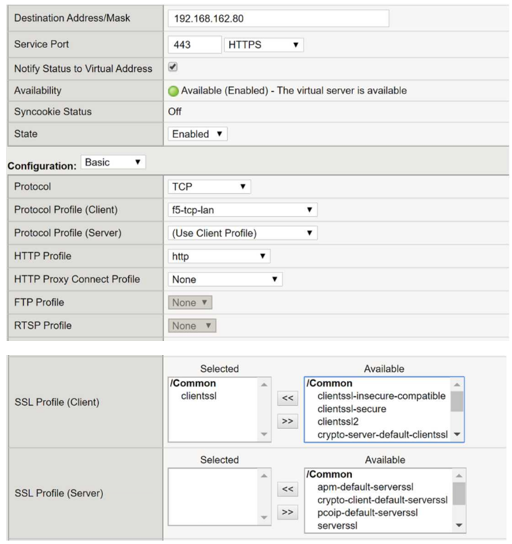
A BIG-IP Administrator needs to deploy an application on the BIG-IP system to performSSL offload and re-encrypt the traffic to pool members. During testing, users are unable to connect to the application.
What must the BIG-IP Administrator do to resolve the issue? (Choose one answer)
To successfully performSSL offload and re-encryptionon a BIG-IP system, the virtual server must be configured withboth a Client SSL profile and a Server SSL profile. The Client SSL profile enables BIG-IP to decrypt inbound HTTPS traffic from clients, while the Server SSL profile is required tore-encrypt traffic before forwarding it to the pool members.
From the exhibit, the virtual server has aClient SSL profile configured, which allows BIG-IP to accept HTTPS connections from clients. However, there isno Server SSL profile attached, meaning BIG-IP attempts to sendunencrypted HTTP trafficto pool members listening on HTTPS (port 443). This protocol mismatch causes the server-side SSL handshake to fail, resulting in users being unable to connect to the application.
This behavior is well documented in BIG-IP SSL troubleshooting guides: when backend servers expect HTTPS, a Server SSL profile is mandatory to establish a secure connection from BIG-IP to the pool members.
The other options are incorrect:
Removing the Client SSL profile (Option A) would break client-side HTTPS.
The server-side TCP profile (Option B) is unrelated to SSL encryption.
Forward Proxy (Option C) is only used for outbound SSL inspection scenarios.
Therefore, configuring anSSL Profile (Server)is the correct and required solution.
A BIG-IP Administrator is informed that traffic on Interface 1.1 is expected to increase over the maximum bandwidth capacity on the link. There is a single VLAN on the Interface. What should the BIG-IP Administrator do to increase the total available bandwidth?
When a physical network link (like Interface 1.1) reaches its maximum capacity, it creates a bottleneck that negatively impacts network-level performance. To overcome the physical limits of a single interface, BIG-IP administrators use 'Trunking,' which is the F5 term for Link Aggregation (often implemented via LACP). A trunk object bundles multiple physical interfaces into a single logical link. By creating a trunk with two or more interfaces, the BIG-IP can spread the traffic load across all members of the trunk, effectively doubling or tripling the available bandwidth for the associated VLANs. Beyond performance, troubleshooting redundancy often leads to the use of trunks; if one cable in a trunk fails, the others continue to carry traffic, preventing a complete outage. This is a superior solution to simply increasing MTU (which requires end-to-end support) or manually setting media speeds. In a high-availability environment, configuring trunks is a foundational troubleshooting and optimization step to ensure that traffic spikes do not result in packet loss due to link saturation.
Clients report that they cannot reach the virtual server vs-production on port 80, but are able to ping the virtual server address. The configuration is shown below:
Plaintext
ltm virtual vs-production {
destination 10.99.20.50:http
ip-protocol tcp
mask 255.255.255.255
profiles {
http {}
tcp {}
}
source 192.168.0.0/16
translate-address enabled
translate-port enabled
vlans {
external
}
vlans-enabled
}
What is the cause?
The issue is caused by the Source Address restriction configured on the virtual server.
Source Filter: The configuration contains the line source 192.168.0.0/16. This acts as an implicit Access Control List (ACL). The virtual server will only accept and process TCP connections if the client's source IP address falls within the 192.168.x.x range.
Why Ping Works: ICMP (Ping) is handled by the Virtual Address object, not the Virtual Server object. Unless ICMP is specifically disabled on the Virtual Address, it will respond to pings from any subnet, even if the Virtual Server itself is restricted by a source filter or is even disabled.
Evaluation of Other Options:
Disabled (Option A): If the VS were disabled, the configuration would typically show disabled or state down, and the symptoms would be similar, but the source filter is a more specific 'misconfiguration' in this context.
Port 80 (Option C): The configuration destination 10.99.20.50:http explicitly confirms it is listening on port 80.
Unallowed Subnet: If a client from a different network (e.g., 10.10.1.5) tries to connect, the BIG-IP will silently drop the connection or send a reset because it does not match the defined source criteria.
A BIG-IP Administrator configured the following virtual server to pass traffic on all addresses and ports. After configuration is completed, the BIG-IP Administrator notices that the virtual server is unable to pass traffic.
Plaintext
ltm virtual forwarding_any_vs {
destination 0.0.0.0:any
ip-forward
mask 255.255.255.255
profiles {
fastL4 {}
}
serverssl-use-sni disabled
source 0.0.0.0/0
translate-address disabled
translate-port disabled
}
Which part of the configuration is the cause of the issue?
The failure of the Forwarding (IP) virtual server is caused by an incorrect Network Mask configuration for a wildcard destination.
Wildcard Destination: The administrator intends to create a 'Wildcard' Virtual Server that listens for any destination IP address (0.0.0.0).
The Mask Conflict: A mask of 255.255.255.255 (or /32) tells the BIG-IP to look for a specific, single host address. When combined with 0.0.0.0, the system is literally looking for traffic destined for the IP 0.0.0.0, which is not a valid routable destination for standard traffic.
Correct Configuration: To allow the virtual server to catch traffic for any IP address, the mask must be changed to 0.0.0.0 (or /0). This signifies that the system should ignore all bits of the destination address and match everything.
Forwarding Logic: The rest of the configuration---including ip-forward (Forwarding IP type), translate-address disabled, and translate-port disabled---is correct for a BIG-IP acting as a router/gateway.
A BIG-IP Administrator configured the following virtual server to pass traffic on all addresses and ports. After configuration is completed, the BIG-IP Administrator notices that the virtual server is unable to pass traffic.
ltm virtual forwarding_any_vs {
destination 0.0.0.0:any
ip-forward
mask 255.255.255.255
profiles {
fastL4 { }
}
serverssl-use-sni disabled
source 0.0.0.0/0
translate-address disabled
translate-port disabled
}
Which part of the configuration is the cause of the issue? (Choose one answer)
This virtual server is intended to function as aforwarding (IP-forwarding) virtual server, which is commonly used for routing or firewall-style deployments where BIG-IP forwards traffic transparently without load balancing or address translation. For a forwarding virtual server to match and passall traffic, the destination must be configured as 0.0.0.0:anywith a mask of 0.0.0.0, not 255.255.255.255.
The configured mask 255.255.255.255 represents a/32 host mask, which restricts the virtual server to matching traffic destined only for the exact IP address 0.0.0.0. Since 0.0.0.0 is not a valid routable destination for normal traffic, no packets will ever match the virtual server, causing it to pass no traffic at all.
This is a well-documented BIG-IP behavior:
destination 0.0.0.0:any
mask 0.0.0.0
together define acatch-all forwarding virtual server.
The destination itself (Option A) is correct for a forwarding VS, and disabling address translation (Option C) is expected and required for IP-forwarding mode. Therefore, the incorrect subnet mask is the sole reason the virtual server is not functioning as expected.
Get access to all 65 verified questions with detailed answers.
Unlock All F5CAB5 Questions