NCP-MCI-6.10 Exam Questions & Answers
Nutanix Certified Professional - Multicloud Infrastructure v6.10 • Nutanix
100% money-back guarantee
Sample NCP-MCI-6.10 Questions
Practice with real exam-style questions, each with the verified correct answer and explanation.
An administrator configured a remote site for Protection Domain replication, but network performance and stability are impacted.
How can the remote site configuration be adjusted to fix the issue?
Refer to Exhibit:
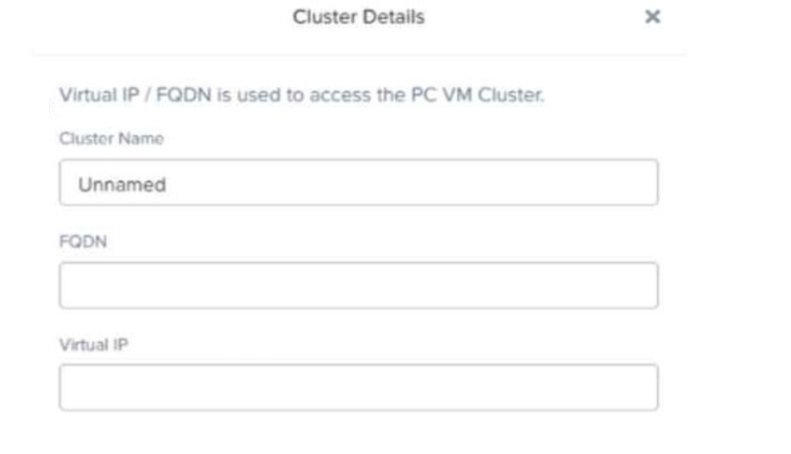
In a scale-out Prism Central deployment, what additional functionality does configuring an FQDN instead of a Virtual IP provide?
When using FQDN instead of a Virtual IP in a scale-out Prism Central deployment, Nutanix enables load balancing across multiple Prism Central instances.
Option A (Load balancing) is correct because it ensures that requests are distributed among multiple Prism Central nodes, improving performance and redundancy.
Option B (Resiliency) is incorrect because resiliency is achieved through HA and replication, not through FQDN configuration.
Option C (Segmentation) is incorrect because network segmentation is handled at the VLAN or security policy level.
Option D (SSL Certificate) is incorrect because SSL certificates can be applied regardless of whether FQDN or Virtual IP is used.
References:
Nutanix Prism Central Deployment Guide
Nutanix Best Practices for Scale-Out Prism Central
Nutanix Support KB: Configuring FQDN for Prism Central
Which feature deploys a temporary VM that allows an administrator to log in and apply OS patches to a VM template?
The Update Guest OS feature (Option D) in Nutanix allows administrators to apply patches and updates to a VM template by creating a temporary VM instance for modification.
How It Works:
A temporary VM is deployed from the template.
Administrators apply updates to the OS.
Once complete, the changes are saved back to the template.
Option A (Create VM from Template) is incorrect:
This feature creates a new VM from an existing template but does not update the template itself.
Option B (Complete Guest OS Update) is incorrect:
There is no specific Nutanix feature named 'Complete Guest OS Update.'
Option C (Update Configuration) is incorrect:
Updates VM hardware and policies but not the OS.
References:
Nutanix Prism Central Managing VM Templates and Guest OS Updates
Nutanix Bible OS Management and Updates in Nutanix Environments
Nutanix KB How to Patch OS in a Nutanix VM Template
An administrator needs to create a storage container for VM disks. The container must meet the following conditions:
10 GiB of the total allocated space must not be used by other containers.
The container must have a maximum storage capacity of 500 GiB.
What settings should the administrator configure while creating the storage container?
Nutanix storage containers allow administrators to configure capacity reservations and advertised limits for better resource management.
Option D (Set Reserved Capacity to 10 GiB and Advertised Capacity to 500 GiB) is correct:
Reserved Capacity ensures that 10 GiB is always available for this container and not consumed by other containers.
Advertised Capacity defines a logical limit of 500 GiB to prevent over-allocation.
Option A is incorrect:
Advertised Capacity of 10 GiB is too low and does not match the requirement of a 500 GiB storage container.
Option B is incorrect:
Only setting Advertised Capacity does not guarantee Reserved Capacity, meaning other containers could consume the reserved space.
Option C is incorrect:
Setting only Reserved Capacity does not enforce an upper limit, which could lead to overprovisioning.
References:
Nutanix Storage Management Guide Understanding Storage Container Settings
Nutanix KB Advertised vs. Reserved Capacity in Storage Containers
In Prism Element, how many nodes can be placed into maintenance mode at one time on 12-node FT2 cluster?
In a 12-node FT2 cluster, only one node can be placed into maintenance mode at a time. This ensures that the cluster maintains data redundancy and protection (FT2 indicates 2-failure tolerance).
From the Nutanix Enterprise Cloud Administration (ECA) course materials:
''For FT2 clusters, a maximum of one node can be placed in maintenance mode at a time to ensure the cluster's ability to tolerate failures and maintain quorum.''
Get access to all 121 verified questions with detailed answers.
Unlock All NCP-MCI-6.10 Questions