NCP-NS Exam Questions & Answers
Nutanix Certified Professional Network & Security v7.5 • Nutanix
100% money-back guarantee
About NCP-NS Exam
The NCP-NS (Nutanix Certified Professional Network & Security v7.5) certification validates your expertise in managing and securing Nutanix infrastructure environments. This advanced certification demonstrates proficiency in critical areas including network configuration, security protocols, threat management, and compliance frameworks within Nutanix cloud platforms. The exam covers essential topics such as virtual networking, firewall implementation, identity and access management, data protection, and disaster recovery strategies. By earning this certification, professionals prove they can design, deploy, and maintain secure Nutanix solutions that protect organizational assets while optimizing network performance.
IT professionals, systems administrators, network engineers, and cloud infrastructure specialists should pursue the NCP-NS v7.5 certification to advance their careers and validate their technical capabilities. To successfully pass this challenging exam, candidates benefit significantly from utilizing updated exam dumps and comprehensive practice tests that mirror the actual test environment. These study resources help identify knowledge gaps, build confidence, and reinforce understanding of complex networking and security concepts. By combining hands-on experience with structured preparation materials, candidates can effectively prepare for the NCP-NS certification and demonstrate mastery of Nutanix security and networking solutions.
Exam Topics & Objectives
4-Week Study Plan for NCP-NS
Week 1: Flow Virtual Networking Fundamentals
- Study Nutanix Flow architecture and components (Controller VM, Proxy, Data Plane)
- Learn virtual networking concepts: VLANs, subnets, IP address management in Flow
- Configure network segmentation policies and micro-segmentation basics
- Practice setting up virtual networks using Prism Central interface
- Understand Flow Networking integration with AHV and ESXi hypervisors
- Review network topology design best practices for Flow environments
- Complete hands-on lab: Create and configure a basic virtual network segment
- Study IPAM (IP Address Management) configuration in Flow
Week 2: Flow Network Security Configuration
- Deep dive into Flow Network Security policies and enforcement mechanisms
- Learn security policy categories: application-centric, protocol-based, and isolation policies
- Study threat defense features: DLP, threat intelligence integration, and alerting
- Configure intra-subnet traffic rules and east-west traffic policies
- Practice creating security groups and category-based policies
- Learn about Flow analytics and visibility dashboards for security monitoring
- Study encryption options: in-transit encryption and data-at-rest encryption
- Complete hands-on lab: Implement segmentation policies blocking specific traffic patterns
- Review compliance and regulatory framework integrations in Flow Security
Week 3: Troubleshooting Flow Virtual Networking and Network Security
- Study diagnostic tools: Flow debugger, packet capture, and flow tracing capabilities
- Learn to identify and resolve network connectivity issues in Flow environments
- Practice troubleshooting virtual network configuration problems
- Study common network security policy misconfigurations and resolution strategies
- Learn to interpret Flow logs and event data for troubleshooting
- Practice using Prism Central diagnostics for Flow-related issues
- Study latency and performance troubleshooting in Flow Virtual Networks
- Complete hands-on lab: Diagnose and resolve connectivity issues in segmented networks
- Review traffic flow analysis and microsegmentation policy validation techniques
Week 4: Flow Deployment, Upgrades, and Exam Preparation
- Study Flow environment deployment prerequisites and planning
- Learn step-by-step Flow installation and enablement procedures
- Practice deploying Flow on AHV and ESXi clusters
- Study upgrade procedures for Flow components and versioning strategies
- Learn licensing requirements and capacity planning for Flow deployments
- Practice backup and disaster recovery procedures for Flow configurations
- Complete hands-on lab: Deploy and configure a complete Flow environment from scratch
- Review cluster health and Flow status monitoring post-deployment
- Take full-length practice exams covering all five exam domains
- Review weak areas and complete final scenario-based labs
- Study exam tips and time management strategies
Sample NCP-NS Questions
Practice with real exam-style questions. Reveal answers to verify your knowledge.
An administrator creates a new VPC in No NAT mode to allow VMs in a web tier to reach an external firewall.
After deployment... none of the VMs can reach external IP addresses...
Which action should the administrator take to restore routed north-south connectivity from the VPC?
An administrator needs to make a web server VM, which is inside a private VPC overlay subnet, accessible from the external network. The administrator assigns a Floating IP to the VM, but the service is still unreachable from the outside.
What is a likely reason for this failure?
An administrator is deploying a new multi-tenant environment in Prism Central and has created a VPC named TenantVPC1.
The administrator needs to enable external connectivity for this VPC so that some services inside the VPC can be accessed from the corporate network without NAT translation, while other services require Internet access through SNAT translation. The administrator plans to use an External Network(s) to provision this connectivity.
Which configuration should the administrator apply to satisfy this requirement?
Which statement is correct about cloning Application Security Policies?
Refer to the exhibit.
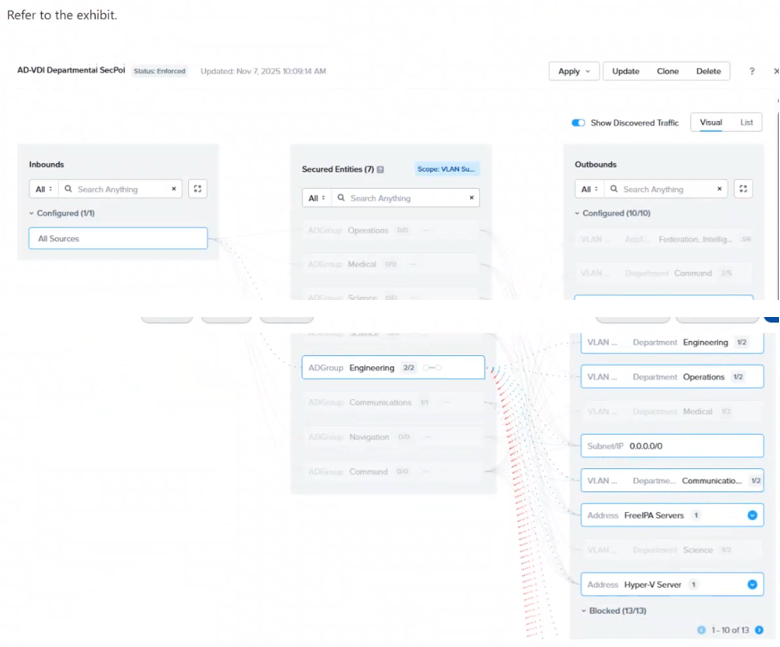
In the AD-VDI Departmental SecPol policy shown in the exhibit, ADGroup: Engineering is configured as a secured entity in a VDI Security Policy. Prism Central shows 2 / 2 active sessions under this group, but the administrator confirms that three Engineering users are currently logged in to persistent VDI desktops.
The third user's VM shows no ADGroup assignment in its VM details in Prism Central, even after the user has successfully logged in. All three users are members of the same AD group, and the Domain Controller event logs confirm a successful interactive login for the third user.
Which condition explains why the third user's VM is not being assigned the ADGroup: Engineering category?
Get access to all 106 verified questions with detailed answers.
Unlock All NCP-NS Questions