1Z0-084 Exam Questions & Answers
Oracle Database 19c: Performance Management and Tuning • Oracle
100% money-back guarantee
Sample 1Z0-084 Questions
Practice with real exam-style questions, each with the verified correct answer and explanation.
Which two statements are true about session wait information contained in v$session or v$session_wait?
In the V$SESSION view, Oracle provides information about the session waits:
B) When the WAIT_TIME column has a value of 0, it signifies that the session is currently waiting for a resource. This column represents the duration of the current or last wait.
C) If the session is not actively waiting, the WAIT_TIME column shows the time the session spent waiting for the last wait event. If the STATE column is showing 'WAITED KNOWN TIME', it means the session is not currently waiting, but it indicates the time for which it had waited.
Oracle Database Reference, 19c
Oracle Database Performance Tuning Guide, 19c
You must configure and enable Database Smart Flash Cache for a database.
You configure these flash devices:

Examine these parameter settings:
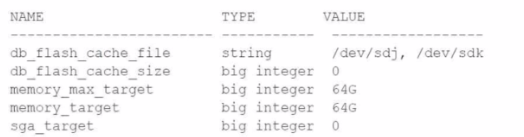
What must be configured so that the database uses these devices for the Database Smart Flash Cache?
To configure and enable Database Smart Flash Cache, you must set the DB_FLASH_CACHE_SIZE parameter to reflect the combined size of the flash devices you intend to use for the cache. In this scenario, two flash devices are configured: /dev/sdj with 128G and /dev/sdk with 64G.
Determine the combined size of the flash devices intended for the Database Smart Flash Cache. In this case, it's 128G + 64G = 192G.
However, Oracle documentation suggests setting DB_FLASH_CACHE_SIZE to the exact sizes of the individual devices, separated by a comma when multiple devices are used.
Modify the parameter in the database initialization file (init.ora or spfile.ora) or using an ALTER SYSTEM command. Here's the command for altering the system setting:
ALTER SYSTEM SET DB_FLASH_CACHE_SIZE='128G,64G' SCOPE=SPFILE;
Since this is a static parameter, a database restart is required for the changes to take effect.
Upon database startup, it will allocate the Database Smart Flash Cache using the provided sizes for the specified devices.
It is important to note that MEMORY_TARGET and MEMORY_MAX_TARGET parameters should be configured independently of DB_FLASH_CACHE_SIZE. They control the Oracle memory management for the SGA and PGA, and do not directly correlate with the flash cache configuration.
Reference
Oracle Database 19c Documentation on Database Smart Flash Cache
Oracle Support Articles and Community Discussions on DB_FLASH_CACHE_SIZE Configuration
An Oracle 19c database uses default values for all optimizer initialization parameters.
After a table undergoes partition maintenance, a large number of wait events occur for:
cursor: pin S wait on X
Which command reduces the number of these wait events?
The cursor: pin S wait on X wait event suggests contention for a cursor pin, which is associated with mutexes (a type of locking mechanism) that protect the library cache to prevent concurrent modifications. This issue can often be alleviated by deferring the invalidation of cursors until the end of the call to reduce contention. The correct command to use would be:
C (Correct): ALTER SYSTEM SET CURSOR_INVALIDATION=DEFERRED; This setting defers the invalidation of dependent cursors until the end of the PL/SQL call, which can reduce the cursor: pin S wait on X wait events.
The other options are incorrect in addressing this issue:
A (Incorrect): Setting CURSOR_SHARING to FORCE makes the optimizer replace literal values with bind variables. It doesn't address the contention for cursor pins directly.
B (Incorrect): CURSOR_SPACE_FOR_TIME=TRUE aims to reduce the parsing effort by keeping cursors for prepared statements open. It may increase memory usage but does not directly resolve cursor: pin S wait on X waits.
D (Incorrect): Increasing SESSION_CACHED_CURSORS caches more session cursors but doesn't necessarily prevent the contention indicated by the cursor: pin S wait on X wait events.
Oracle Database Reference: CURSOR_INVALIDATION
Oracle Database Performance Tuning Guide: Reducing Cursor Invalidation
Which three types of statistics are captured by statspack with snap level 6?
Statspack is a performance diagnostic tool provided by Oracle prior to the introduction of the Automatic Workload Repository (AWR). At snap level 6, Statspack captures the following types of statistics:
A (Correct): Parent and child latches are captured. Latch statistics provide information about contention for latches, which are low-level serialization mechanisms used by Oracle.
E (Correct): Enqueue statistics, which provide information on the waits for locks that manage the concurrency between users.
F (Correct): Segment-level statistics, which provide detailed information on database segments such as tables, indexes, etc., to identify I/O and contention issues.
C (Incorrect): While optimizer execution plans are an essential aspect of performance tuning, detailed execution plan capture is not part of the Statspack report at level 6.
D (Incorrect): Plan usage data refers to how frequently a plan is being used, which is more associated with AWR and not typically captured in Statspack reports.
Examine this statement and output:
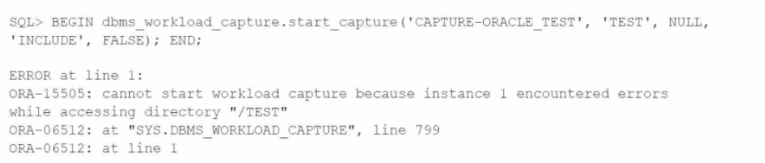
Which two situations can trigger this error?
The ORA-15505 error indicates that the instance encountered errors while trying to access the specified directory. This could be due to:
A) Insufficient privileges: The user attempting to start the workload capture might not have the required permissions to execute the DBMS_WORKLOAD_CAPTURE package or to read/write to the directory specified.
E) Accessibility: The database instance may not be able to access the directory due to issues such as incorrect directory path, directory does not exist, permission issues at the OS level, or the directory being on a file system that's not accessible to the database instance.
Oracle Database Error Messages, 19c
Oracle Database Administrator's Guide, 19c
Get access to all 55 verified questions with detailed answers.
Unlock All 1Z0-084 Questions