1Z0-820 Exam Questions & Answers
Upgrade to Oracle Solaris 11 System Administrator • Oracle
100% money-back guarantee
Sample 1Z0-820 Questions
Practice with real exam-style questions, each with the verified correct answer and explanation.
Before booting testzone. a non-global zone, you want to connect to the zone s console so that you can watch the boot process. Choose the command used to connect to testzone's console.
The crash dump notification on your server is:
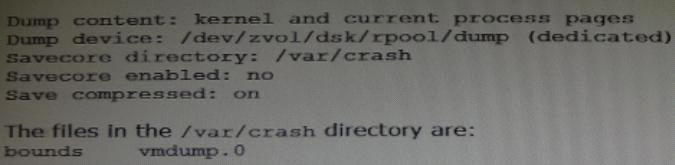
Documentation states that there should be two core files for each crash dump in the /var/crash directory named vmdump.0
Which command should you choose to display theses two files?
Decompress using savecore -f vmdump.0
savecore - save a crash dump of the operating system
-f dumpfile Attempt to save a crash dump from the speci-
fied file instead of from the system's
current dump device. This option may be use-
ful if the information stored on the dump
device has been copied to an on-disk file by
When setting up Automated Installer (AI) clients, an interactive tool can be used to generate a custom system configuration profile. The profile will specify the time zone, data and time, user and root accounts, and name services used for an AI client installation. This interactive tool will prompt you to enter the client information and an SC profile (XML) will be created.
Which interactive tool can be used to generate this question configuration?
Use the installadm set-criteria command to update the client criteria associated with an AI manifest that you already added to a service using installadm add-manifest.
Use the installadm add-manifest command to add a custom AI manifest to an install service.
The value of manifest is a full path and file name with .xml extension. The manifest file contains an AI manifest (installation instructions). The manifest file can also reference or embed an SC manifest (system configuration instructions).
Incorrect answers:
A: The sys-unconfig command is used to restore a system's configuration to
an 'as-manufactured' state, ready to be reconfigured again.
C: You can use the sysconfig create-profile command to create a new system configuration profile. Thesysconfigcommand affects all functional groupings in the Solaris instance.
D: Use the installadm create-profile command to add a system configuration profile to an install service. The create-profile subcommand validates profiles before adding them to the install service.
Specify criteria so that appropriate clients select that configuration profile. If no criteria are specified, all clients use this profile.
Which three methods of delivering a package are provided by the image Package System (iPS)?
(Choose tnree.)
Your task is to convert a JumpStart sysidcfg file to an Automated Installer (AI) sc_profile.xml file, using js2ai.
Select two unsupported items that will require changes.
A: terminal
The js2ai tool does not perform any translation. Make sure the terminal type
speciied in the sysidcfg ile is supported in Oracle Solaris 11.
D: system_locale
The js2ai tool does not perform any translation. Make sure the locale specified in
the sysidcfg ile is supported in Oracle Solaris 11.
Incorrect answers:
B: name_service
AI supports DNS, NIS, and LDAP. The js2ai tool supports values NONE, DNS, NIS,
and LDAP. NIS+ name services are translated as NIS.
C: timezone
The js2ai tool does not perform any translation
E: network_interface
AI supports only a single interface. The js2ai tool processes only the irst
interface encountered in the sysidcfg ile and provides limited support for
PRIMARY.
F: root_password
The js2ai tool does not perform any translation.
Get access to all 131 verified questions with detailed answers.
Unlock All 1Z0-820 Questions