1Z0-822 Exam Questions & Answers
Oracle Solaris 11 Advanced System Administration • Oracle
100% money-back guarantee
About 1Z0-822 Exam
The 1Z0-822 Oracle Solaris 11 Advanced System Administration certification exam is a comprehensive assessment designed for IT professionals seeking to validate their expertise in managing and administering Oracle Solaris 11 systems at an advanced level. This challenging certification covers critical topics including system administration fundamentals, network configuration, storage management, system performance tuning, and security implementation. The exam tests candidates' ability to handle complex system environments, troubleshoot technical issues, and implement best practices for enterprise-level Solaris deployments. With questions spanning kernel tuning, virtualization technologies, and advanced networking protocols, the 1Z0-822 exam demands thorough knowledge and practical experience in Solaris system administration.
System administrators, IT engineers, and DevOps professionals responsible for managing Solaris infrastructure should consider pursuing this certification to advance their careers and demonstrate their technical competency. To maximize success rates, candidates benefit significantly from utilizing updated exam dumps and comprehensive practice tests that simulate real testing conditions. These resources help identify knowledge gaps, reinforce difficult concepts, and build confidence before the actual exam. Practice tests provide valuable insights into question formats and time management strategies, while updated dumps ensure content alignment with the latest Oracle exam specifications. Combined with hands-on lab experience and official Oracle training materials, these preparation tools create a well-rounded study approach that substantially improves certification pass rates and ensures candidates are truly ready for advanced Solaris administration responsibilities.
Exam Topics & Objectives
4-Week Study Plan for 1Z0-822
Week 1: Foundation and Service Management
- Study SMF architecture, including service states, milestones, and the service repository
- Practice using svcs command to view service status and dependencies
- Learn svcadm commands for enabling, disabling, and restarting services
- Configure service properties using svccfg and understand property groups
- Study service manifests and how to create custom services
- Practice setting service dependencies and fault recovery policies
- Review service logging and debugging techniques
- Complete hands-on labs creating and managing custom SMF services
Week 2: Package Management, ZFS Backup, and Network Configuration
- Study IPS package management fundamentals, publishers, and repositories
- Practice pkg command syntax for installing, updating, and removing packages
- Learn package dependencies and conflict resolution
- Study ZFS snapshot creation and cloning procedures
- Practice ZFS send and receive for backup and restore operations
- Configure incremental and full ZFS backups
- Study network interface configuration and ipadm command usage
- Practice configuring IPv4 and IPv6 addresses
- Learn datalink configuration and virtual network interfaces
- Complete backup and restore scenarios using ZFS
Week 3: Network Services, Zones, and Security
- Study DNS configuration and resolver setup on Solaris 11
- Configure DHCP client and server functionality
- Practice NTP synchronization and time zone configuration
- Learn zone creation, installation, and boot processes
- Study zone configuration and resource controls
- Practice zone cloning and migration between hosts
- Learn zone networking and zone isolation
- Study Solaris 11 security features including user and role management
- Practice RBAC configuration and privilege assignment
- Learn firewall configuration using ipfilter
- Study encryption and SSL/TLS configuration
- Complete zone administration practical exercises
Week 4: Advanced Administration, Process Management, and System Diagnostics
- Study process priorities, scheduling classes, and nice values
- Practice process management using ps, prstat, and top commands
- Learn CPU affinity and processor sets configuration
- Study resource capping and fair-share scheduling
- Review Oracle Solaris 11 installation methods for multiple hosts
- Practice automated installation using AI (Automated Installer)
- Study manifest and profile creation for mass deployment
- Learn system messaging facilities and syslog configuration
- Study SMF diagnostic and logging capabilities
- Practice using fmdump and fmadm for fault detection
- Configure system log aggregation and log analysis
- Review and practice exam questions covering all topics
- Complete mock exams and identify weak areas for final review
Sample 1Z0-822 Questions
Practice with real exam-style questions. Reveal answers to verify your knowledge.
Your company's security policy prohibits access to the Internet. You already installed an instance of Oracle Solaris 11 on an M-series server for base testing. You used the text install media to install the system. You also installed a package repository on the same system. There are 10 M-series servers that have just been installed on the local network. Can you immediately install an AI server on your testing machine order to install Oracle Solaris 11 on these 10 servers?
You want to configure an anonymous IPMP group. Which method lets you enable this behavior?
Which two statements describe projects and/or tasks?
You and an associate named Frank administer a Solaris server. Frank will be responsible for monitoring system resource usage, so you set up a project entry for his account. Consider the following commands and output:
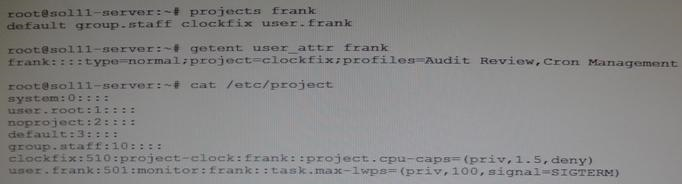
Which is Frank's default project?
Which option lists default checkpoints for building an image using the Distribution Constructor?
Get access to all 140 verified questions with detailed answers.
Unlock All 1Z0-822 Questions