QSDA2024 Exam Questions & Answers
Qlik Sense Data Architect Certification Exam - 2024 • Qlik
100% money-back guarantee
Sample QSDA2024 Questions
Practice with real exam-style questions, each with the verified correct answer and explanation.
A data architect needs to acquire social media data for the past 10 years. The data architect needs to track all changes made to the source data, include all relevant fields, and reload the application four times a day.
What information does the data architect need?
The scenario describes a need to track social media data over the past 10 years, capturing all changes (inserts, updates, deletes) while reloading the data four times a day.
To manage this:
ModificationTime: This field is essential for tracking changes over time. It indicates when a record was last modified, allowing the script to determine whether it needs to insert, update, or delete records.
Primary Key Field: A primary key is crucial for uniquely identifying records. It enables the script to match records in the source with those already loaded, facilitating updates and deletions.
Insert and Update Records: The script should handle both inserting new records and updating existing ones based on the ModificationTime.
Remove Records: If records are deleted in the source, they should also be removed in the Qlik Sense data model to maintain consistency.
This approach ensures that all changes in the social media data are accurately captured and reflected in the Qlik Sense application.
A data architect wants reflect a value of the variable in the script log for tracking purposes. The variable is defined as:

Which statement should be used to track the variable's value?
A)
B)

C)
D)

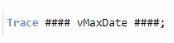
In Qlik Sense, the TRACE statement is used to print custom messages to the script execution log. To output the value of a variable, particularly one that is dynamically assigned, the correct syntax must be used to ensure that the variable's value is evaluated and displayed correctly.
The variable vMaxDate is defined with the LET statement, which means it is evaluated immediately, and its value is stored.
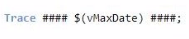
When using the TRACE statement, to output the value of vMaxDate, you need to ensure the variable's value is expanded before being printed. This is done using the $() expansion syntax.
The correct syntax is TRACE #### $(vMaxDate) ####; which evaluates the variable vMaxDate and inserts its value into the log output.
Key Qlik Sense Data Architect Reference:
Variable Expansion: In Qlik Sense scripting, $(variable_name) is used to expand and insert the value of the variable into expressions or statements. This is crucial when you want to output or use the value stored in a variable.
TRACE Statement: The TRACE command is used to write messages to the script log. It is commonly used for debugging purposes to track the flow of script execution or to verify the values of variables during script execution.
A data architect needs to load large amounts of data from a database that is continuously updated.
* New records are added, and existing records get updated and deleted.
* Each record has a LastModified field.
* All existing records are exported into a QVD file.
* The data architect wants to load the records into Qlik Sense efficiently.
Which steps should the data architect take to meet these requirements?
When dealing with a database that is continuously updated with new records, updates, and deletions, an efficient data load strategy is necessary to minimize the load time and keep the Qlik Sense data model up-to-date.
Explanation of Steps:
Load the existing data from the QVD:
This step retrieves the already loaded and processed data from a previous session. It acts as a base to which new or updated records will be added.
Load new and updated data from the database. Concatenate with the table loaded from the QVD:
The next step is to load only the new and updated records from the database. This minimizes the amount of data being loaded and focuses on just the changes.
The new and updated records are then concatenated with the existing data from the QVD, creating a combined dataset that includes all relevant information.
Create a separate table for the deleted rows and use a WHERE NOT EXISTS to remove these records:
A separate table is created to handle deletions. The WHERE NOT EXISTS clause is used to identify and remove records from the combined dataset that have been deleted in the source database.
Refer to the exhibit.
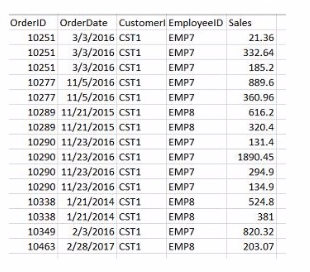
A data architect needs to build a dashboard that displays the aggregated sates for each sales representative. All aggregations on the data must be performed in the script.
Which script should the data architect use to meet these requirements?
A)
B)
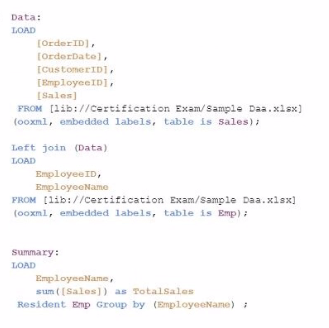
C)
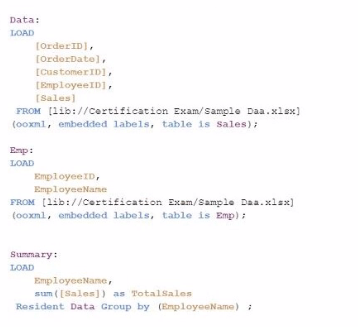
D)
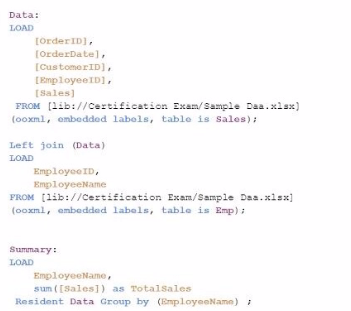
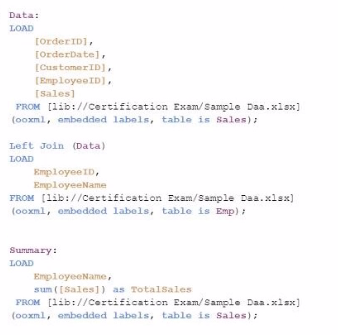
The goal is to display the aggregated sales for each sales representative, with all aggregations being performed in the script. Option C is the correct choice because it performs the aggregation correctly using a Group by clause, ensuring that the sum of sales for each employee is calculated within the script.
Data Load:
The Data table is loaded first from the Sales table. This includes the OrderID, OrderDate, CustomerID, EmployeeID, and Sales.
Next, the Emp table is loaded containing EmployeeID and EmployeeName.
Joining Data:
A Left Join is performed between the Data table and the Emp table on EmployeeID, enriching the data with EmployeeName.
Aggregation:
The Summary table is created by loading the EmployeeName and calculating the total sales using the sum([Sales]) function.
The Resident keyword indicates that the data is pulled from the existing tables in memory, specifically the Data table.
The Group by clause ensures that the aggregation is performed correctly for each EmployeeName, summarizing the total sales for each employee.
Key Qlik Sense Data Architect Reference:
Resident Load: This is a method to reuse data that is already loaded into the app's memory. By using a Resident load, you can create new tables or perform calculations like aggregation on the existing data.
Group by Clause: The Group by clause is essential when performing aggregations in the script. It groups the data by specified fields and performs the desired aggregation function (e.g., sum, count).
Left Join: Used to combine data from two tables. In this case, Left Join is used to enrich the sales data with employee names, ensuring that the sales data is associated correctly with the respective employee.
Conclusion: Option C is the most appropriate script for this task because it correctly performs the necessary joins and aggregations in the script. This ensures that the dashboard will display the correct aggregated sales per employee, meeting the data architect's requirements.
Exhibit.
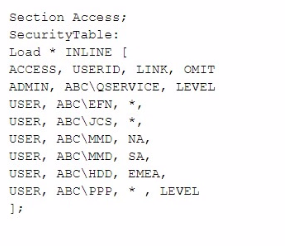
The Section Access security table for an app is shown. User ABC\PPP opens a Qlik Sense app with a table using the field called LEVEL on one of the table columns.
Which is the result?
In this scenario, the Section Access security table controls user access to data within the Qlik Sense app. The user in question, ABC\PPP, has a specific entry in the security table that determines their access rights to the LEVEL field.
Understanding Section Access:
Section Access is used to enforce security by restricting access to certain data based on the user's credentials.
In the security table provided, the USER role for ABC\PPP is set to have access to all data (* in the LINK field), but the OMIT field is set to LEVEL. The OMIT field in Section Access specifies fields that should be omitted from the user's view.
Outcome:
Since the OMIT field for user ABC\PPP is set to LEVEL, this user will not have access to the LEVEL field in the Qlik Sense application.
Option D: The table is displayed without the LEVEL column is the correct outcome.
Qlik Sense Security and Section Access Documentation: The OMIT functionality in Section Access is specifically designed to remove fields from the user's access, ensuring that sensitive or unnecessary data is not exposed.
Get access to all 50 verified questions with detailed answers.
Unlock All QSDA2024 Questions