UiPath-ADAv1 Exam Questions & Answers
UiPath Automation Developer Associate v1 Exam • UiPath
100% money-back guarantee
About UiPath-ADAv1 Exam
The UiPath Automation Developer Associate v1 (UiPath-ADAv1) certification exam is a professional credential designed to validate your expertise in robotic process automation (RPA) using the UiPath platform. This comprehensive exam assesses your knowledge across critical topics including UiPath Studio fundamentals, workflow design, variable management, control flow structures, data manipulation, exception handling, and debugging techniques. Candidates must demonstrate proficiency in creating efficient automation solutions, implementing best practices, and troubleshooting complex processes. The UiPath-ADAv1 exam serves as an essential stepping stone for IT professionals, business analysts, and developers seeking to establish their credibility in the rapidly growing RPA industry.
This certification is ideal for professionals aspiring to advance their careers in automation development, including junior developers, system integrators, and those transitioning into RPA roles. To ensure exam success, candidates benefit significantly from utilizing updated exam dumps and comprehensive practice tests that reflect the latest exam objectives and real-world scenarios. Quality study materials provide invaluable insights into exam question formats, time management strategies, and content gaps. By combining hands-on experience with the UiPath platform with targeted exam preparation resources, candidates can build confidence, identify weak areas, and maximize their chances of passing the UiPath-ADAv1 certification on their first attempt, ultimately unlocking career advancement opportunities in automation development.
Exam Topics & Objectives
4-Week Study Plan for UiPath-ADAv1
Week 1: Foundation and Core Concepts
- Study UiPath Platform architecture and licensing models
- Explore Studio interface layout, ribbon menu, and workspace customization
- Learn variables and arguments: data types, scope, naming conventions
- Practice creating variables in different scopes (Global, Activity, Argument)
- Understand control flow: If/Else, Switch, While, Do While, For Each activities
- Study business process automation fundamentals and use cases
- Review UiPath automation best practices and naming standards
- Complete Studio Interface practice exercises
- Set up local development environment and test basic project creation
Week 2: Automation Techniques and Debugging
- Master Debugging tools: breakpoints, step into/over/out, watch window
- Study Exception Handling: Try-Catch, Throw activities and custom exceptions
- Learn Logging best practices: Log Message activity, log levels, output tracking
- Practice UI Automation: selectors, dynamic selectors, anchor base, image recognition
- Study Object Repository creation and management
- Hands-on practice with selector inspector and UI Explorer
- Learn wildcard usage and element identification techniques
- Complete debugging exercises with sample workflows
- Practice exception handling scenarios and error recovery
Week 3: Data Processing and Integration
- Master Excel Automation: Read Range, Write Range, filtering, formatting
- Study Email Automation: Send SMTP Mail, Get IMAP Mail Message activities
- Learn PDF Automation: Read PDF, Extract PDF text and tables
- Practice Working with Files and Folders: File operations, path handling
- Study Data Manipulation: String operations, collections, LINQ queries
- Learn Version Control Integration: Git integration with Studio
- Study Libraries and Templates: creating reusable components
- Practice creating custom activities and publishing to orchestrator
- Complete hands-on exercises for each data processing type
Week 4: Advanced Topics and Exam Preparation
- Study Workflow Analyzer: rules, best practices detection, refactoring
- Learn Implementation Methodology: RPA lifecycle, requirements gathering, design
- Study Orchestrator: queues, assets, triggers, job scheduling
- Learn Integration Service: connecting external systems and APIs
- Practice Workflow Analyzer on sample projects and apply recommendations
- Review all control flow and exception handling patterns
- Complete end-to-end practice projects covering multiple topics
- Take 2-3 full-length practice exams
- Review weak areas from practice tests
- Study official UiPath documentation and certification guide
- Practice time management for exam conditions
Sample UiPath-ADAv1 Questions
Practice with real exam-style questions. Reveal answers to verify your knowledge.
Which of the following statements accurately describes the function of the If activity in a workflow?
What will be the outcome when executing a Try Catch activity with a sequence placed within the Try section and no Catches section present?
You are invoking a workflow file called "SecondaryWorkflow.xaml" from "PrimaryWorkflow.xamr. The following shows the Import Arguments panel of the Invoke Workflow File activity:
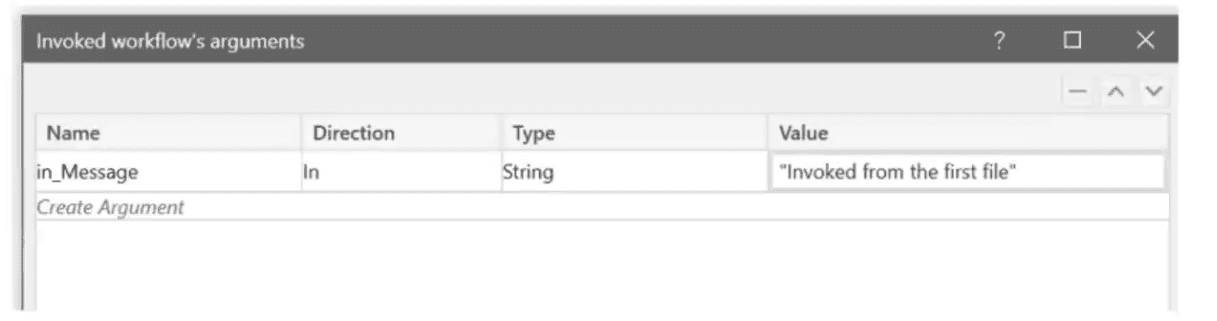
In addition, the following reflects the Arguments panel in ''SecondaryWorkflow.xaml":
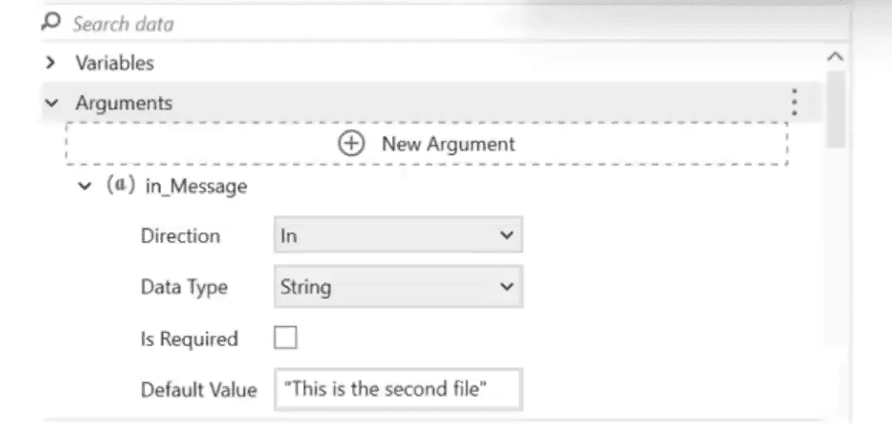
You use a Log Message activity in ''SecondaryWorkflow.xamr to print the value of the argument ''in_Message". What is the expected result of executing "PrimaryWorkflow.xaml"?
What actions must be manually selected in the App/Web Recorder before recording a step?
What is a valid way to install a custom activity package in UiPath Studio?
Get access to all 382 verified questions with detailed answers.
Unlock All UiPath-ADAv1 Questions