UiPath-ADPv1 Exam Questions & Answers
UiPath Automation Developer Professional v1 Exam • UiPath
100% money-back guarantee
Sample UiPath-ADPv1 Questions
Practice with real exam-style questions, each with the verified correct answer and explanation.
Which of the following is an outcome of converting a personal workspace into a folder in UiPath Orchestrator?
The outcome of converting a personal workspace into a folder in UiPath Orchestrator is that the owner of the initial workspace is added by default to the newly created folder and assigned the Folder Administrator role. A personal workspace is a special type of folder that is created automatically for each user in Orchestrator and allows them to work on their own automation projects without affecting other users or folders. A personal workspace can be converted into a regular folder if the user wants to share their work with other users or move it to another folder. When a personal workspace is converted into a folder, the owner of the workspace becomes the owner of the folder and gets the Folder Administrator role, which gives them full permissions to manage the folder and its contents. The folder also inherits the permissions and settings of the parent folder, which is the Default folder by default. The admin user is not added to the folder by default, but they can access the folder as a Tenant Administrator if they have that role.Reference: [Personal Workspaces], [Convert Personal Workspace to Folder]
Which of the following sections are part of the Final State in a State Machine?
In a State Machine, every state---including the Final State---can contain an Entry and an Exit section. However, the Final State does not include Transitions, as it's meant to mark the end of execution. Once entered, no further transitions occur from this state.
A developer designed a project in the REFramework. The "Config.xlsx" has me following Setting entry:
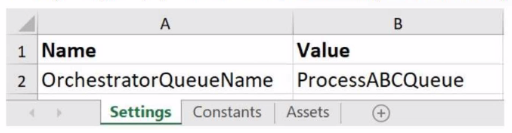
Assuming the default REFramework configuration, how can the developer reference the Setting in the Config variable to obtain the Setting value as a String from the dictionary?
Which of the following statements accurately describes the primary components of a State Machine in a workflow?
A State Machine is a type of automation that uses a finite number of states in its execution. It can go into a state when it is triggered by an activity, and it exits that state when another activity is triggered. A State Machine consists of four primary components:
*States: These are the nodes that represent the possible situations or conditions of the automation. Each state can have one or more activities inside it that define the behavior of the automation in that state. There are two types of states: State and Final State. A State Machine must have one initial state and one or more final states.
*Triggers: These are the events or conditions that cause the automation to enter a state. A trigger can be an activity, a variable, or an argument that is executed or evaluated before entering a state. For example, a Click activity can be a trigger for entering a state that performs some actions after clicking a button.
*Transitions: These are the arrows or branches that connect the states and define the flow of the automation. A transition can have a condition that determines whether the automation can move from one state to another. For example, a Boolean expression can be a condition for a transition that checks if a certain condition is true or false before moving to the next state.
*Actions: These are the activities or sequences that are executed when the automation moves from one state to another. An action can be performed before or after the transition, depending on the type of the transition. For example, a Log Message activity can be an action that logs a message when the automation exits a state.
You can find out more about state machines on the Studio - State Machines - UiPath Documentation Portal or in the official Workflow Foundation documentation.
What is the purpose of the Interval filter in the Orchestrator's Monitoring page?
The purpose of the Interval filter in the Orchestrator's Monitoring page is to allow you to control the granularity of the displayed data and check the health of your system in either the last day or the last hour. The Monitoring page provides various metrics and charts that show the status and performance of your robots, processes, queues, and transactions. The Interval filter lets you choose the time frame for the data that you want to see. You can select either the last day or the last hour as the interval. The data will be updated accordingly and show you the trends and changes in your system over the selected period. This can help you identify any issues or anomalies and take corrective actions if needed.
Get access to all 205 verified questions with detailed answers.
Unlock All UiPath-ADPv1 Questions