Associate-Cloud-Engineer Exam Questions & Answers
Google Associate Cloud Engineer • Google
100% money-back guarantee
Sample Associate-Cloud-Engineer Questions
Practice with real exam-style questions, each with the verified correct answer and explanation.
The sales team has a project named Sales Data Digest that has the ID acme-data-digest You need to set up similar Google Cloud resources for the marketing team but their resources must be organized independently of the sales team. What should you do?
Your company has a 3-tier solution running on Compute Engine. The configuration of the current infrastructure is shown below.
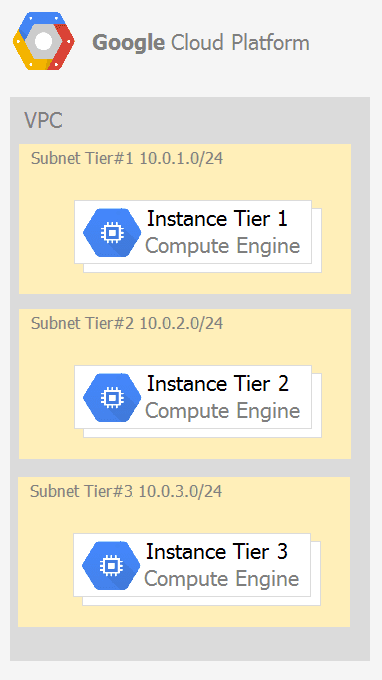
Each tier has a service account that is associated with all instances within it. You need to enable communication on TCP port 8080 between tiers as follows:
* Instances in tier #1 must communicate with tier #2.
* Instances in tier #2 must communicate with tier #3.
What should you do?
1. Create an ingress firewall rule with the following settings: ' Targets: all instances with tier #2 service account ' Source filter: all instances with tier #1 service account ' Protocols: allow TCP:8080 2. Create an ingress firewall rule with the following settings: ' Targets: all instances with tier #3 service account ' Source filter: all instances with tier #2 service account ' Protocols: allow TCP: 8080
Your company would like to store invoices and other financial documents in Google Cloud. You need to identify a Google-managed solution to store this information for your company. You must ensure that the documents are kept for a duration of three years. Your company's analysts need frequent access to invoices from the past six months. After six months, invoices should be archived for audit purposes only. You want to minimize costs and follow Google-recommended practices. What should you do?
The correct answer is B because Cloud Storage is the appropriate Google-managed object storage service for durable document storage, and Object Lifecycle Management can automatically transition objects to a lower-cost storage class after a defined age. The documents are frequently accessed for the first six months, so keeping them initially in Standard storage is reasonable. After six months, the documents are retained mainly for audit purposes, making Coldline more cost-effective for infrequently accessed data. Option A is backward because Standard is the higher-access storage class, not the archive target. Filestore is a managed file system, not the best low-cost object archive for invoices. Moving data manually or through Filestore adds unnecessary operational overhead.
Your company is closely monitoring their cloud spend. You need to allow different teams to monitor their Google Cloud costs. You must ensure that team members receive notifications when their cloud spend reaches certain thresholds and give team members the ability to create dashboards for additional insights with detailed billing data. You want to follow Google-recommended practices and minimize engineering costs. What should you do?
The correct answer is A because Google Cloud Billing budgets and alerts handle threshold-based notifications without custom engineering, while Cloud Billing export to BigQuery provides detailed billing data for dashboards and deeper cost analysis. This directly meets both requirements: notifications when spend reaches thresholds and dashboard creation for detailed insights. Writing scripts to call the Cloud Billing API adds unnecessary engineering and maintenance because billing export already provides a managed data pipeline into BigQuery. Deploying Grafana on Compute Engine introduces server management and extra operational cost. Asking teams to create their own alerting stack is less controlled and less aligned with Google-recommended managed services. Budget alerts plus BigQuery export is simpler, scalable, and cost-effective.
Your company runs one batch process in an on-premises server that takes around 30 hours to complete. The task runs monthly, can be performed offline, and must be restarted if interrupted. You want to migrate this workload to the cloud while minimizing cost. What should you do?
Install the workload in a compute engine VM, start and stop the instance as needed, because as per the question the VM runs for 30 hours, process can be performed offline and should not be interrupted, if interrupted we need to restart the batch process again. Preemptible VMs are cheaper, but they will not be available beyond 24hrs, and if the process gets interrupted the preemptible VM will restart.
Get access to all 363 verified questions with detailed answers.
Unlock All Associate-Cloud-Engineer Questions