CKA Exam Questions & Answers
Certified Kubernetes Administrator • Linux Foundation
100% money-back guarantee
Sample CKA Questions
Practice with real exam-style questions, each with the verified correct answer and explanation.
SIMULATION
Task
Create a new Ingress resource as follows:
. Name: echo
. Namespace : sound-repeater
. Exposing Service echoserver-service on
http://example.org/echo using Service port 8080
The availability of Service
echoserver-service can be checked
i
using the following command, which should return 200 :
[candidate@cka000024] $ curl -o /de v/null -s -w "%{http_code}\n" http://example.org/echo
Task Summary
Create an Ingress named echo in the sound-repeater namespace that:
Routes requests to /echo on host example.org
Forwards traffic to service echoserver-service
Uses service port 8080
Verification should return HTTP 200 using curl
Step-by-Step Answer
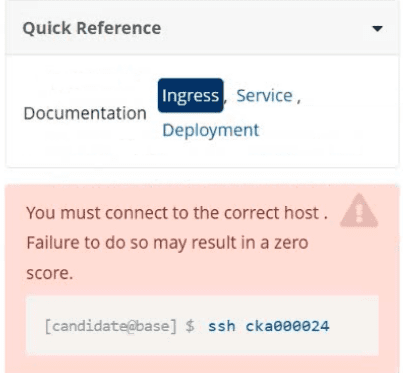
1 SSH into the correct node
As shown in the image:
bash
CopyEdit
ssh cka000024
Skipping this will result in a ZERO score!
2 Verify the namespace and service
Ensure the sound-repeater namespace and echoserver-service exist:
kubectl get svc -n sound-repeater
Look for:
echoserver-service ClusterIP ... 8080/TCP
3 Create the Ingress manifest
Create a YAML file: echo-ingress.yaml
apiVersion: networking.k8s.io/v1
kind: Ingress
metadata:
name: echo
namespace: sound-repeater
annotations:
nginx.ingress.kubernetes.io/rewrite-target: /$1
spec:
rules:
- host: example.org
http:
paths:
- path: /echo
pathType: Prefix
backend:
service:
name: echoserver-service
port:
number: 8080
4 Apply the Ingress resource
kubectl apply -f echo-ingress.yaml
5 Test with curl as instructed
Use the exact verification command:
curl -o /dev/null -s -w '%{http_code}\n' http://example.org/echo
You should see:
200
Final Answer Summary
ssh cka000024
kubectl get svc -n sound-repeater
# Create the Ingress YAML
cat <<EOF > echo-ingress.yaml
apiVersion: networking.k8s.io/v1
kind: Ingress
metadata:
name: echo
namespace: sound-repeater
annotations:
nginx.ingress.kubernetes.io/rewrite-target: /$1
spec:
rules:
- host: example.org
http:
paths:
- path: /echo
pathType: Prefix
backend:
service:
name: echoserver-service
port:
number: 8080
EOF
kubectl apply -f echo-ingress.yaml
curl -o /dev/null -s -w '%{http_code}\n' http://example.org/echo
SIMULATION
Score: 7%
Task
Create a new nginx Ingress resource as follows:
* Name: ping
* Namespace: ing-internal
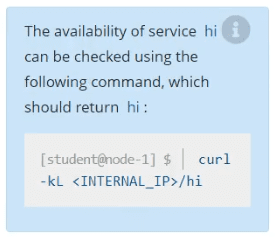
* Exposing service hi on path /hi using service port 5678
Solution:
vi ingress.yaml
#
apiVersion: networking.k8s.io/v1
kind: Ingress
metadata:
name: ping
namespace: ing-internal
spec:
rules:
- http:
paths:
- path: /hi
pathType: Prefix
backend:
service:
name: hi
port:
number: 5678
#
kubectl create -f ingress.yaml
SIMULATION
You must connect to the correct host.
Failure to do so may result in a zero score.
[candidate@base] $ ssh Cka000059
Context
A kubeadm provisioned cluster was migrated to a new machine. It needs configuration changes to
run successfully.
Task
Fix a single-node cluster that got broken during machine migration.
First, identify the broken cluster components and investigate what breaks them.
The decommissioned cluster used an external etcd server.
Next, fix the configuration of all broken cluster
Task Summary
SSH into node: cka000059
Cluster was migrated to a new machine
It uses an external etcd server
Identify and fix misconfigured components
Bring the cluster back to a healthy state
Step-by-Step Solution
Step 1: SSH into the correct host
ssh cka000059
Step 2: Check the cluster status
Run:
kubectl get nodes
If it fails, the kubelet or kube-apiserver is likely broken.
Check kubelet status:
sudo systemctl status kubelet
Also, check pod statuses in the control plane:
sudo crictl ps -a | grep kube
or:
docker ps -a | grep kube
Look especially for failures in kube-apiserver or kube-controller-manager.
Step 3: Inspect the kube-apiserver manifest
Since this is a kubeadm-based cluster, manifests are in:
ls /etc/kubernetes/manifests
Open kube-apiserver.yaml:
bash
CopyEdit
sudo nano /etc/kubernetes/manifests/kube-apiserver.yaml
Look for the --etcd-servers= flag. If the external etcd endpoint has changed (likely, due to migration), this needs to be fixed.
Example of incorrect configuration:
--etcd-servers=https://192.168.1.100:2379
If the IP has changed, update it to the correct IP or hostname of the external etcd server.
Also ensure the correct client certificate and key paths are still valid:
--etcd-cafile=/etc/kubernetes/pki/etcd/ca.crt
--etcd-certfile=/etc/kubernetes/pki/apiserver-etcd-client.crt
--etcd-keyfile=/etc/kubernetes/pki/apiserver-etcd-client.key
If the files are missing or the path is wrong due to migration, correct those as well.
Step 4: Save and exit, and let static pod restart
Static pod changes will be picked up automatically by the kubelet (watch for /etc/kubernetes/manifests changes).
Check again:
docker ps | grep kube-apiserver
# or
crictl ps | grep kube-apiserver
Step 5: Confirm API is healthy
Once kube-apiserver is up, try:
kubectl get componentstatuses
kubectl get nodes
If these commands work and return valid statuses, the control plane is functional again.
Step 6: Check controller-manager and scheduler (optional)
If still broken, check the other static pods in /etc/kubernetes/manifests/ and correct paths if necessary.
Also verify that /etc/kubernetes/kubelet.conf and /etc/kubernetes/admin.conf are present and valid.
Command Summary
ssh cka000059
# Check system and kubelet
sudo systemctl status kubelet
docker ps -a | grep kube # or crictl ps -a | grep kube
# Check manifests
ls /etc/kubernetes/manifests
sudo nano /etc/kubernetes/manifests/kube-apiserver.yaml
# Fix --etcd-servers and certificate paths if needed
# Watch pods restart and confirm:
kubectl get nodes
kubectl get componentstatuses
SIMULATION
Task Weight: 4%
Task
Schedule a Pod as follows:
* Name: kucc1
* App Containers: 2
* Container Name/Images:
o nginx
o consul
Solution:


SIMULATION
Scale the deployment webserver to 6 pods.
solution

Get access to all 83 verified questions with detailed answers.
Unlock All CKA Questions