AZ-500 Exam Questions & Answers
Microsoft Azure Security Technologies • Microsoft
100% money-back guarantee
Sample AZ-500 Questions
Practice with real exam-style questions, each with the verified correct answer and explanation.
You have an Azure subscription named Subscription1.
You need to view which security settings are assigned to Subscription1 by default.
Which Azure policy or initiative definition should you review?
https://docs.microsoft.com/en-us/azure/security-center/tutorial-security-policy
https://docs.microsoft.com/en-us/azure/security-center/policy-reference
SIMULATION
Lab Task
use the following login credentials as needed:
To enter your username, place your cursor in the Sign in box and click on the username below.
To enter your password. place your cursor in the Enter password box and click on the password below.
Azure Username: Userl -28681041@ExamUsers.com
Azure Password: GpOAe4@lDg
If the Azure portal does not load successfully in the browser, press CTRL-K to reload the portal in a new browser tab.
The following information is for technical support purposes only:
Lab Instance: 28681041
Task 4
You need to ensure that a user named user2-28681041 can manage the properties of the virtual machines in the RG1lod28681041 resource group. The solution must use the principle of least privilege.
To ensure that a user named user2-28681041 can manage the properties of the virtual machines in the RG1lod28681041 resource group using the principle of least privilege, you can follow these steps:
In the Azure portal, search for and select the resource group named RG1lod28681041.
In the left pane, selectAccess control (IAM).
SelectAdd.
In the Add role assignment pane, enter the following information:
Role: Select the appropriate role for your scenario. For example,Virtual Machine Contributor.
Assign access to: SelectUser, group, or service principal.
Select: Enter the name of the user you want to assign the role to. For example, user2-28681041.
SelectSave.
https://docs.microsoft.com/en-us/azure/role-based-access-control/role-assignments-portal
Note: This question is part of a series of questions that present the same scenario. Each question in the series contains a unique solution that might meet the stated goals. Some question sets might have more than one correct solution, while others might not have a correct solution.
After you answer a question in this section, you will NOT be able to return to it. As a result, these
questions will not appear in the review screen.
You have a hybrid configuration of Azure Active Directory (AzureAD).
You have an Azure HDInsight cluster on a virtual network.
You plan to allow users to authenticate to the cluster by using their on-premises Active Directory credentials.
You need to configure the environment to support the planned authentication.
Solution: You deploy the On-premises data gateway to the on-premises network.
Does this meet the goal?
Instead, you connect HDInsight to your on-premises network by using Azure Virtual Networks and a VPN
gateway.
Note: To allow HDInsight and resources in the joined network to communicate by name, you must perform the following actions:
Create Azure Virtual Network.
Create a custom DNS server in the Azure Virtual Network.
Configure the virtual network to use the custom DNS server instead of the default Azure Recursive
Resolver.
Configure forwarding between the custom DNS server and your on-premises DNS server.
https://docs.microsoft.com/en-us/azure/hdinsight/connect-on-premises-network
You have an Azure subscription that contains the resources shown in the following table.
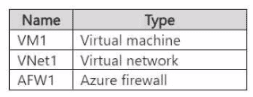
You need to configure AFW1 to only allow traffic from VM1 to storage accounts in the West US Azure region. The solution must minimize administrative effort.
What should you configure?
You have an Azure subscription that contains the virtual machines shown in the following table.
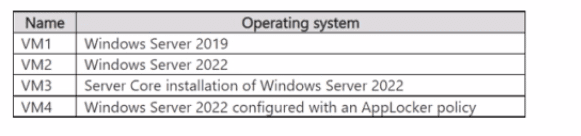
You are configuring Microsoft Defender for Servers.
You plan to enable adaptive application controls to create an allowlist of known-safe apps on the virtual machines. Which virtual machines support the use of adaptive application controls?
Get access to all 515 verified questions with detailed answers.
Unlock All AZ-500 Questions