PL-300 Exam Questions & Answers
Microsoft Power BI Data Analyst • Microsoft
100% money-back guarantee
Sample PL-300 Questions
Practice with real exam-style questions, each with the verified correct answer and explanation.
You have a Q&A visual that displays information from a table named Carriers as shown in the following exhibit.
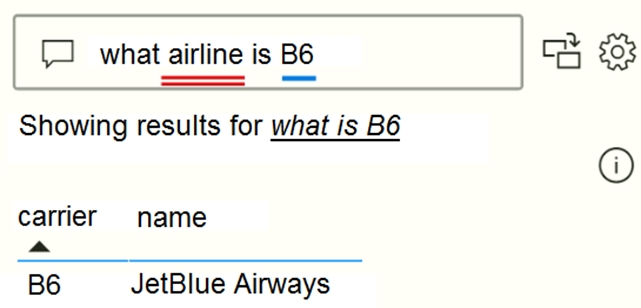
You need to ensure that users can ask questions by using the term airline or carrier. The solution must minimize changes to the data model.
What should you do?
Add synonyms to tables and columns: This step applies specifically to Q&A (and not to Power BI reports in general). Users often have a variety of terms they use to refer to the same thing, such as total sales, net sales, total net sales. You can add these synonyms to tables and columns in the Power BI model.
This step can be important. Even with straightforward table and column names, users of Q&A ask questions using the vocabulary that first comes to them. They're not choosing from a predefined list of columns. The more sensible synonyms you add, the better your users' experience is with your report.
https://docs.microsoft.com/en-us/power-bi/natural-language/q-and-a-best-practices
You have a Power Bl report that uses row-level security (RLS).
You need to transfer RLS membership maintenance to an Azure network security team. The solution must NOT provide the Azure network security team with the ability to manage reports, datasets. or dashboards.
What should you do?
It is common practice that the PBI developer creates RLS groups and instructs the network team to create the corresponding AD roles. Then the developer assigns the AD groups to the RLS groups.
You are creating a query to be used as a Country dimension in a star schema.
A snapshot of the source data is shown in the following table.
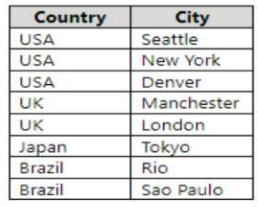
You need to create the dimension. The dimension must contain a list of unique countries.
Which two actions should you perform? Each correct answer presents part of the solution.
Delete the City column. You don't need this column for your Country dimension, as it is not a descriptive attribute of Country. You can create another dimension table for City if you want to use it in your analysis.
Remove duplicates from the Country column. You want to have a list of unique countries in your dimension table, so you need to remove any duplicate values from this column.
You have a CSV file that contains user complaints. The file contains a column named Logged. Logged contains the date and time each complaint occurred. The data in Logged is in the following format: 2018-12-31 at 08:59.
You need to be able to analyze the complaints by the logged date and use a built-in date hierarchy.
What should you do?
Simply create a custom table in Power Query, enter the date shown in the question into a column called Date, and then Split it by a delimiter. No need for spaces on either side of 'at' Power BI takes care of the rest:
= Table.SplitColumn(#'Changed Type', 'Date', Splitter.SplitTextByDelimiter('at', QuoteStyle.Csv), {'Date.1', 'Date.2'})
It will even automatically change the type to Date:
= Table.TransformColumnTypes(#'Split Column by Delimiter',{{'Date.1', type date}, {'Date.2', type time}})
You have a large dataset that contains more than 1 million rows. The table has a datetime column named
Date.
You need to reduce the size of the data model.
What should you do?
We have to separate date & time tables. Also, we don't need to put the time into the date table, because the time is repeated every day.
Split your DateTime column into a separate date & time columns in fact table, so that you can join the date to the date table & the time to the time table. The time need to be converted to the nearest round minute or second so that every time in your data corresponds to a row in your time table.
https://intellipaat.com/community/6461/how-to-include-time-in-date-hierarchy-in-power-bi
Get access to all 470 verified questions with detailed answers.
Unlock All PL-300 Questions