MB-500 Exam Questions & Answers
Microsoft Dynamics 365: Finance and Operations Apps Developer • Microsoft
100% money-back guarantee
About MB-500 Exam
The MB-500 Microsoft Dynamics 365: Finance and Operations Apps Developer certification exam is designed for developers who build and customize finance and operations applications using Microsoft Dynamics 365. This comprehensive exam validates expertise in key areas including extending the platform, developing reports, managing data entities, creating extensions, and implementing security frameworks. Candidates must demonstrate proficiency in X++, Visual Studio, and the Dynamics 365 development environment. The MB-500 certification is essential for professionals seeking to advance their careers in enterprise resource planning (ERP) development and establish credibility in the competitive IT job market.
Finance and operations developers, software engineers, and technical consultants should pursue this certification to showcase their advanced development capabilities and increase earning potential. Preparing effectively for the MB-500 exam requires access to reliable study materials, including updated exam dumps and practice tests that reflect the latest exam objectives. Quality practice tests help candidates identify knowledge gaps, build confidence, and familiarize themselves with the exam format and question types. By utilizing comprehensive study resources and exam dumps alongside hands-on experience, aspiring developers can maximize their chances of passing the MB-500 certification on their first attempt and launching successful careers in Dynamics 365 development.
Exam Topics & Objectives
4-Week Study Plan for MB-500
Week 1: Foundation & Architecture
- Study Plan Architecture and Solution Design (5-10%): Review solution architecture patterns, application lifecycle management, and deployment models for D365 F&O
- Understand application stack architecture: tiers, services, and components
- Learn about solution packages, model structure, and versioning strategies
- Apply Developer Tools (10-15%): Install and configure Visual Studio with Dynamics 365 development tools
- Practice creating new projects and navigating the development environment
- Explore X++ editor features, IntelliSense, and debugging tools
- Complete hands-on lab: Set up local development environment and create first model
- Review Microsoft Learn modules on architecture fundamentals
Week 2: AOT Elements & Design
- Design and Develop AOT Elements (15-20%): Study tables, extended data types, and base enumerations
- Learn table inheritance, computed fields, and field groups design
- Practice creating forms with data sources and controls hierarchy
- Study form patterns and best practices for F&O user interface
- Design queries, views, and query ranges
- Practice creating classes, methods, and event handlers
- Implement menu items and navigation structures
- Complete hands-on labs: Create custom tables, forms, and basic classes
- Review form and table design patterns from documentation
Week 3: Development, Testing & Reporting
- Develop and Test Code (15-20%): Study X++ syntax, operators, and control structures
- Learn about tables, collections, and data manipulation
- Practice exception handling and debugging techniques
- Study unit testing frameworks and test data creation
- Learn code coverage and best practices for maintainable code
- Implement Reporting (10-15%): Explore SQL Server Reporting Services (SSRS) report design
- Learn Power BI integration and analytical workspaces
- Practice creating reports using Report Designer
- Study data provider classes and business logic for reporting
- Complete hands-on labs: Write and test X++ code, create SSRS report, build Power BI visualization
Week 4: Integration, Security & Performance
- Integrate and Manage Data Solutions (10-15%): Study data import/export frameworks
- Learn about recurring integrations, batch jobs, and OData endpoints
- Practice using Data Management Framework (DMF) and Excel add-in integration
- Study REST APIs and service integration patterns
- Implement Security (10-15%): Review role-based security, duties, and privileges
- Learn about table-level security and field-level security implementation
- Study record-level security and extensible data security policies
- Optimize Performance (10-15%): Learn performance tuning techniques and monitoring
- Study query optimization, indexing strategies, and avoiding N+1 queries
- Practice using Performance Analyzer and SQL trace tools
- Complete hands-on labs: Set up data integration, implement security role, optimize slow query
- Take practice exams and review all weak areas
Sample MB-500 Questions
Practice with real exam-style questions. Reveal answers to verify your knowledge.
A company uses Dynamics 365 finance and operations apps.
The company must implement the Excel Add-in to allow for data modification outside of Dynamics 365 finance and operations apps.
The company must modify the standard fields displayed for a particular entity to include additional columns.
You need to add the additional columns.
Which field group should you add the columns to?
Note: This question is part of a series of questions that present the same scenario. Each question in the series contains a unique solution that might meet the stated goals. Some question sets might have more than one correct solution, while others might not have a correct solution.
After you answer a question in this section, you will NOT be able to return to it. As a result, these questions will not appear in the review screen.
A company is automating manual processes in the Dynamics 365 finance and operations apps. The company has the following batch groups and priorities configured:
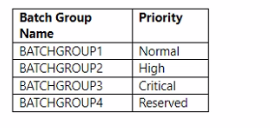
The batch processes run during the following times of day:

The company requires a process that meets the following requirements:
* Runs every weekday.
* Runs outside of work hours.
* Runs with at least a high priority.
You need to automate the manual process.
Solution: Create a batch job to have an active period of AFTERHOURS and a batch job recurrence of Daily. Set the batch job to run as part of BATCHGROUP2.
Does the solution meet the goal?
You are a Dynamics 365 Finance developer. You have the following Extended Data Types (EDTs):

You plan to modify the properties of the EDTs by using an extension. You need to determine which operations can be performed. Which operation is possible?
You are a Dynamics 365 Finance developer.
You make changes to an existing class.
You need to compare the code that is in source control with the updated class. In Visual Studio, you display
Team Explorer.
What are three possible ways to achieve the goal? Each correct answer presents a complete solution.
NOTE: Each correct selection is worth one point.
You create an extension for the Invent Table. Which two field properties can you modify in the extension? Each: correct answer presents a complete solution.
NOTE: Each correct selection is worth one point.
Get access to all 316 verified questions with detailed answers.
Unlock All MB-500 Questions