AZ-800 Exam Questions & Answers
Administering Windows Server Hybrid Core Infrastructure • Microsoft
100% money-back guarantee
Sample AZ-800 Questions
Practice with real exam-style questions, each with the verified correct answer and explanation.
SIMULATION
Task 8
You plan to delegate the management of a ONS zone named fabnkam.com located on DO to the BranchAdmins group. You need to ensure that you can grant permissions to the fabikam.com zone.
Objective:
Grant permissions to the BranchAdmins group to manage the fabikam.com DNS zone on DC1.
Step-by-Step Guide
Step 1: Log in to the DNS Server
Log in to DC1 (which hosts the DNS zone fabikam.com) using an account with Domain Admin or Enterprise Admin rights.
Step 2: Open the DNS Manager
Open DNS Manager:
Press Windows + R, type dnsmgmt.msc, and hit Enter.
Step 3: Locate the Zone
In the DNS Manager, expand the Forward Lookup Zones.
Locate and right-click on the zone fabikam.com.
Step 4: Open Zone Properties
Right-click on fabikam.com and select Properties.
In the Properties window, go to the Security tab.
Step 5: Grant Permissions
In the Security tab, click Add.
Enter the name of the group:
nginx
Copy
BranchAdmins
Click Check Names to resolve the group.
Click OK.
Step 6: Assign the Appropriate Permissions
In the Permissions window, select the BranchAdmins group.
Assign the following permissions:
Read
Write
Create All Child Objects
Delete All Child Objects
Optionally, click Advanced for more granular control if needed.
Step 7: Apply and Close
Click Apply and OK to save the changes.
You have a Windows Server container host named Server 1 and a container image named Image1.
You need to start a container from image1. The solution must run the container on a Hyper-V virtual machine.
Which parameter should you specify when you run the docker run command?
In Windows Server container scenarios, process isolation shares the host kernel, while Hyper-V isolation runs each container inside a lightweight Hyper-V VM that provides a stronger boundary. The Windows Server Hybrid Core Infrastructure guidance states that when you must run a Windows container with a VM boundary, you start it using Hyper-V isolation. Operationally, this is done at run time with the Docker CLI by specifying the isolation mode: docker run --isolation=hyperv .... Other parameters don't meet the requirement: --expose only publishes ports, --privileged is a Linux concept not used for Windows security boundaries, --runtime selects the OCI runtime (relevant to Linux), and --entrypoint overrides the default process but does nothing for isolation. Using --isolation=hyperv ensures the container launches on a minimal Hyper-V partition created by the Windows container host, satisfying scenarios that require strict separation, kernel mismatch tolerance, or enhanced defense-in-depth---exactly what the requirement ''run the container on a Hyper-V virtual machine'' describes. This aligns with the exam's emphasis on selecting the proper Windows container isolation mode to meet security and compatibility goals during deployment and operations.
Your network contains an Active Directory Domain Services (AD DS) domain named conioso.com.
You need to identify which server is the PDC emulator for the domain.
Solution: from Active Directory Users and Computers, you right-click contoso.com in the console tree, and then select Operations Master
Does this meet the goal?
The Administering Windows Server Hybrid Core Infrastructure module covering GUI management tools states that Active Directory Users and Computers (ADUC) exposes the domain-scoped FSMO roles through the Operations Masters dialog. By right-clicking the domain node (e.g., contoso.com) and selecting Operations Masters, administrators can view the RID, PDC, and Infrastructure masters and see (or change) the current role holder. The materials clarify that these three roles are domain-wide and are surfaced in ADUC, whereas the forest-wide roles (Schema Master and Domain Naming Master) are viewed in the Active Directory Schema and Active Directory Domains and Trusts consoles, respectively. Therefore, using ADUC exactly as described---right-clicking the domain and choosing Operations Master---does meet the goal of identifying which server holds the PDC Emulator role in that domain. This method is especially useful in GUI-enabled admin stations and supports safe, controlled transfers when appropriate permissions are present.
Your network contains a single-domain Active Directory Domain Services (AD DS) forest named conto.com. The forest contains the servers shown in the following exhibit table.
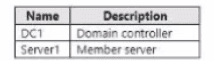
You plan to install a line-of-business (LOB) application on Server1. The application will install a custom windows services.
A new corporate security policy states that all custom Windows services must run under the context of a group managed service account (gMSA). You deploy a root key.
You need to create, configure, and install the gMSA that will be used by the new application.
Which two actions should you perform? Each correct answer presents part of the solution.
NOTE: Each correct selection is worth one point.
The AZ-800 objectives for securing Windows Server services with group Managed Service Accounts (gMSAs) specify a two-stage process: (1) Create the gMSA in AD DS, and (2) install (make usable) the gMSA on the member server that will run the service. The documentation outlines: first ensure a KDS root key is present (done), then on a domain controller run New-ADServiceAccount to create the gMSA, define SPNs as needed, and set PrincipalsAllowedToRetrieveManagedPassword to include the target server(s). Next, on each server that will use the account, install the account by running Install-ADServiceAccount, and then configure the Windows service to run under the gMSA (accountname$ with ''Service accounts'' logon). Running Install-ADServiceAccount on a DC is incorrect because the account must be installed on the workload host (Server1). Set-ADComputer is not required for gMSA deployment, and Get-ADServiceAccount merely queries objects and does not create or install them. Therefore, the correct actions are B (create the gMSA on DC1) and A (install the gMSA on Server1).
You have an on-premises Active Directory Domain Services (AD DS) domain that syncs with an Azure Active Directory (Azure AD) tenant The on-premises network is connected to Azure by using a Site-to-Site VPN. You have the DNS zones shown in the following table.

You need to ensure that names from fabrikam.com can be resolved from the on-premises network Which two actions should you perform? Each correct answer presents part of the solution, NOTE: Each correct selection Is worth one point
In hybrid name-resolution designs covered in Administering Windows Server Hybrid Core Infrastructure, Azure Private DNS does not support zone transfers and therefore you cannot host it on, or pull it into, on-premises DNS by using stub or secondary zones. The guidance states that when on-premises clients must resolve names that live in an Azure Private DNS zone, the recommended pattern is to place a DNS forwarder in Azure (typically a Windows Server VM running the DNS role) that can directly query the Azure resolver from inside the virtual network. Then, on-premises Windows DNS servers are configured with a conditional forwarder that forwards queries for the private zone's suffix to the Azure DNS forwarder over the VPN/ExpressRoute connection.
This achieves the following:
Keeps the authoritative zone in Azure Private DNS while making it reachable from on-premises.
Avoids unsupported mechanisms (no AXFR/IXFR available from Azure Private DNS, so stub and secondary zones won't work).
Uses least privilege and minimal change on both sides: add a DNS VM in Azure (E) and create a conditional forwarder on DC1 for fabrikam.com pointing to that VM's private IP (A).
Options B and C require zone transfers, which are not available from Azure Private DNS, and D (changing VNet DNS servers) affects Azure VMs' resolver settings but does not enable on-premises resolution of the Azure-hosted private zone.
Get access to all 260 verified questions with detailed answers.
Unlock All AZ-800 Questions