AZ-801 Exam Questions & Answers
Configuring Windows Server Hybrid Advanced Services • Microsoft
100% money-back guarantee
About AZ-801 Exam
The AZ-801 certification exam, officially titled Configuring Windows Server Hybrid Advanced Services, is a critical Microsoft credential for IT professionals seeking to validate their expertise in managing hybrid Windows Server environments. This advanced exam evaluates candidates' proficiency in deploying and managing hybrid cloud infrastructure, configuring advanced networking, implementing security solutions, and managing virtualization workloads. Key topics include Azure Stack HCI configuration, storage replica implementation, software-defined networking, and Windows Admin Center management. IT administrators, systems engineers, and cloud architects who want to demonstrate their ability to manage modern Windows Server deployments across on-premises and cloud environments should pursue this certification.
Preparing for the AZ-801 exam requires comprehensive study materials and hands-on practice. Updated exam dumps and practice tests serve as invaluable resources for candidates, offering real-world scenario-based questions that mirror the actual exam format. These practice assessments help identify knowledge gaps, build confidence, and reinforce understanding of complex hybrid infrastructure concepts. By utilizing current dumps and conducting multiple practice test runs, candidates can familiarize themselves with question patterns, improve time management, and significantly increase their likelihood of passing the exam on the first attempt. Combining official Microsoft documentation with quality practice materials creates an optimal preparation strategy for achieving AZ-801 certification success.
Exam Topics & Objectives
4-Week Study Plan for AZ-801
Week 1: Security Foundations and Hybrid Infrastructure
- Study Windows Server security hardening: SMB signing, encryption, and protocol vulnerabilities
- Configure Active Directory Domain Services (AD DS) security policies and Group Policy Objects (GPOs)
- Learn Azure AD Connect synchronization and hybrid identity management
- Implement Windows Defender for Endpoint and advanced threat protection
- Study firewall rules, Windows Firewall with Advanced Security, and network segmentation
- Configure Just-Enough Administration (JEA) and Just-In-Time (JIT) access
- Practice labs: Secure AD DS, configure hybrid Azure AD join, implement MFA
- Review Microsoft Defender for Cloud integration with on-premises servers
Week 2: High Availability, Disaster Recovery, and Advanced Networking
- Study Windows Server Failover Clustering architecture and configuration
- Configure cluster quorum settings and heartbeat mechanisms
- Implement Network Load Balancing (NLB) for web servers and applications
- Learn Hyper-V replica for disaster recovery and asynchronous replication
- Study Azure Site Recovery for on-premises to Azure replication
- Configure backup strategies using Windows Server Backup and Azure Backup
- Study recovery time objective (RTO) and recovery point objective (RPO) concepts
- Practice labs: Create failover cluster, set up Hyper-V replica, configure Site Recovery
Week 3: Migration Strategies and Workload Modernization
- Study Windows Server migration tools: Server Migration Assistant and Azure Migrate
- Learn physical-to-virtual (P2V) and virtual-to-virtual (V2V) migration scenarios
- Configure Storage Migration Service (SMS) for file server migrations
- Study application migration patterns and compatibility assessment
- Learn Azure Site Recovery for migrating on-premises servers to Azure
- Implement shared nothing cluster migrations for high-availability workloads
- Study database migration considerations and SQL Server migration specifics
- Practice labs: Migrate file servers using SMS, assess applications, configure Azure Migrate appliance
Week 4: Monitoring, Troubleshooting, and Exam Preparation
- Study Windows Admin Center features and remote server management capabilities
- Configure Azure Monitor and Log Analytics for Windows Server monitoring
- Learn performance monitoring using Performance Monitor and Event Viewer
- Implement Health Service for Windows Server 2019+ monitoring
- Study network troubleshooting tools: ipconfig, netstat, Network Monitor, and Wireshark
- Configure alerts and automated remediation in Azure Monitor
- Learn diagnostic tools for storage, networking, and Hyper-V troubleshooting
- Practice full-length practice exams and review weak areas
- Review case studies covering hybrid scenarios combining security, HA, DR, and migration
- Conduct final review of all exam domains and hands-on lab validation
Sample AZ-801 Questions
Practice with real exam-style questions. Reveal answers to verify your knowledge.
You have an Azure virtual machine named VM1 that runs Windows Server.
The operating system on VM1 fails to fully initialize its network stack, and you cannot establish a network connection.
You need to establish an interactive shell session.
What should you use?
Your network contains an Active Directory Domain Services (AD DS) forest that has a Windows Server 2008 R2 forest functional level. The forest contains the domains shown in the following table.
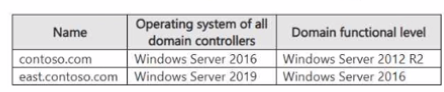
You need to perform an in-place upgrade of the domain controllers in east.contoso.com to Windows Server 2025. The solution must minimize administrative effort.
What should you do first?
Your network contains an Active Directory Domain Services (AD DS) domain. The domain contains domain controllers that run Windows Server 2019 and are configured as shown in the following table.
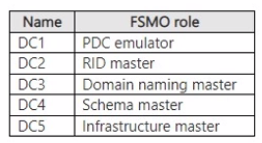
You plan to run the adprep /domainprep command.
Which domain controller should be available for the command to complete?
You have an on-premises network and an Azure virtual network.
You establish a Site-to-Site VPN connection from the on-premises network to the Azure virtual network, but the connection frequently disconnects.
You need to debug the IPsec tunnel from Azure.
Which Azure VPN Gateway diagnostic log should you review?
Your network contains an Active Directory Domain Services (AD DS) domain. The domain contains a domain controller named DC!
The domain uses Microsoft Entra Connect sync with a Microsoft Entra tenant and uses Microsoft Entra Password Protection to enforce a custom banned password list
You deploy a new domain controller named DC2 to the domain.
You discover that the custom banned password list is applied inconsistently and often allows banned passwords to be used.
You need to ensure that the custom banned password list is always enforced.
What should you do on DC2?
Get access to all 281 verified questions with detailed answers.
Unlock All AZ-801 Questions