MS-102 Exam Questions & Answers
Microsoft 365 Administrator • Microsoft
100% money-back guarantee
Sample MS-102 Questions
Practice with real exam-style questions, each with the verified correct answer and explanation.
: 232
Note: This question is part of a series of questions that present the same scenario. Each question in the series contains a unique solution that might meet the stated goals. Some question sets might have more than one correct solution, while others might not have a correct solution.
After you answer a question in this section, you will NOT be able to return to it. As a result, these questions will not appear in the review screen.
You have a Microsoft 365 E5 subscription.
You create an account for a new security administrator named SecAdmin1.
You need to ensure that SecAdmin1 can manage Office 365 Advanced Threat Protection (ATP) settings and policies for Microsoft Teams, SharePoint, and OneDrive.
Solution: From the Microsoft Entra ID admin center, you assign SecAdmin1 the Security administrator role.
Does this meet the goal?
You have a Microsoft 365 E5 subscription that uses Microsoft intune.
in the Microsoft Endpoint Manager admin center, you discover many stale and inactive devices,
You enable device clean-up rules
What can you configure as the minimum number of days before a device a removed automatically?
You have a Microsoft 365 E5 subscription that contains devices onboarded to Microsoft Defender for Endpoint. You integrate Microsoft Defender for Cloud Apps with Defender for Endpoint. You need identify which cloud apps and services were used most during the last 30 days What should you do?
You have a Microsoft 365 subscription that contains 500 Windows devices enrolled in Microsoft Intune.
You need to ensure that you can review vulnerability management recommendations for the devices. The solution must minimize administrative effort.
Which policy template should you select in the Microsoft Defender portal?
The correct policy template is Endpoint Detection and Response because vulnerability management recommendations require the devices to be onboarded to Microsoft Defender for Endpoint, where Defender Vulnerability Management can assess the endpoint inventory, detected weaknesses, exposure, and security recommendations. Microsoft states that after Intune is integrated with Defender for Endpoint, Defender Vulnerability Management identifies vulnerabilities on managed devices and allows security admins to review endpoint vulnerabilities and create remediation tasks.
For Intune-managed Windows devices, the lowest-administration deployment path is to use an endpoint security policy rather than manually deploying onboarding scripts or packages. Microsoft's Defender portal endpoint security policy documentation states that when Defender for Endpoint is integrated with Intune, administrators use endpoint detection and response endpoint security policies to manage EDR settings and onboard devices to Microsoft Defender for Endpoint. Microsoft's onboarding guidance also identifies deploying an endpoint detection and response policy with Intune as an onboarding deployment method.
Device Control manages removable/device access controls, Microsoft Defender Antivirus configures antivirus behavior, and Windows Security Experience controls end-user Windows Security app experience. None of those templates is the direct onboarding mechanism needed for Defender Vulnerability Management recommendations. Reference/topics: Microsoft Defender for Endpoint onboarding, Intune endpoint security policies, Endpoint Detection and Response policy, Defender Vulnerability Management recommendations.
You have a Microsoft 365 E5 subscription that contains the groups shown in the following table.
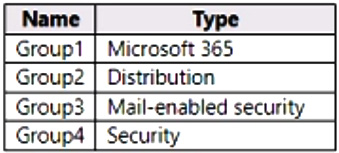
You plan to publish a sensitivity label named Label1.
To which groups can you publish Label1?
In addition to using sensitivity labels to protect documents and emails, you can also use sensitivity labels to protect content in the following containers: Microsoft Teams sites, Microsoft 365 groups (formerly Office 365 groups), and SharePoint sites.
https://learn.microsoft.com/en-us/microsoft-365/compliance/sensitivity-labels-teams-groups-sites
Get access to all 598 verified questions with detailed answers.
Unlock All MS-102 Questions