SC-300 Exam Questions & Answers
Microsoft Identity and Access Administrator • Microsoft
100% money-back guarantee
Sample SC-300 Questions
Practice with real exam-style questions, each with the verified correct answer and explanation.
Your company has two divisions named Contoso East and Contoso West. The Microsoft 365 identity architecture tor both divisions is shown in the following exhibit.
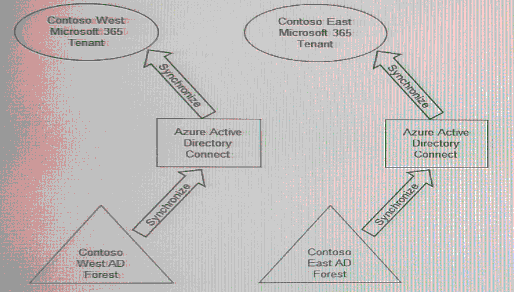
You need to assign users from the Contoso East division access to Microsoft SharePoint Online sites in the Contoso West tenant. The solution must not require additional Microsoft 3G5 licenses.
What should you do?
In SC-300, Microsoft emphasizes Azure AD B2B collaboration for cross-tenant access without extra Microsoft 365 licensing. The guidance explains that organizations can invite external users as guests to their tenant to access Microsoft 365 resources such as SharePoint Online and Teams, and guest access does not require an additional Microsoft 365 license for the guest. The host tenant remains licensed for the workloads being accessed, and Azure AD billing for B2B collaboration is handled through External Identities (MAU) if configured. The study content also notes that synchronizing a single on-premises AD forest to multiple Azure AD tenants is not a supported topology with a single Azure AD Connect server, and deploying another AAD Connect to sync the same identities to a second tenant introduces complexity and is unnecessary when the requirement is simply to let users in one tenant access resources in another. Application Proxy (publishing on-prem apps) is unrelated to granting SharePoint Online cross-tenant access. Therefore, the minimum-effort, license-compliant approach is to invite Contoso East users as B2B guests in the Contoso West tenant and assign them the required SharePoint permissions.
You have a Microsoft Entra tenant.
You need to query risky user activity for the tenant.
How long will the logs of risky user activity be retained?
According to the Microsoft Entra ID Protection section of the SC-300 Study Guide and the official Microsoft documentation on risk detections and retention, Microsoft Entra ID stores risky user activity and detections for 90 days. This includes logs of risky users, risky sign-ins, and risk detections identified by machine learning models and heuristic signals.
The retention period of 90 days ensures administrators can analyze user risk patterns, investigate compromised accounts, and implement mitigations such as Conditional Access or user risk policies. After 90 days, these logs are automatically purged unless exported to a SIEM such as Microsoft Sentinel for extended retention.
Microsoft Learn states:
''Identity Protection retains data for 90 days. Administrators can view risk detections, risky users, and risky sign-ins in the portal or query them using Microsoft Graph.''
Your network contains an on-premises Active Directory Domains Services (AD DS) domain named contoso.com and a web app named WebApp1. WebApp1 uses integrated Windows authentication.
Remote users access WebApp1 by establishing a VPN connection to the on-premises network and using a URL of https://webapp1 .contoso.com.
You have a Microsoft Entra tenant that syncs with contoso.com.
You perform the following actions:
* Deploy Microsoft Entra Private Access.
* Configure a connector group that contains a connector named Connector1.
You need to ensure that the remote users can access WebApp1 by using Microsoft Entra Private Access. What should you do?
You have a Microsoft 365 tenant.
All users must use the Microsoft Authenticator app for multi-factor authentication (MFA) when accessing Microsoft 365 services.
Some users report that they received an MFA prompt on their Microsoft Authenticator app without initiating a sign-in request.
You need to block the users automatically when they report an MFA request that they did not Initiate.
Solution: From the Azure portal, you configure the Account lockout settings for multi-factor authentication (MFA).
Does this meet the goal?
In SC-300, the mitigation for unsolicited MFA prompts (push fatigue) is Fraud alert on Azure AD MFA. The materials state that administrators can ''allow users to report suspicious MFA prompts and automatically block the user when they select Report fraud in Microsoft Authenticator.'' By contrast, Account lockout settings are designed to ''temporarily lock an account after a configurable number of consecutive MFA denials to thwart brute-force attempts,'' and they do not initiate an automatic block tied to a user's fraud report. The study guide further clarifies that fraud alerts ''can automatically block the user for a specified period (default 90 days) when a fraudulent attempt is reported,'' which is precisely the behavior required in the scenario. Therefore, merely configuring Account lockout settings will not meet the goal of automatically blocking users when they report an unsolicited prompt.
You have an Azure subscription named Sub1 that contains a virtual machine named VM1.
You need to enable Microsoft Entra login for VM1 and configure VM1 to access the resources in Sub1.
Which type of identity should you assign to VM1?
When enabling Microsoft Entra (Azure AD) login for a virtual machine, you must assign a managed identity so that the VM can authenticate to Azure AD and access other Azure resources securely without storing credentials.
Between the two types of managed identities---system-assigned and user-assigned---the system-assigned identity is the most appropriate when the identity is unique to the VM and should be automatically managed by Azure.
Once you enable a system-assigned managed identity, Azure creates an identity tied directly to the VM's lifecycle. It allows the VM to request tokens from Microsoft Entra ID and access resources within Sub1 under the permissions granted through RBAC.
From Microsoft documentation:
''To enable Microsoft Entra login for your VM, the VM must have a system-assigned managed identity that is granted access to Azure resources.''
Get access to all 383 verified questions with detailed answers.
Unlock All SC-300 Questions