XDR-Analyst Exam Questions & Answers
Palo Alto Networks XDR Analyst • Palo Alto Networks
100% money-back guarantee
Sample XDR-Analyst Questions
Practice with real exam-style questions, each with the verified correct answer and explanation.
Which built-in dashboard would be the best option for an executive, if they were looking for the Mean Time to Resolution (MTTR) metric?
The Incident Management Dashboard provides a high-level overview of the incident response process, including the Mean Time to Resolution (MTTR) metric. This metric measures the average time it takes to resolve an incident from the moment it is created to the moment it is closed. The dashboard also shows the number of incidents by status, severity, and assigned analyst, as well as the top alerts by category, source, and destination. The Incident Management Dashboard is designed for executives and managers who want to monitor the performance and efficiency of their security teams.Reference: [PCDRA Study Guide], page 18.
Which statement is true based on the following Agent Auto Upgrade widget?
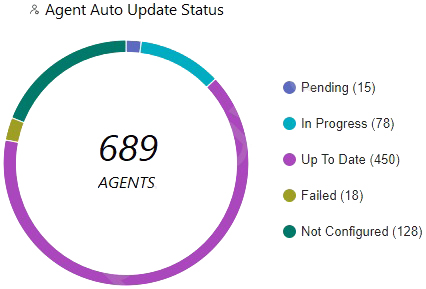
The Agent Auto Upgrade widget shows the status of the agent auto upgrade feature on the endpoints. The widget displays the number of agents that are up to date, in progress, pending, failed, and not configured. In this case, the widget shows that there are 450 agents that are up to date, 78 in progress, 15 pending, 18 failed, and 128 not configured. This means that the agent auto upgrade feature was enabled but not on all endpoints.Reference:
Cortex XDR Agent Auto Upgrade
PCDRA Study Guide
Which of the following paths will successfully activate Remediation Suggestions?
Remediation Suggestions is a feature of Cortex XDR that provides you with recommended actions to remediate the root cause and impact of an incident. Remediation Suggestions are based on the analysis of the causality chain, the behavior of the malicious files or processes, and the best practices for incident response. Remediation Suggestions can help you to quickly and effectively contain and resolve an incident, as well as prevent future recurrence.
To activate Remediation Suggestions, you need to follow these steps:
In the Cortex XDR management console, go toIncidentsand select an incident that you want to remediate.
ClickCausality Viewto see the graphical representation of the causality chain of the incident.
ClickActionsand selectRemediation Suggestions. This will open a new window that shows the suggested actions for each node in the causality chain.
Review the suggested actions and select the ones that you want to apply. You can also edit or delete the suggested actions, or add your own custom actions.
ClickApplyto execute the selected actions on the affected endpoints. You can also schedule the actions to run at a later time or date.
Remediate Changes from Malicious Activity: This document explains how to use Remediation Suggestions to remediate the root cause and impact of an incident.
Causality View: This document describes how to use Causality View to investigate the causality chain of an incident.
What functionality of the Broker VM would you use to ingest third-party firewall logs to the Cortex Data Lake?
The Broker VM is a virtual machine that acts as a data broker between third-party data sources and the Cortex Data Lake. It can ingest different types of data, such as syslog, netflow, database, and pathfinder. The Syslog Collector functionality of the Broker VM allows it to receive syslog messages from third-party devices, such as firewalls, routers, switches, and servers, and forward them to the Cortex Data Lake. The Syslog Collector can be configured to filter, parse, and enrich the syslog messages before sending them to the Cortex Data Lake. The Syslog Collector can also be used to ingest logs from third-party firewall vendors, such as Cisco, Fortinet, and Check Point, to the Cortex Data Lake. This enables Cortex XDR to analyze the firewall logs and provide visibility and threat detection across the network perimeter.Reference:
Cortex XDR Data Broker VM
Syslog Collector
Supported Third-Party Firewall Vendors
As a Malware Analyst working with Cortex XDR you notice an alert suggesting that there was a prevented attempt to download Cobalt Strike on one of your servers. Days later, you learn about a massive ongoing supply chain attack. Using Cortex XDR you recognize that your server was compromised by the attack and that Cortex XDR prevented it. What steps can you take to ensure that the same protection is extended to all your servers?
To ensure that the same protection is extended to all your servers, you need to create Behavioral Threat Protection (BTP) rules to recognize and prevent the activity. BTP is a feature of Cortex XDR that allows you to create custom rules that detect and block malicious or suspicious behaviors on your endpoints, such as file execution, process injection, network connection, or registry modification. BTP rules can use various operators, functions, and variables to define the criteria and the actions for the rules.By creating BTP rules that match the behaviors of the supply chain attack, you can prevent the attack from compromising your servers12.
Let's briefly discuss the other options to provide a comprehensive explanation:
B . Enable DLL Protection on all servers but there might be some false positives: This is not the correct answer. Enabling DLL Protection on all servers will not ensure that the same protection is extended to all your servers. DLL Protection is a feature of Cortex XDR that allows you to block the execution of unsigned or untrusted DLL files on your endpoints. DLL Protection can help to prevent some types of attacks that use malicious DLL files, but it may not be effective against the supply chain attack that used a Trojanized DLL file that was digitally signed by a trusted vendor.DLL Protection may also cause some false positives, as it may block some legitimate DLL files that are unsigned or untrusted3.
C . Create IOCs of the malicious files you have found to prevent their execution: This is not the correct answer. Creating IOCs of the malicious files you have found will not ensure that the same protection is extended to all your servers. IOCs are indicators of compromise that you can create to detect and respond to known threats on your endpoints, such as file hashes, registry keys, IP addresses, domain names, or full paths. IOCs can help to identify and block the malicious files that you have already discovered, but they may not be effective against the supply chain attack that used different variants of the malicious files with different hashes or names.IOCs may also become outdated, as the attackers may change or update their files to evade detection4.
D . Enable Behavioral Threat Protection (BTP) with cytool to prevent the attack from spreading: This is not the correct answer. Enabling BTP with cytool will not ensure that the same protection is extended to all your servers. BTP is a feature of Cortex XDR that allows you to create custom rules that detect and block malicious or suspicious behaviors on your endpoints, such as file execution, process injection, network connection, or registry modification. BTP rules can help to prevent the attack from spreading, but they need to be created and configured in the Cortex XDR app, not with cytool. Cytool is a command-line tool that allows you to perform various operations on the Cortex XDR agent, such as installing, uninstalling, upgrading, or troubleshooting. Cytool does not have an option to enable or configure BTP rules.
In conclusion, to ensure that the same protection is extended to all your servers, you need to create BTP rules to recognize and prevent the activity. By using BTP rules, you can create custom and flexible prevention rules that match the behaviors of the supply chain attack.
Behavioral Threat Protection
Create a BTP Rule
DLL Protection
Create an IOC Rule
[Cytool]
Get access to all 91 verified questions with detailed answers.
Unlock All XDR-Analyst Questions