PEGACPLSA88V1 Exam Questions & Answers
Certified Pega Lead System Architecture Exam 8.8 • Pegasystems
100% money-back guarantee
Sample PEGACPLSA88V1 Questions
Practice with real exam-style questions, each with the verified correct answer and explanation.
An organization has two sets of users: Manager and Vice President, with no role dependencies. The organization wants to introduce a new set of users called Senior Manager that has Manager access and a subset of Vice President access.
What is the recommended approach to add the Senior Manager role to meet this requirement?
Senior Manager Role with Dependent Roles:
Creating a new Senior Manager role with Manager and Vice President as dependent roles ensures that the Senior Manager inherits access from both roles. Overriding the Access of Role to Object rules from the Vice President role as required provides the necessary fine-tuning.
Reference:
Pega documentation on role-based access control recommends defining new roles with dependencies to inherit access rights and customize as needed.
Therefore, the correct answer is:
Review the following classes and properties:
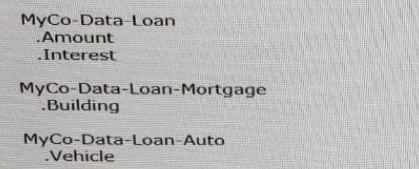
A field group list is defined at the MyCo-Lending-Work work pool level. The find group list name is Loans: the specified data type is MyCo-Data-Loan.
Which three statements are valid? (Choose Three)
To understand the valid statements regarding the field group list:
An auto loan application can extend MyCo-Data-Loan-Auto without affecting a sum performed against .Loans.Amount:
Since MyCo-Data-Loan-Auto extends MyCo-Data-Loan, it can be included in the field group list. Calculations like sums on .Loans.Amount will not be affected as they are based on the common superclass.
All pages within the .Loans field group must be the same class, either MyCo-Data-Loan-Auto or MyCo-Data-Loan-Mortgage:
The field group list should maintain consistency in the class type for its pages. Mixing classes within the field group can lead to errors and unpredictable behavior.
A rule in MyCo-Data-Loan-Mortgage can only be referenced through .Loans if also defined in MyCo-Data-Loan:
To reference rules through the field group list, they must be accessible via the common superclass (MyCo-Data-Loan). This ensures that rules can be consistently applied across different subclasses.
Pega Documentation on Field Groups: Field Groups
Pega Documentation on Class Inheritance: Class Inheritance
when a customer submits a credit card dispute, the application connects to an external service to retrieve all transaction made by the customer. the external service returns transactions ordered by date of transaction, in a descending, chronological order when a case worker reviews the dispute the application displays the 10 most recent transactions.
if the case worker does not see the disputed transaction in the list, the case worker can search for additional transaction the caseworker can filter search results on transaction date the transaction amount or the merchant name the search results display the 10 most recent transactions that satisfy the filter criteri
a. the case worker cannot paginate through the results.
how do you configure the response data transform to satisfy all of the requirements in the scenario?
To configure the response data transform to satisfy all the requirements in the scenario:
Configure the data transform to copy only the first 10 matching records to a page list property (Answer A):
APP Studio created a data type in the Organization layer for Quote data called BCO-Data-Quote. How do you help users find rules from this data class when working in APP Studio?
To help users find rules from the BCO-Data-Quote class when working in APP Studio, you should:
Relevant Records Configuration: Mark each rule you want to reuse as a relevant record. This makes these rules easily discoverable and reusable within APP Studio.
Implementation in APP Studio: Navigate to the data type and mark the necessary rules as relevant records. This action ensures that these rules are available in the relevant contexts when users work within the application.
Using relevant records in App Studio
you need to formet required fields with red labels. you configure a custom style in the skin rule.
how do you apply the custom style?
To format required fields with red labels using a custom style in the skin rule:
Reference the custom style in the required field labels (Answer D):
Get access to all 238 verified questions with detailed answers.
Unlock All PEGACPLSA88V1 Questions