2V0-51.23 Exam Questions & Answers
VMware Horizon 8.x Professional • VMware
100% money-back guarantee
Sample 2V0-51.23 Questions
Practice with real exam-style questions, each with the verified correct answer and explanation.
An administrator needs to enable Session Collaboration in the VMware Horizon environment. What will be used as a requirement to enable Session Collaboration?
Collaboration is a feature that allows users to invite other users to join an existing Windows or Linux remote desktop session with both screen sharing and audio out features enabled. A remote desktop session that is shared in this way is called a collaborative session. The user that shares a session with another user is called the session owner, and the user that joins a shared session is called a session collaborator. A Horizon administrator must enable the Session Collaboration feature for the desktop pool or farm that contains the remote desktops that support collaboration.
One of the requirements to enable Session Collaboration is to use the VMware Blast display protocol for the remote desktops. VMware Blast is a protocol that provides high-performance, high-quality graphics and multimedia delivery over LAN or WAN networks. VMware Blast supports Session Collaboration by allowing multiple users to view and interact with the same remote desktop session simultaneously. Other display protocols, such as PCoIP or RDP, do not support Session Collaboration and will not allow users to share or join collaborative sessions.
Which of the following components enables central communication, management, and configuration of multiple ESXi servers?
VMware vCenter Server is the central management component for ESXi servers, allowing administrators to manage multiple ESXi hosts and virtual machines (VMs) from a single console. It provides essential management capabilities, including resource allocation, performance monitoring, and centralized access control, making it the cornerstone for managing a VMware virtualized infrastructure.
Refer to the exhibit.
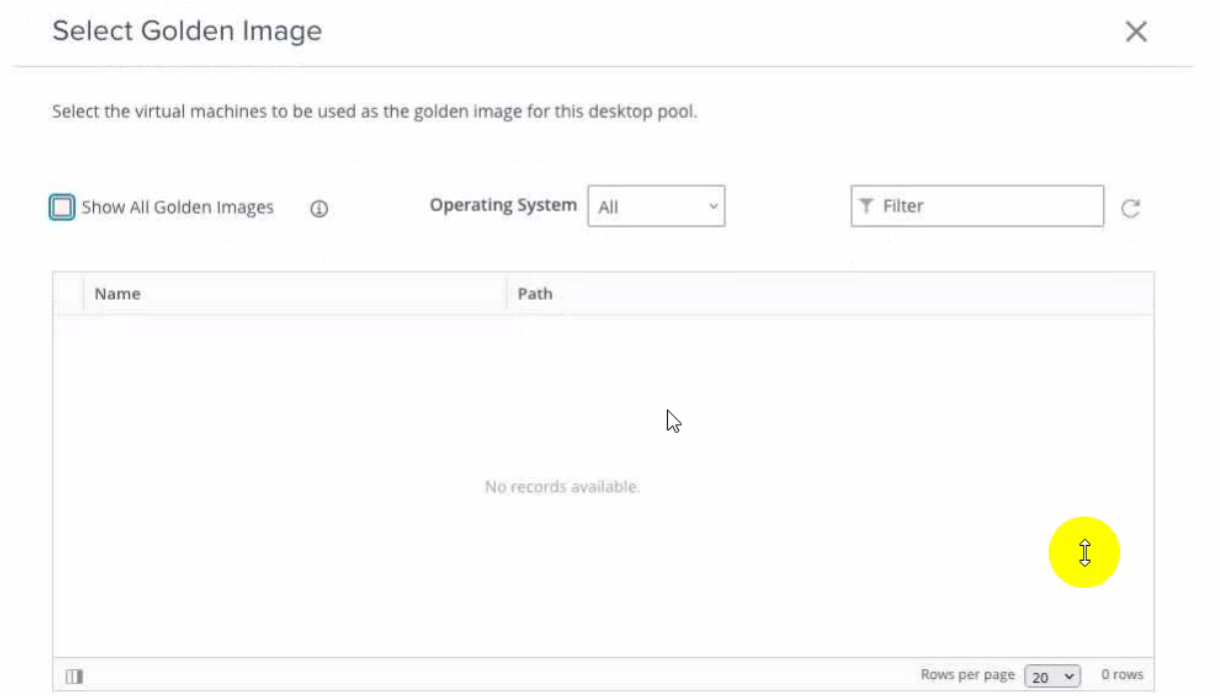
An administrator is tasked with creating an instant clone pool for their sales department. During the creation of the pool the administrator saw that there is no golden image available, as seen in the exhibit.
Which two actions can an administrator take so that the golden image is showing up in the Golden Image selection window? (Choose two.)
The administrator can take two actions to make the golden image show up in the Golden Image selection window. First, they can login to the vSphere Client, select the Golden Image virtual machine and create a snapshot. This will make the golden image available in the selection window. Second, they can login to the vSphere Client, select the Golden Image virtual machine and convert it to a template. This will also make the golden image available in the selection window.
The other options are not correct for this scenario:
Refresh the Select Golden Image view and select the Golden Image. This option is not correct because refreshing the view will not change the availability of the golden image in the selection window. The administrator must create a snapshot or a template of the golden image before it can be selected.
Login to the vSphere Client, select the Golden Image virtual machine and clone it to a new virtual machine. This option is not correct because cloning the golden image to a new virtual machine will not make it show up in the selection window. The administrator must still create a snapshot or a template of the cloned virtual machine before it can be selected.
Preparing a Golden Image Virtual Machine for Instant-Clones
Snapshot vmdk files of the golden image used to publish Instant clone ...
Create an Automated Instant-Clone Desktop Pool
[VMware Horizon 8.x Professional]
Which storage product allows the pooling of resources to create datastores in a software defined datacenter?
Refer to the exhibit.
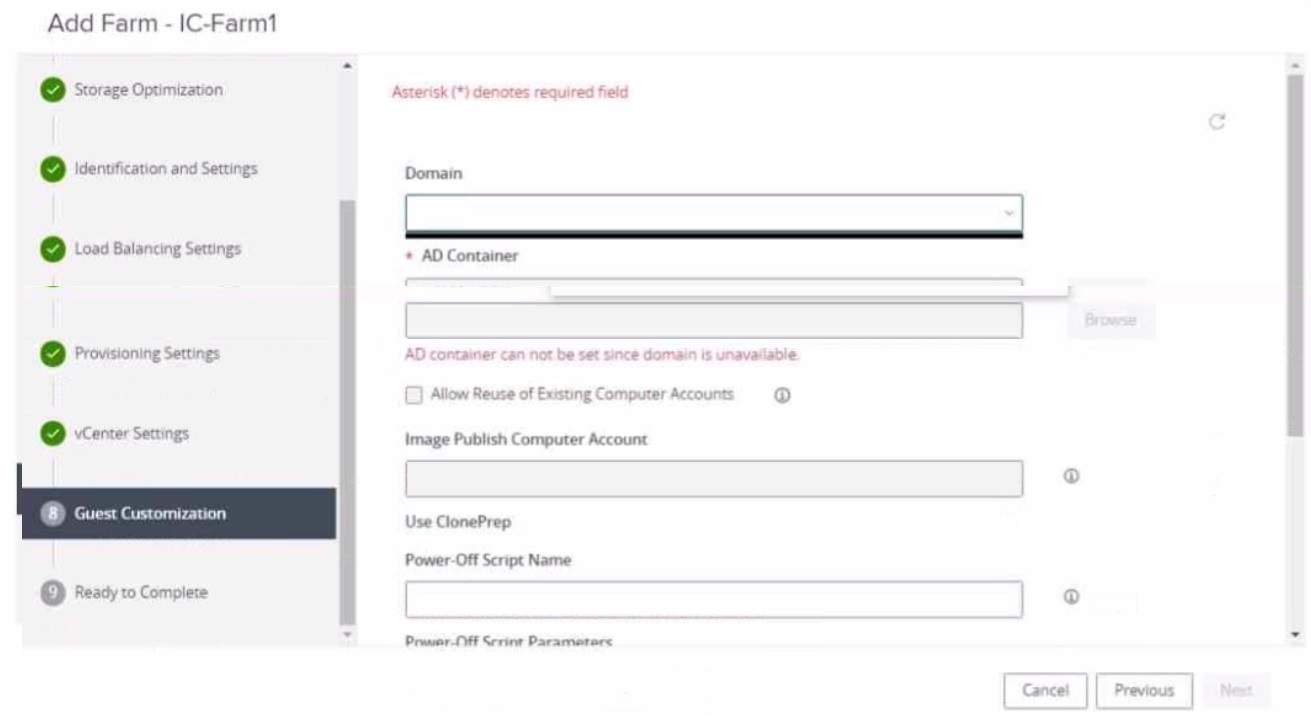
An administrator is trying to create an automated farm of instant-clone virtual machines using the Add Farm wizard. The administrator cannot proceed beyond the page displayed in the exhibit.
Which of the following could be the reason for the issue?
The reason for the issue is that the administrator may not have added an instant clone domain administrator to VMware Horizon. This is a requirement for creating an automated farm of instant-clone virtual machines using the Add Farm wizard.
An instant clone domain administrator is a user account in Microsoft Active Directory that allows Connection Server to perform certain operations related to instant clones in Active Directory, such as joining instant-clone virtual machines to the domain, creating computer accounts, and deleting computer accounts. The administrator must create and configure this account in Active Directory and then specify the user name and password in VMware Horizon.
To add an instant clone domain administrator to VMware Horizon, the administrator needs to follow these steps:
In the Horizon Console, select Settings > Domains > Domain Accounts.
Click Add.
Enter the domain, user name, and password for the instant clone domain administrator.
After adding the instant clone domain administrator to VMware Horizon, the administrator can proceed with creating an automated farm of instant-clone virtual machines using the Add Farm wizard.
The other options are not the reason for the issue:
In the Add Farm wizard, the administrator may not have selected Automated Farm as farm type: This option is not relevant to the issue, as the farm type selection is done in a later page of the Add Farm wizard, after selecting the domain and the AD container. The page displayed in the exhibit is the Identification and Settings page, which is the first page of the Add Farm wizard.
The administrator did not prepare a RDSH golden image snapshot: This option is not relevant to the issue, as the RDSH golden image snapshot selection is done in a later page of the Add Farm wizard, after selecting the domain and the AD container. The page displayed in the exhibit is the Identification and Settings page, which does not require a RDSH golden image snapshot.
The administrator did not add the RDSH golden image to the correct domain: This option is not relevant to the issue, as the RDSH golden image domain selection is done in a later page of the Add Farm wizard, after selecting the domain and the AD container. The page displayed in the exhibit is the Identification and Settings page, which does not require a RDSH golden image domain.
Get access to all 89 verified questions with detailed answers.
Unlock All 2V0-51.23 Questions