100-150 Exam Questions & Answers
Cisco Certified Support Technician (CCST) Networking • Cisco
100% money-back guarantee
Sample 100-150 Questions
Practice with real exam-style questions, each with the verified correct answer and explanation.
Which two pieces of information should you include when you initially create a support ticket? (Choose 2.)
Statement A: 'A detailed description of the fault.' This is essential for support staff to understand the nature of the problem and begin troubleshooting effectively.
Statement C: 'A description of the conditions when the fault occurs.' This helps in reproducing the issue and identifying patterns that might indicate the cause of the fault.
Statement B: 'Details about the computers connected to the network.' While useful, this is not as immediately critical as understanding the fault itself and the conditions under which it occurs.
Statement D: 'The actions taken to resolve the fault.' This is important but typically follows the initial report.
Statement E: 'The description of the top-down fault-finding procedure.' This is more of a troubleshooting methodology than information typically included in an initial support ticket.
Best Practices for Submitting Support Tickets: Support Ticket Guidelines
Which command will display the following output?
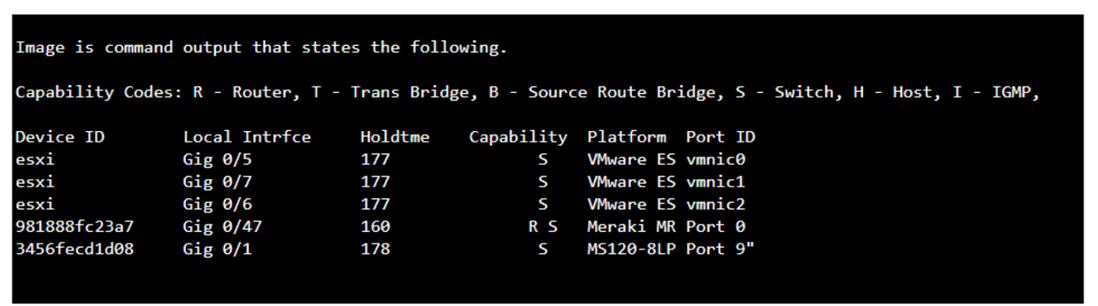
The command that will display the output provided, which includes capability codes, local interface details, device IDs, hold times, and platform port ID capabilities, is the show cdp neighbor command. This command is used in Cisco devices to display current information about neighboring devices detected by Cisco Discovery Protocol (CDP), which includes details such as the interface through which the neighbor is connected, the type of device, and the port ID of the device1.
* Cisco - show cdp neighbors
The provided output is from the Cisco Discovery Protocol (CDP) neighbor table. The show cdp neighbor command displays information about directly connected Cisco devices, including Device ID, Local Interface, Holdtime, Capability, Platform, and Port ID.
* A. show mac-address-table: Displays the MAC address table on the switch.
* C. show inventory: Displays information about the hardware inventory of the device.
* D. show ip interface: Displays IP interface status and configuration.
Thus, the correct answer is B. show cdp neighbor.
* Cisco CDP Neighbor Command
* Understanding CDP
A Cisco switch is not accessible from the network. You need to view its running configuration.
Which out-of-band method can you use to access it?

Out-of-band (OOB) network interface configuration guidelines
Out of band management configuration
If you have any more questions or need further assistance, feel free to ask!
A support technician examines the front panel of a Cisco switch and sees 4 Ethernet cables connected in the first four ports. Ports 1, 2, and 3 have a green
LED. Port 4 has a blinking green light.
What is the state of the Port 4?
On a Cisco switch, a port with a blinking green LED typically indicates that the port is up (active) and is currently transmitting or receiving data. This is a normal state indicating active traffic on the port.
* A. Link is up with cable malfunctions: Usually indicated by an amber or blinking amber light.
* B. Link is up and not stable: Not typically indicated by a green blinking light.
* D. Link is up and there is no activity: Would be indicated by a solid green light without blinking.
Thus, the correct answer is C. Link is up and active.
* Cisco Switch LED Indicators
* Cisco Ethernet Switch LED Patterns
Which wireless security option uses a pre-shared key to authenticate clients?
WPA2-Personal, also known as WPA2-PSK (Pre-Shared Key), is the wireless security option that uses a pre-shared key to authenticate clients. This method is designed for home and small office networks and doesn't require an authentication server. Instead, every user on the network uses the same key or passphrase to connect1.
* What is a Wi-Fi Protected Access Pre-Shared Key (WPA-PSK)?
* Exploring WPA-PSK and WiFi Security
* WPA2-Personal: This wireless security option uses a pre-shared key (PSK) for authentication. Each client that connects to the network must use this key to gain access. It is designed for home and small office networks where simplicity and ease of use are important.
* WPA2-Enterprise: Unlike WPA2-Personal, WPA2-Enterprise uses 802.1x authentication with an authentication server (such as RADIUS) and does not rely on a pre-shared key.
* 802.1x: This is a network access control protocol for LANs, particularly wireless LANs. It provides an authentication mechanism to devices wishing to attach to a LAN or WLAN.
* 802.1q: This is a networking standard that supports VLAN tagging on Ethernet networks and is not related to wireless security.
* Cisco Documentation on WPA2 Security: Cisco WPA2
* Understanding Wireless Security: Wireless Security Guide
Get access to all 40 verified questions with detailed answers.
Unlock All 100-150 Questions