Limited-Time Offer: Enjoy 50% Savings! - Ends In 0d 00h 00m 00s Coupon code: 50OFF
Free Exam Questions

AZ-140 Exam Questions & Answers

Configuring and Operating Microsoft Azure Virtual Desktop  •  Microsoft

299 Questions 100 min Updated Jul 2026 99% Pass Rate
Get Full Access

100% money-back guarantee

About AZ-140 Exam

The AZ-140 certification exam, officially titled "Configuring and Operating Microsoft Azure Virtual Desktop," is a critical assessment for IT professionals seeking to validate their expertise in deploying and managing virtual desktop infrastructure on Microsoft Azure. This exam evaluates candidates' ability to implement Azure Virtual Desktop solutions, configure host pools, manage user sessions, and optimize performance in cloud-based environments. Key topics covered include Azure Virtual Desktop architecture, session host deployment, application management, user experience optimization, and security configurations. Professionals pursuing this certification demonstrate competency in modern workplace solutions that organizations increasingly rely upon for remote work and desktop virtualization.

IT administrators, cloud engineers, and systems professionals responsible for implementing or managing Azure Virtual Desktop environments should pursue the AZ-140 certification to advance their careers and enhance organizational capabilities. To effectively prepare for this exam, candidates benefit significantly from utilizing updated exam dumps and comprehensive practice tests that simulate real testing conditions and assess knowledge gaps. These resources provide valuable insights into exam format, question types, and challenging scenarios candidates will encounter. Combined with official Microsoft learning paths and hands-on Azure lab experience, practice tests and exam dumps create a well-rounded preparation strategy that increases confidence and improves pass rates, enabling professionals to successfully validate their Azure Virtual Desktop expertise.

Exam Topics & Objectives

Plan and implement an Azure Virtual Desktop infrastructure
40-45%
Plan and implement user environments and apps
20-25%
Monitor and maintain an Azure Virtual Desktop infrastructure
10-15%
Plan and implement identity and security
15-20%

4-Week Study Plan for AZ-140

Week 1: Azure Virtual Desktop Infrastructure Foundation

  • Study AVD architecture components: host pools, session hosts, workspaces, and application groups
  • Learn Azure subscription and resource group planning for AVD deployments
  • Understand different host pool types: pooled, personal, and validation environments
  • Practice creating and configuring host pools using Azure Portal and PowerShell
  • Study session host sizing and compute requirements for different workloads
  • Explore Azure Storage integration for FSLogix profiles and MSIX app attach
  • Complete hands-on lab: Deploy a basic pooled host pool with Windows 11 session hosts
  • Review networking requirements: virtual networks, subnets, and connectivity to on-premises

Week 2: AVD Infrastructure Implementation and User Environments

  • Study image management: Golden image creation and deployment using Azure Image Builder
  • Learn FSLogix container configuration for profile and Office container management
  • Understand MSIX app attach process and application packaging for AVD
  • Practice configuring RemoteApp applications and desktop assignments
  • Study user assignment methods to application groups and host pools
  • Learn workspace configuration and settings for different user groups
  • Implement app masking and filtering based on user roles
  • Complete hands-on lab: Create custom image, configure FSLogix, and publish applications
  • Practice assigning users to appropriate desktop and application groups

Week 3: Monitoring, Maintenance, and Identity Security

  • Study Azure Monitor integration with AVD for performance metrics and logs
  • Learn diagnostic settings configuration and log analytics workspace setup
  • Understand alert creation for session host health and connection failures
  • Study Azure AD identity configuration for AVD authentication and conditional access
  • Learn multi-factor authentication (MFA) implementation for AVD users
  • Practice role-based access control (RBAC) configuration for AVD resources
  • Study session host patching strategies and maintenance windows
  • Learn troubleshooting connection and performance issues using Log Analytics queries
  • Complete hands-on lab: Configure monitoring, set up alerts, and implement conditional access policies

Week 4: Security Implementation and Exam Preparation

  • Study Azure security features: encryption at rest and in transit for AVD
  • Learn network security group (NSG) configuration and firewall rules for AVD
  • Understand Azure AD Domain Services versus on-premises Active Directory options
  • Study compliance and governance: auditing, Azure Policy, and Azure Blueprints for AVD
  • Practice administrative delegation and least privilege access principles
  • Learn update management and patch compliance for session hosts
  • Review cost optimization strategies and resource management best practices
  • Complete practice exam: Full-length AZ-140 exam simulation focusing on weak areas
  • Review all four exam domains: infrastructure (40-45%), user environments (20-25%), monitoring (10-15%), identity/security (15-20%)
  • Study case studies and real-world deployment scenarios

Sample AZ-140 Questions

Practice with real exam-style questions. Reveal answers to verify your knowledge.

Q1 MultipleChoice

You have an Azure Virtual Desktop deployment that contains a host pool named Pool1. Pool1 contains three session hosts.

You need to implement a private endpoint connection for Pool1.

Which two actions should you perform? Each correct answer presents part of the solution.

NOTE: Each correct selection is worth one point.

Q2 MultipleChoice

Your on-premises network contains an Active Directory domain that syncs with a Microsoft Entra tenant.

You have a new Azure virtual network named VNet1.

You plan to implement an Azure Virtual Desktop host pool named Pool1. The session hosts in Pool1 will be joined to the Active Directory domain.

You need to recommend a networking solution for connectivity between Azure Virtual Desktop and the on-premises network.

Which three resources should you include in the recommendation? Each correct answer presents part of the solution.

NOTE: Each correct selection is worth one point.

Q3 MultipleChoice

Note: This question is part of a series of questions that present the same scenario. Each question in the series contains a unique solution that might meet the stated goals. Some question sets might have more than one correct solution, while others might not have a correct solution.

After you answer a question in this section, you will NOT be able to return to it. As a result, these questions will not appear in the review screen.

You have the following:

A Microsoft 365 E5 tenant

An on-premises Active Directory domain

A hybrid Azure Active Directory (Azure AD) tenant

An Azure Active Directory Domain Services (Azure AD DS) managed domain

An Azure Virtual Desktop deployment

The Azure Virtual Desktop deployment contains personal desktops that are hybrid joined to the on-premises domain and enrolled in Microsoft Intune.

You need to configure the security settings for the Microsoft Edge browsers on the personal desktops.

Solution: You configure a Group Policy Object (GPO) in the Azure AD DS managed domain.

Does this meet the goal?

Q4 MultipleChoice

You have an Azure Virtual Desktop deployment in the East US Azure region and a disaster recovery location in the West US Azure region.

You need to recommend a disaster recovery solution that meets the following requirements:

* Controlled failover and fallback tests between the two regions must be performed every six months.

* Administrative effort and costs must be minimized.

What should you recommend?

Q5 MultipleChoice

You have an Azure Virtual Desktop deployment that contains the resources shown in the following table.
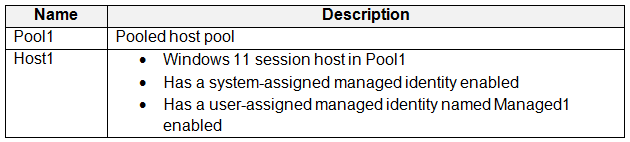
You plan to enable Start VM on connect for Pool1.

You create a custom Azure role named Role1 that has sufficient permissions to start virtual machines on demand.

You need to ensure that the session hosts in Pool1 can start on demand.

To which service principal should you assign Role1?

Get access to all 299 verified questions with detailed answers.

Unlock All AZ-140 Questions

Frequently Asked Questions

The AZ-140 exam covers deploying Azure Virtual Desktop, managing access and security, optimizing user experience and app performance, and monitoring and maintaining AVD environments. It tests your ability to implement, configure, and manage Azure Virtual Desktop infrastructure and user sessions.

Microsoft recommends having at least 6 months of hands-on experience with Azure Virtual Desktop deployments and administration. You should also be familiar with Azure services, identity management, and Windows Server or Windows client operating systems.

The AZ-140 exam typically lasts 120 minutes and contains 40-60 questions in various formats, including multiple choice, drag-and-drop, and case studies. The exact number of questions may vary as Microsoft uses different question sets for different exam sessions.

While not mandatory, Microsoft recommends first obtaining the AZ-104 (Azure Administrator) certification to establish foundational Azure knowledge. Having experience with virtualization, networking, and Windows administration is also beneficial for success on the AZ-140 exam.

You need to achieve a score of at least 700 out of 1000 to pass the AZ-140 exam. The score is scaled, so the difficulty of the questions you answer may affect how many correct answers are needed to reach the passing threshold.
Exam Details
  • Exam CodeAZ-140
  • VendorMicrosoft
  • Total Questions299
  • Duration100 min
  • LanguageEnglish
  • Last UpdatedJul 21, 2026
4.9/5

Pass AZ-140 First Time

Get all 299 exam questions with verified answers and 90-day free updates.

Buy Now & Pass
  • PDF + Practice Test Bundle
  • 90-Day Free Updates
  • 100% Money-Back Guarantee
  • Instant Download
  • 24/7 Customer Support
99% Pass Rate Trusted by 50,000+ IT professionals