DP-800 Exam Questions & Answers
Developing AI-Enabled Database Solutions • Microsoft
100% money-back guarantee
Sample DP-800 Questions
Practice with real exam-style questions, each with the verified correct answer and explanation.
You have an Azure SQL table that contains the following data.

You need to retrieve data to be used as context for a large language model (LLM). The solution must minimize token usage.
Which formal should you use to send the data to the LLM?
A)
B)
C)
D)
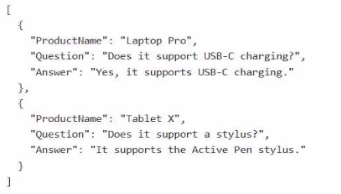
The correct choice is Option A because it provides the relevant semantic context the LLM needs while avoiding an unnecessary field that would add tokens without improving answer quality.
For LLM grounding and RAG-style context, Microsoft guidance emphasizes mapping and sending the fields that contain text pertinent to the use case. In this FAQ scenario, the useful context is the ProductName, the Question, and the Answer. Those three fields help the model understand both the subject domain and the actual Q&A pair. By contrast, FaqId is just a technical identifier and generally adds no semantic value for response generation, so including it wastes tokens.
That is why Option A is better than the others:
Option A keeps the meaningful text fields and removes the low-value identifier.
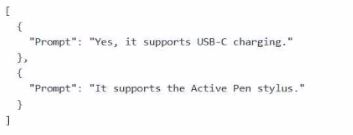
Option B is too minimal because it includes only the answer text as Prompt, which strips away the product and question context the LLM may need for accurate grounding.
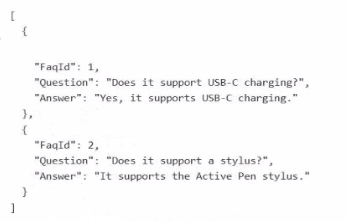
Option C keeps FaqId but omits ProductName, which can be important disambiguating context.
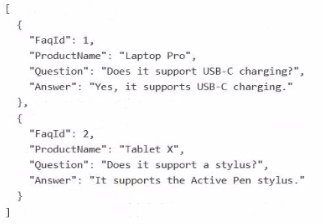
Option D includes everything, but that does not minimize token usage because it keeps the unnecessary FaqId.
You have an Azure SQL database that contains a table named dbo.ManualChunks. dbo.HonualChunks contains product manuals
A retrieval query already returns the top five matching chunks as nvarchar(max) text.
You need to call an Azure OpenAI REST endpomt for chat completions. The request body must include both the user question and theretiieved chunks.
You write the following Transact-SQL code.
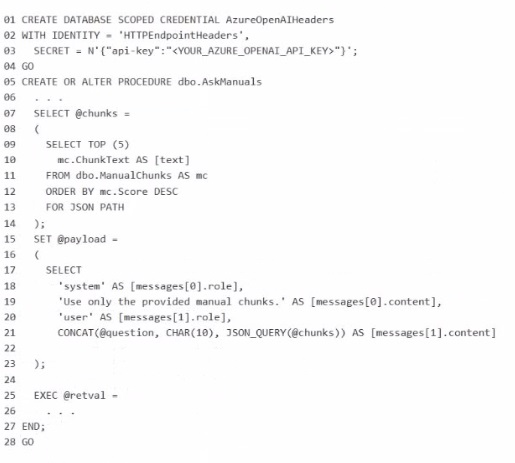
What should you insert at line 22?
The correct insertion at line 22 is FOR JSON PATH, WITHOUT_ARRAY_WRAPPER.
The request body for the Azure OpenAI chat completions call must be a single JSON object containing the messages array with both the system/user content and the retrieved chunks. Microsoft documents that FOR JSON PATH is the preferred way to shape JSON output, especially when you want precise control over nested property names like messages[0].role and messages[1].content.
The key detail is WITHOUT_ARRAY_WRAPPER. By default, FOR JSON returns results enclosed in square brackets as a JSON array. Microsoft documents that WITHOUT_ARRAY_WRAPPER removes those brackets so a single JSON object is produced instead. That is exactly what is needed here for @payload, because the stored procedure is building one request body, not an array of request bodies.
You have an SDK-style SQL database project stored in a Git repository. The project targets an Azure SQL database.
The CI build fails with unresolved reference errors when the project references system objects.
You need to update the SQL database project to ensure that dotnet build validates successfully by including the correct system objects in the database model for Azure SQL Database.
Solution: Add the Microsoft.SqlServer.Dacpacs.Azure.Master NuGet package to the project.
Does this meet the goal?
This does meet the goal. Microsoft documents that SDK-style SQL projects can add the master.dacpac database reference as a package reference, and for Azure SQL Database the correct package is the Azure-specific master DACPAC package. The Azure SQL system DACPACs are available through NuGet, and this is the recommended way to include the right system objects in the database model for dotnet build validation.
So for an SDK-style SQL database project that targets Azure SQL Database, adding Microsoft.SqlServer.Dacpacs.Azure.Master is the correct fix for unresolved references to system objects.
You have a SQL database in Microsoft Fabric that contains a column named Payload. pay load stores customer data in JSON documents that have the following format.
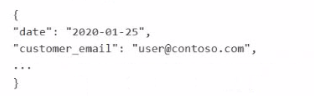
Data analysis shows that some customers have subaddressing in their email address, for example, user1+promo@contoso.com.
You need to return a normalized email value that removes the subaddressing, for example, user! + promo@contoso.com must be normalized to userl@contoso.com.
Which Transact SQL expression should you use?
The correct answer is C because the email must be normalized by removing only the subaddressing portion between the plus sign and the @, while preserving the domain. JSON_VALUE is the correct function to extract the scalar email value from the JSON document. Microsoft states that JSON_VALUE is used to extract a scalar value from JSON text.
Then REGEXP_REPLACE should remove the pattern \+.*@ and replace it with a single @. For example:
user1+promo@contoso.com user1@contoso.com
Microsoft documents that REGEXP_REPLACE returns the source string with text matching the regular expression replaced by the replacement string, and that an empty or custom replacement string can be used to reshape the result.
Why the other options are wrong:
A removes everything from + to the end of the string, which would leave user1 and lose @contoso.com.
B tries to extract a string that already excludes +..., but it does not reliably reconstruct the normalized address in this pattern.
D also removes everything after +, including the domain, which is incorrect.
So the normalized-email expression is:
REGEXP_REPLACE(JSON_VALUE(Payload, '$.customer_email'), '\+.*@', '@')
You have an Azure SQL database That contains database-level Data Definition Language (DDL) triggers, including a trigger named ddl_Audit.
You need to prevent ddl_Audit from firing during the next deployment. The trigger object must remain in place.
Which Transact-SQL statement should you use?
The requirement is very specific: prevent ddl_Audit from firing during the next deployment, but leave the trigger object in place. Microsoft documents DISABLE TRIGGER as the statement used to disable a trigger without dropping it. That is exactly the right operation for a temporary suspension of a DDL trigger. For a database-scoped DDL trigger, the syntax is on the database scope, for example DISABLE TRIGGER ddl_Audit ON DATABASE;.
The other options do not meet the requirement as directly:
ALTER TRIGGER changes the trigger definition, not simply disables execution.
ALTER DATABASE is not the direct statement for disabling a specific DDL trigger.
ALTER SERVER AUDIT SPECIFICATION and ALTER DATABASE AUDIT SPECIFICATION are audit-feature statements, not trigger-control statements.
So the correct Transact-SQL statement is DISABLE TRIGGER.
Get access to all 87 verified questions with detailed answers.
Unlock All DP-800 Questions