MB-820 Exam Questions & Answers
Microsoft Dynamics 365 Business Central Developer • Microsoft
100% money-back guarantee
Sample MB-820 Questions
Practice with real exam-style questions, each with the verified correct answer and explanation.
You need to define the data types for the fields of the N on-conformity table.
Which two data types should you use? Each correct answer presents part of the solution.
NOTE: Each correct selection is worth one point.
A company has a task that is performed infrequently. Users often need to look up the procedure to complete the task.
The company requires a wizard that leads users through a sequence of steps to complete the task.
You need to create the page to enable the wizard creation.
Which page type should you use?
For a task that is performed infrequently and requires users to follow a sequence of steps, a wizard-like interface is ideal. In Microsoft Dynamics 365 Business Central, the NavigatePage page type (A) is best suited for this purpose. NavigatePage is designed to guide users through a series of steps or pages, allowing them to complete a task by making choices or entering data in a structured manner. This page type is often used for setup wizards, data migration tasks, or any other process that benefits from a step-by-step approach. Unlike the other page types like Card (B), RoleCenter (C), or List (D), NavigatePage specifically supports the navigation and decision-making flow required for wizard creation, making it the optimal choice for this requirement.
https://learn.microsoft.com/en-us/dynamics365/business-central/dev-itpro/developer/devenv-pages-overview
You have an XMLport that exports items from a database to an XML file.
You need to change the export format from XML to CSV.
What should you do?
XMLport Overview In Microsoft Dynamics 365 Business Central, XMLports are used for importing and exporting data in XML, CSV, or other text formats. By default, XMLports are designed to work with XML data, but they can also handle delimited text formats like CSV (Comma-Separated Values).
Requirement Clarification The requirement is to change the export format from XML to CSV. CSV is a text-based format, not an XML format. To accommodate this, you need to change how the XMLport handles data during export.
Properties of XMLport
The Format property in XMLports controls whether the output format is XML or a text-based format such as CSV.
The VariableText option of the Format property specifies that the data should be exported in a variable text format, like CSV.
The XMLports default to an XML format, but by setting the Format property to VariableText, you can change the export to CSV format or another text-delimited format.
Explanation of Correct Answer (E) To switch from XML to CSV export:
You need to change the Format property of the XMLport to VariableText.
The VariableText option allows for the export of data in a non-XML format, which is precisely what CSV represents (a comma-delimited text file).
Why Other Options Are Incorrect
Option A (Change the Direction property to Both): The Direction property controls whether the XMLport is used for Import, Export, or Both (import and export), but it does not affect the file format (XML vs. CSV). Hence, this is irrelevant to the file format change.
Option B (Change the FormatEvaluate property to Legacy): The FormatEvaluate property is not related to changing the export format. It deals with the evaluation of the data format during the processing but doesn't change the format type (XML or CSV).
Option C (Change the XmlVeisionNo property to 1.1): The XmlVersionNo property defines the XML version used for the export (such as 1.0 or 1.1). This only applies to XML exports and does not change the format to CSV.
Option D (Fill the FileName property with Items.csv): While this option would specify the name of the file being exported (i.e., 'Items.csv'), it doesn't control the format of the export itself. The actual format change is controlled by the Format property.
Developer Reference from Microsoft Documentation According to the official Microsoft documentation for XMLports in Business Central, the Format property is critical for determining how data is structured for export. To change the file format from XML to CSV, developers need to set the Format property to VariableText. This allows for export in a text-delimited format, which is ideal for CSV.
XMLport Properties - Format Property
How to: Export Data in Text Format Using XMLports
You must simulate the user interaction of selecting a posting option. The options must include:
* Ship
* Invoice
* Ship & Invoice
You need to create a test codeunit to run the test.
What should you use?
Handler methods are used in tests to simulate user interactions, such as responding to dialogs, confirmation messages, or option selections. Since you need to simulate the user interaction of selecting a posting option (Ship, Invoice, Ship & Invoice), a Handler method would be the appropriate choice for capturing this kind of user input.
Normal attribute and Test attribute are used for marking methods for test execution, but they do not simulate user interaction, making Handler method the correct answer.
For more details, see the Microsoft Docs on Test Codeunits and Handler Methods.
A company plans to change a field on the Resource Card page in a Base Application.
You need to hide the field "Unit Price" from the Resource Card page.
Which code snippet should you use?
A.
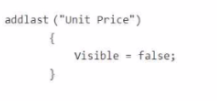
B.
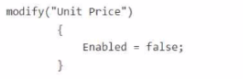
C.

D.
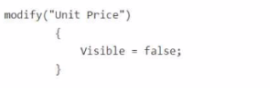
To hide the field 'Unit Price' from the Resource Card page in Microsoft Dynamics 365 Business Central, you need to modify the visibility property of the field using the modify keyword, which allows you to change the properties of an existing field on a page.
modify('Unit Price') is the correct way to target an existing field on a page (like the Resource Card page).
The line Visible = false; makes the field invisible on the page.
Here's a breakdown of why each option is right or wrong:
Option A:
Uses addlast('Unit Price'), which is incorrect because you are not adding a new field; you're modifying an existing one. Also, Visible = false is correct for hiding a field, but the wrong method (addlast) is used.
Option B:
Uses modify('Unit Price') with Enabled = false;. This would disable the field (make it non-editable), not hide it. The field would still be visible, so this does not meet the requirement.
Option C:
Uses addlast('Unit Price'), which is incorrect, and Enabled = false;, which would disable the field, not hide it.
Option D:
modify('Unit Price') { Visible = false; } is the correct syntax for hiding the field on the page.
Correct Code Snippet:
modify('Unit Price')
{
Visible = false;
}
This hides the 'Unit Price' field from the Resource Card page.
Get access to all 122 verified questions with detailed answers.
Unlock All MB-820 Questions