Web-Development-Foundation Exam Questions & Answers
WGU Web Development Foundation (NVO1) • WGU
100% money-back guarantee
About Web-Development-Foundation Exam
The Web Development Foundation (NVO1) certification exam by Western Governors University is a comprehensive assessment designed for aspiring web developers seeking to validate their foundational knowledge in web development principles and practices. This certification covers essential topics including HTML, CSS, JavaScript fundamentals, responsive web design, web standards, accessibility, and basic backend concepts. The exam evaluates candidates' understanding of client-side technologies, version control systems, and web development best practices. Whether you're a beginner entering the tech industry or a career-changer looking to establish credibility, the WGU Web Development Foundation certification demonstrates your commitment to professional excellence and technical competency in web development.
Candidates preparing for the NVO1 exam benefit significantly from utilizing updated exam dumps and comprehensive practice tests that mirror the actual certification assessment. These study materials provide real-world scenarios and questions that help identify knowledge gaps and build confidence before test day. Practice tests enable learners to familiarize themselves with the exam format, time management, and difficulty level while exam dumps offer detailed explanations of correct answers. By incorporating these resources into a structured study plan, candidates can effectively master the core competencies required to pass the Web Development Foundation certification exam and advance their careers in the competitive web development industry.
Exam Topics & Objectives
4-Week Study Plan for Web-Development-Foundation
Week 1: Web Design Fundamentals and HTML Basics
- Review web design principles: user experience, accessibility, and responsive design concepts
- Study the client-server model and how web browsers request and render content
- Learn HTML5 semantic elements: header, nav, main, article, section, footer, aside
- Practice creating proper HTML document structure with DOCTYPE, html, head, and body tags
- Complete exercises on meta tags, character encoding, and viewport configuration
- Understand the difference between block and inline elements
- Create 3 sample HTML pages demonstrating proper semantic markup
Week 2: HTML Structure and Implementation
- Master form elements: input types, textarea, select, button, and fieldset
- Study form attributes: action, method, name, id, required, placeholder, and validation
- Learn table structure: thead, tbody, tfoot, tr, th, td elements and accessibility attributes
- Practice creating accessible forms with proper labels and ARIA attributes
- Implement form validation using HTML5 attributes (email, number, required)
- Study hyperlink implementation: anchor tags, relative paths, absolute paths, and fragments
- Build a multi-page website with proper navigation and internal linking
- Create a complex form with various input types and proper semantic structure
Week 3: CSS Styling Fundamentals and Selectors
- Study CSS selector types: element, class, ID, attribute, pseudo-class, and pseudo-element selectors
- Learn CSS specificity and the cascade rules
- Practice the box model: margin, border, padding, and content dimensions
- Master display properties: block, inline, inline-block, flexbox, and grid
- Study color models: RGB, hex, and HSL color values
- Learn typography: font-family, font-size, font-weight, line-height, and letter-spacing
- Create stylesheets for 5 different HTML documents using various selector combinations
- Build a styled form demonstrating proper visual hierarchy and spacing
Week 4: CSS Layout and Advanced Styling
- Master flexbox layout: flex-direction, justify-content, align-items, and flex properties
- Study CSS Grid: grid-template-columns, grid-template-rows, grid-gap, and grid positioning
- Learn responsive design: media queries, mobile-first approach, and flexible sizing
- Practice positioning: static, relative, absolute, fixed, and sticky positioning
- Study transitions and transforms for interactive effects
- Learn CSS variables and how to use them for maintainable stylesheets
- Create a complete responsive website using flexbox and grid layouts
- Build a responsive navigation menu that adapts to different screen sizes
- Complete practice exam questions covering all three certification domains
- Review and refine all previous projects for accessibility and cross-browser compatibility
Sample Web-Development-Foundation Questions
Practice with real exam-style questions. Reveal answers to verify your knowledge.
A portion of the HTML for a webpage is shown.
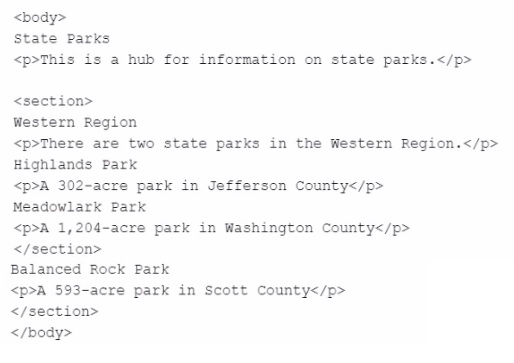
Which heading should be enclosed with an
tag?
Use the given code to answer the following question:
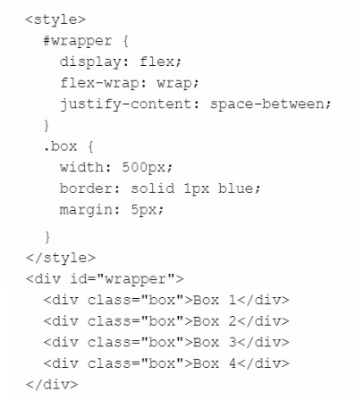
How will the boxes be arranged if the viewport's width is 600px?
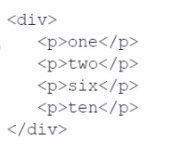
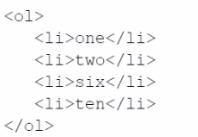
Use the given text to answer the following question:
one
two
size
ten
Which code snippet should be used to create this content?
A)
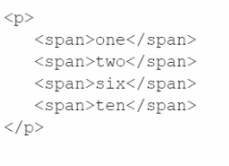
B)
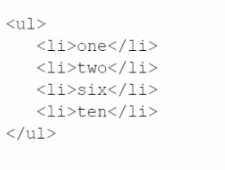
C)
D)
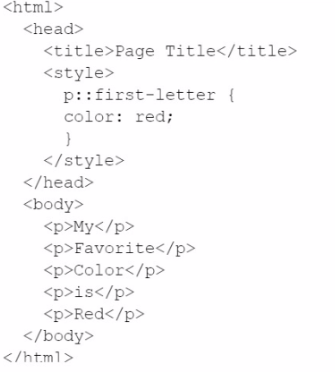
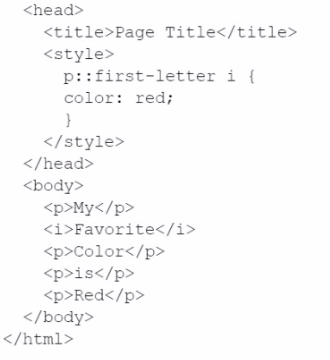
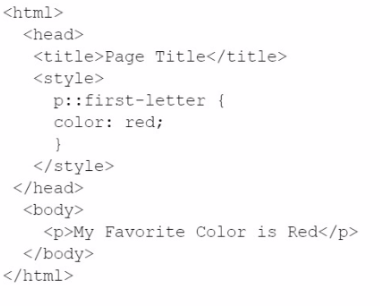
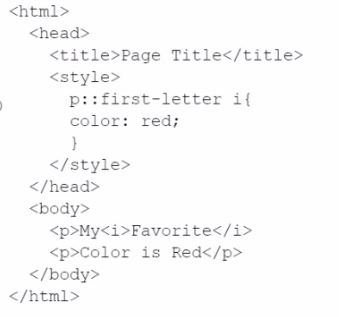
Use the given text to answer the following question:
My
Favorite
Color
is
Red
Which code can be used to style the first letter of each word in red font?
A)
B)
C)
D)
Which CSS selector is a multiple selector?
Get access to all 77 verified questions with detailed answers.
Unlock All Web-Development-Foundation Questions