100-160 Exam Questions & Answers
Cisco Certified Support Technician (CCST) Cybersecurity • Cisco
100% money-back guarantee
Sample 100-160 Questions
Practice with real exam-style questions, each with the verified correct answer and explanation.
A SOC analyst notices repeated failed login attempts from a foreign IP address followed by a successful login to a privileged account. What is the most appropriate next step?
The CCST Cybersecurity course highlights that signs of brute-force attacks followed by successful access require immediate account security actions and an investigation to determine if other systems were accessed.
'When suspicious login activity is detected, immediate containment steps such as password resets and log analysis are necessary to limit damage and identify the extent of the compromise.'
(CCST Cybersecurity, Incident Handling, Account Compromise Response section, Cisco Networking Academy)
You are reviewing the Application log on a Windows computer. You see an event with an error-level message as shown.
What can you determine about the application that generated the event message?
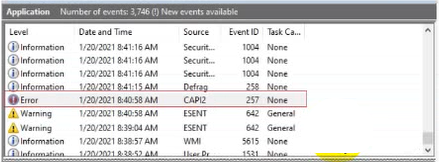
In the CCST Cybersecurity course, Windows Event Viewer Error events in the Application log indicate a severe problem that caused an application or component to fail. This usually requires investigation or repair.
'Error events indicate a significant problem such as a loss of functionality in an application or system component. Errors are often critical and need immediate attention.'
(CCST Cybersecurity, Incident Handling, Event Logging and Analysis section, Cisco Networking Academy)
A is incorrect: Performance slowness would usually generate warnings, not errors.
B is correct: An 'Error' level in Event Viewer means the application failed in some way.
C is incorrect: That describes an 'Information' event, not an error.
D is incorrect: That also corresponds to an 'Information' event.
Why is it necessary to update firmware to the latest version?
According to the CCST Cybersecurity Study Guide, firmware updates are a critical security maintenance task because vulnerabilities in firmware can be exploited by attackers to gain persistent control over hardware.
'Keeping firmware up to date is necessary to patch security vulnerabilities and weaknesses that could be exploited by threat actors. Vendors release firmware updates to correct security flaws, enhance stability, and ensure compatibility with updated security protocols.'
(CCST Cybersecurity, Endpoint Security Concepts, System and Firmware Maintenance section, Cisco Networking Academy)
A is partially true but not the primary security reason for updates.
B is incorrect because firmware is not part of the OS kernel; it's embedded in the hardware.
C is correct: patching vulnerabilities in firmware is essential for endpoint protection.
D may occur as a side benefit, but it's not the main reason from a cybersecurity perspective.
An employee accidentally sends an email containing sensitive corporate information to an external email address.
Which type of threat does this scenario describe?
The CCST Cybersecurity Study Guide explains that an insider threat is any threat to an organization that comes from people within the organization---employees, contractors, or business partners---who have inside information concerning the organization's security practices, data, and systems. Insider threats may be intentional or unintentional.
'An insider threat can be malicious or accidental. Employees may unintentionally cause data breaches by mishandling sensitive information, such as sending it to the wrong recipient.'
(CCST Cybersecurity, Essential Security Principles, Threat Actor Types section, Cisco Networking Academy)
A (Logic bomb) is malicious code triggered by conditions.
B (Malware) is malicious software, unrelated to accidental email leaks.
C (Phishing) is an external social engineering attack.
D is correct: This is an unintentional insider threat.
You work for a hospital that stores electronic protected health information (ePHI) in an online portal. Authorized employees can use their mobile devices to access patient ePHI.
You need to ensure that employees' mobile devices comply with HIPAA regulations.
Which safeguard should you develop and implement?
The CCST Cybersecurity Study Guide notes that HIPAA (Health Insurance Portability and Accountability Act) requires that ePHI be protected both in storage and when devices are decommissioned or repurposed. This includes implementing data removal policies for mobile devices.
'HIPAA requires procedures for the removal of electronic protected health information (ePHI) from devices before disposal, reuse, or reassignment.'
(CCST Cybersecurity, Essential Security Principles, Regulatory Compliance section, Cisco Networking Academy)
Get access to all 50 verified questions with detailed answers.
Unlock All 100-160 Questions