B2B-Commerce-Developer Exam Questions & Answers
Salesforce Accredited B2B Commerce Developer Professional • Salesforce
100% money-back guarantee
Sample B2B-Commerce-Developer Questions
Practice with real exam-style questions, each with the verified correct answer and explanation.
What are three ways to implement custom post Order processing? (3 answers)
Three ways to implement custom post Order processing are:
Extend cc_hk_invoice to handle custom business logic post Order processing. This hook allows modifying the invoice data or performing additional actions after an Order is placed. For example, the hook can send an email notification or update a custom field on the invoice record.
Use cc_hk_Order.placeTarget to define a new Order Confirmation page which executes additional business logic. This hook allows specifying a custom Visualforce page that will be displayed after an Order is placed. The custom page can include additional business logic or user interface elements.
Which three statements are accurate?
Salesforce documentation clarifies the interoperability between Aura and Lightning Web Components (LWCs). An Aura component can indeed contain another Aura component, as well as a LWC, allowing for a mix of component technologies in a single application. However, due to the architectural and design principles of LWCs, a LWC cannot contain an Aura component. This is because LWCs are designed to be lightweight and leverage web standards, which makes them not fully compatible with the older Aura component framework in terms of containment.
A developer has made a component with a lightning combobox in the follow! markup. To handle changes on the combobox, what should replace
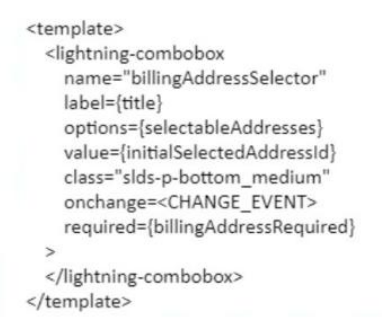
To handle changes on the combobox, the developer should replace <CHANGE EVENT> with {handleChange}. The handleChange is a function that is defined in the JavaScript file of the Lightning web component and is invoked when the value of the combobox changes. The developer can use this function to perform custom logic or actions based on the selected value of the combobox, such as updating other components or properties, calling Apex methods or services, or firing events. The developer can use the onchange attribute to bind the handleChange function to the combobox element in the HTML file of the Lightning web component. The onchange attribute is an HTML attribute that specifies a function to be executed when the value of an element changes. {event:handleChange} is not a valid way to handle changes on the combobox, as it is not a valid syntax for binding a function to an element. javascript:void(0);handleChange(); is not a valid way either, as it is not a valid syntax for binding a function to an element. {handleChange()} is not a valid way either, as it is not a valid syntax for binding a function to an element. Salesforce Reference: Lightning Web Components Developer Guide: Handle Events, Lightning Web Components Developer Guide: Communicate with Properties, Lightning Web Components Developer Guide: lightning-combobox
Which two Salesforce B2B Commerce visualforce pages must be enabled at a Salesforce Community level to make the out of the box SEO functionality available? (2 answers)
Two Salesforce B2B Commerce Visualforce pages that must be enabled at a Salesforce Community level to make the out of the box SEO functionality available are:
CCSizeIndex: This page generates a sitemap.xml file, which is a file that lists all the pages and resources on a site that can be crawled by web crawlers. The page uses the configuration settings CO.SiteMapIncludeProducts and CO.SiteMapIncludeCategories to specify which products and categories should be included in the sitemap.
Which three pages should be enabled for the Guest user profile for a storefront to have anonymous checkout? (3 answers)
Three pages that should be enabled for the Guest user profile for a storefront to have anonymous checkout are:
CCPaymentInfo: This page allows the guest user to enter their payment information, such as credit card number, expiration date, and security code. The page also displays the order summary and total amount.
CheckoutNew: This page allows the guest user to enter their shipping and billing information, such as name, address, phone number, and email. The page also displays the cart items and shipping options.
Get access to all 221 verified questions with detailed answers.
Unlock All B2B-Commerce-Developer Questions