HPE7-A06 Exam Questions & Answers
HPE Campus Access Switching Expert Written Exam • HP
100% money-back guarantee
Sample HPE7-A06 Questions
Practice with real exam-style questions, each with the verified correct answer and explanation.
Exhibit.
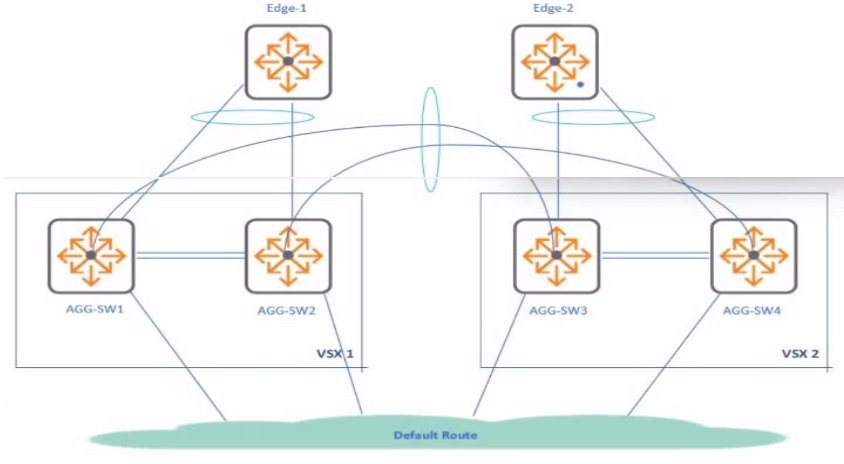
The customer has VSX clusters in two locations interconnected over an MC-LAG interface.
If active-gateway configuration uses the same virtual IP address and vMAC on each of the VSX nodes, what must you take into consideration0
The scenario describes two separate VSX clusters interconnected via MC-LAG, where both clusters are configured to use the exact same virtual IP address and virtual MAC address for their respective Active Gateway SVIs.
Active Gateway Scope & Conflict: Active Gateway provides a highly available default gateway within a single VSX cluster (L2 domain). The vIP/vMAC combination should be unique within its L2 broadcast domain.
Interconnecting Clusters with Same vIP/vMAC: When two VSX clusters using the identical Active Gateway vIP/vMAC are interconnected at Layer 2 (even via MC-LAG), this creates a situation where the same active L2 (vMAC) and L3 (vIP) address exists in multiple places within the extended broadcast domain.
Consequences: This leads to MAC address conflicts and L3 ambiguity. ARP resolution becomes unreliable, potentially causing ARP tables to flap on connected devices. Traffic forwarding becomes unpredictable, as packets destined for the vIP/vMAC might be delivered to the 'wrong' cluster. This unstable and unpredictable state is sometimes referred to as an asymmetric or 'async' setup.
Analysis of Options:
A: ISL traffic might change, but it's a symptom, not the root problem.
B: Multiple ARP replies would occur, contributing to the confusion.
C: The configuration results in an 'async setup,' accurately describing the unstable state caused by duplicate active L2/L3 addresses across the interconnected L2 domain.
D: Load-balancing happens within a cluster; this setup causes conflict, not predictable load balancing across clusters.
Conclusion: Reusing the same Active Gateway vIP and vMAC across interconnected VSX clusters is not a valid design and leads to an unstable, asymmetric ('async') environment due to address duplication within the extended L2 domain. Option C best describes this problematic outcome.
The client would like to automate the process of troubleshooting issues to have better visibility. Which solution would you recommend for your client?
The client wants to automate troubleshooting processes and gain better visibility into their network. We need to identify the recommended Aruba solution.
Analysis of Options:
A . HPE Aruba Networking Fabric Composer: A tool primarily for data center fabric provisioning and management, not general campus troubleshooting automation.
B . HPE Aruba Networking Switch Multi-Edit Software: Likely refers to configuration management features (e.g., in Central or NetEdit) for applying changes to multiple switches, not primarily focused on automated troubleshooting or visibility.
C . Automate processes with scripting like Python: AOS-CX supports on-box scripting (NAE) and REST APIs, enabling custom automation for monitoring and troubleshooting. While powerful, it requires development effort.
D . AIOps integrated into HPE Aruba Networking Central: Aruba Central's AIOps capabilities are specifically designed to enhance visibility and automate aspects of troubleshooting. It uses AI/ML to analyze network data, detect anomalies, provide insights into potential issues, correlate events, and offer prescriptive recommendations, directly addressing the client's need for better visibility and automated assistance with troubleshooting.
Conclusion: While custom scripting (C) allows automation, Aruba Central AIOps (D) is the platform-integrated solution specifically marketed and designed by HPE Aruba Networking to provide enhanced visibility and automated insights for troubleshooting campus networks. It is the most direct and recommended solution among the options for achieving these goals within the Aruba ecosystem.
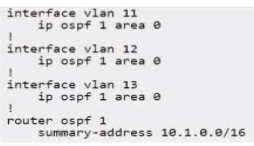
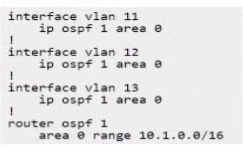
You want to use OSPF to advertise a only .\16 summary route for the SVls below to a neighbor In the same area (area 0).
Which configuration will achieve this?
A)

B)
C)

D)

E.
The goal is to configure OSPF on a router so that it advertises only a 10.1.0.0/16 summary route for the specific SVIs (VLAN 11, 12, 13, assumed to be within the 10.1.x.x range) to its OSPF neighbors within the same area (Area 0).
OSPF Intra-Area Behavior: A fundamental principle of OSPF (link-state protocols) is that all routers within the same area must have an identical Link State Database (LSDB) for that area. This means all routers learn about all the specific networks (Type-1 Router LSAs, Type-2 Network LSAs) within their area. OSPFv2 does not support summarizing routes in a way that hides specific network LSAs from other routers within the same area. Summarization occurs only at area boundaries (by ABRs using Type-3 Summary LSAs via the area range command) or for external routes redistributed into OSPF (by ASBRs using Type-5 External LSAs via the summary-address command).
Analysis of Options:
A) area 0 range 10.1.0.0/16: This command is used on an Area Border Router (ABR) to summarize routes originating from Area 0 when advertising them into another area (e.g., the backbone). It does not affect LSA flooding within Area 0. It also includes redistribute connected, which is unrelated here.
B) summary-address 10.1.0.0/16: This command is used on an Autonomous System Boundary Router (ASBR) to summarize external routes being redistributed into OSPF. It is not used for summarizing internal OSPF routes like SVIs defined within an OSPF area.
C) & D) summary-address 10.1.0.0/16: Same issue as B; incorrect command for summarizing internal OSPF routes.
E) area 0 range 10.1.0.0/16: Similar to A, this uses the area range command. It correctly shows the SVIs configured for OSPF Area 0 first. However, like A, this command performs inter-area summarization on an ABR and does not suppress the specific LSAs within Area 0.
Conclusion: The question asks for something that OSPFv2 cannot do: advertise only a summary route within the same area while suppressing specifics. Therefore, none of the configurations will achieve the exact stated outcome. However, if the question is flawed and intends to ask which configuration uses the correct command structure for summarizing internal OSPF routes (even if only effective between areas), then the area range command is the relevant one. Both A and E use this command. Option E is slightly better structured as it shows the interfaces being added to OSPF Area 0 first. Assuming this is the intended direction despite the impossibility of the specific request, E is the most plausible choice among the given options.
You are configuring VSX active gateway on CX 8360 campus aggregation switches when the switch prompt returns the following error: "No more than IB VMACs can be configured."
What should be done to address this issue?
The error 'No more than 16 vMACs can be configured' occurs when trying to configure active-gateway on multiple SVIs on a CX 8360 VSX pair. This indicates a platform limit on the number of unique virtual MAC addresses has been reached.
Active Gateway vMACs: Each SVI configured with Active Gateway requires a virtual MAC address (vMAC). While AOS-CX can auto-generate these, doing so consumes entries from a limited hardware pool (e.g., 16 on this platform/version).
Best Practice & Solution: The recommended best practice to conserve these limited vMAC resources is to manually specify and reuse the same virtual MAC address across all SVIs configured with Active Gateway on that specific VSX pair. Since MAC addresses are Layer 2 local, using the same vMAC on different SVIs (different L3 subnets) does not cause conflicts within the VSX pair's operation.
Analysis of Options:
A: Limiting the number of SVIs using Active Gateway is a workaround, not a solution.
B: Changing switch profiles doesn't typically alter hardware vMAC limits.
C: Changing to a higher-end switch model might increase limits but is not the first or standard solution.
D: Reusing the same VMAC across SVIs (active-gateway ip <vip> mac <SAME_VMAC>) avoids consuming a new vMAC entry for each SVI, thus staying within the platform limit. This is the standard, recommended solution.
Conclusion: The correct approach to address the vMAC limit error is to explicitly configure the same virtual MAC address for all SVIs using the Active Gateway feature on the VSX pair.
Refer to the exhibit.
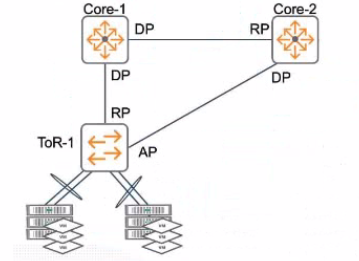
Acme Corp has VM workload running downstream of ToR-1 and has noticed performance degradation. They suspect ToR-1 uplinks are periodically over utilized. A partner has suggested you migrate your legacy 1U Coie-1 and Cote-2 to the CX 6400 series.
Which aspects of this platform would solve the customer's problem, while focusing on implementing HPE Aruba Networking best practices? (Select two.)
The question involves a customer experiencing performance degradation due to periodic overutilization of ToR-1 uplinks to legacy Core-1 and Core-2 switches. The proposed solution is to migrate to CX 6400 series switches, and the task is to identify which aspects of the CX 6400 platform address the issue while adhering to HPE Aruba Networking best practices.
Analysis of Options:
Option A: Incorrect. The CX 6400 does not support ''multi-region design'' as a feature for active forwarding pathways.
Option B: Correct. Virtual Switching Framework (VSF) on the CX 6400 allows multiple active forwarding pathways by creating a single logical switch from multiple physical switches, eliminating the need for STP in the core and reducing uplink congestion.
Option C: Incorrect. Backplane stacking does not directly enable ESXi hosts to load balance using active LACP; this is unrelated to uplink utilization.
Option D: Correct. Multi-Chassis Link Aggregation (MC-LAG) allows Core-1 and Core-2 to form a single logical 802.3ad (LACP) device, enabling active-active uplinks from ToR-1 and load balancing traffic to prevent overutilization.
Why B and D are Correct: The performance degradation is caused by uplink overutilization, likely due to STP blocking redundant paths or inefficient load balancing. The CX 6400's VSF capability combines multiple switches into a single logical device, allowing all uplinks from ToR-1 to be active without relying on STP, which often blocks redundant paths. MC-LAG further enhances this by presenting Core-1 and Core-2 as a single LACP system, enabling ToR-1 to use all uplinks actively via LACP load balancing. These features align with HPE Aruba Networking best practices for high-availability and performance in campus core deployments.
Relevance to Certification Objectives:
Network Resiliency and Virtualization (8%): Designing and troubleshooting VSF and MC-LAG for resiliency and redundancy.
Performance Optimization (6%): Analyzing and remediating uplink utilization issues.
Connectivity (9%): Applying advanced networking architectures like VSF and MC-LAG.
HPE Aruba Networking AOS-CX Configuration Guide: VSF and MC-LAG Configuration, detailing active forwarding and load balancing.
HPE7-A06 Study Guide: Covers core switch resiliency and performance optimization.
HPE Aruba Networking Technical Documentation: CX 6400 Series Deployment Best Practices.
Get access to all 70 verified questions with detailed answers.
Unlock All HPE7-A06 Questions