JN0-106 Exam Questions & Answers
Junos, Associate (OS 21.2) • Juniper
100% money-back guarantee
Sample JN0-106 Questions
Practice with real exam-style questions, each with the verified correct answer and explanation.
Which command is used to view real-time traffic statistics for all interfaces?
In Junos OS, there is a distinct difference between show commands and monitor commands. While show commands provide a static snapshot of the current state of the device or its interfaces at the moment the command is executed, monitor commands provide dynamic, real-time updates. To view live traffic statistics across all physical and logical interfaces, the correct command is monitor interface traffic.
When this command is executed, the CLI enters an interactive text-based interface (TUI) that displays a list of interfaces along with their input and output rates in bits per second (bps) and packets per second (pps). The display refreshes automatically (usually every few seconds), allowing an administrator to observe traffic spikes or drops as they occur without manually re-running a command. This is an invaluable tool for troubleshooting congestion or verifying that traffic is flowing as expected after a configuration change. Commands like show interfaces extensive provide significantly more detail---including error counters and physical layer parameters---but they are not real-time and require manual execution to update the statistics. The monitor interface traffic command simplifies the view to focus specifically on throughput metrics across the entire device. Reference: Operational Monitoring and Maintenance, Interface Monitoring, Real-time Statistics.
Which statement about class of service (CoS) in a network is correct?
Class of Service (CoS) is a fundamental suite of features in Junos OS designed to manage traffic patterns during periods of network congestion. Rather than treating all packets equally, CoS allows the Packet Forwarding Engine (PFE) to differentiate between various types of traffic---such as latency-sensitive Voice over IP (VoIP), critical routing protocol updates, and standard 'best-effort' internet traffic---and prioritize them accordingly. When egress interface buffers become saturated, the CoS mechanism uses defined schedulers and queues to ensure that high-priority packets are transmitted first, while less critical traffic may be delayed or dropped.
It is important to distinguish CoS from security or addressing functions. CoS does not provide encryption services (which is the role of IPsec or MACsec), nor does it manage IP address allocation or VLAN segmentation. Instead, it focuses entirely on the intelligent allocation of bandwidth and buffer resources. By implementing CoS, network architects can guarantee a specific level of performance for mission-critical applications, effectively minimizing jitter and packet loss for the most important data streams. This deterministic behavior is vital for modern converged networks where multiple traffic types compete for limited hardware resources across the switch fabric or WAN links. Reference: Junos OS Fundamentals, Class of Service (CoS) Overview.
Refer to the exhibit.
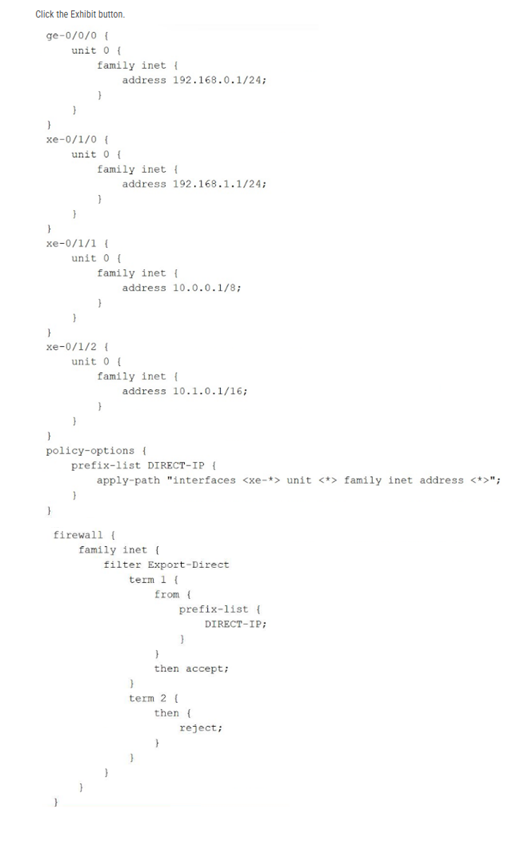
Referring to the exhibit, which command would be used to view the IP subnet addresses associated with prefix-list DIRECT-IP?
The exhibit illustrates the use of the apply-path feature within a prefix list configuration. In Junos OS, apply-path is a dynamic configuration utility that allows a prefix list to be automatically populated with values derived from other parts of the configuration---in this case, all IPv4 addresses assigned to interfaces with the xe-* prefix. This is particularly useful for building automated firewall filters or routing policies that stay updated as interfaces are added or modified.
When viewing the standard configuration using show configuration, the CLI only displays the literal apply-path statement. To verify the actual list of IP addresses that the system has inherited and populated into the DIRECT-IP list, the administrator must use the | display inheritance pipe filter. This command instructs the Junos OS parser to expand all inherited values and dynamic paths, showing the effective configuration as it is seen by the Packet Forwarding Engine. Based on the exhibit, this would reveal the subnets associated with xe-0/1/0, xe-0/1/1, and xe-0/1/2, while ignoring ge-0/0/0 because it does not match the xe-* wildcard. This verification is a critical troubleshooting step before applying such a prefix list to a transit firewall filter like Export-Direct.
Which IPv4 address and subnet mask combination represents a point-to-point link with only two usable host addresses?
In networking architecture, point-to-point (P2P) links are used to interconnect two Layer 3 devices, such as a pair of Juniper MX series routers. Because these links only involve two endpoints, using a large subnet mask would result in wasted IP addresses. The standard historical prefix for a P2P link that provides exactly two usable host addresses is /30.
A /30 subnet mask (255.255.255.252) reserves 2 bits for the host portion. Applying the usable host formula ($2^2 - 2$) results in 2 usable addresses. In the case of 192.168.1.0/30:
192.168.1.0 is the Network Address.
192.168.1.1 is the first usable host address (assigned to Router A).
192.168.1.2 is the second usable host address (assigned to Router B).
192.168.1.3 is the Broadcast Address.
While modern Junos OS versions also support /31 masks for point-to-point links (which eliminate the network and broadcast address overhead to provide two hosts), the /30 mask remains the classic and most widely recognized answer for providing 'only two usable host addresses' within the standard subnetting framework. Using /30 ensures compatibility across all legacy and multi-vendor environments while precisely meeting the connectivity requirements of a dedicated link between two interfaces.
You want to redeploy a Junos device by clearing the existing configuration and resetting it to factory defaults. In this scenario, which command would help to accomplish this task?
When a network architect needs to completely sanitize a Junos device for redeployment or decommissioning, the request system zeroize command is the most thorough tool available. Unlike simply loading the factory default configuration, which only resets the configuration database, the zeroize command performs a deep wipe of the system.
Specifically, this command removes all user-created data, including all configuration files (active and rollback), log files, license keys, and any locally stored files in the /var/tmp or /home directories. It essentially restores the device to its 'pristine' out-of-box state. Once the command is initiated, the device reboots and goes through a sanitization process. This is a critical security measure to ensure that sensitive information---such as encrypted passwords, proprietary routing policies, or SNMP community strings---does not leave the organization when hardware is transferred.
In contrast, the request system storage cleanup command is a maintenance utility used to delete temporary files and old log entries to free up disk space, but it does not affect the running configuration or user accounts. Therefore, for a total system reset that includes configuration deletion, zeroize is the mandatory operational command.
Get access to all 95 verified questions with detailed answers.
Unlock All JN0-106 Questions