JN0-481 Exam Questions & Answers
Data Center, Specialist • Juniper
100% money-back guarantee
Sample JN0-481 Questions
Practice with real exam-style questions, each with the verified correct answer and explanation.
Referring to the exhibit,
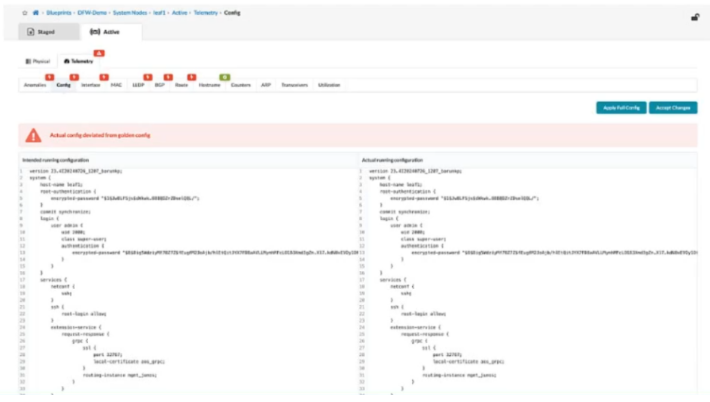
what happens when an operator clicks the Accept Changes button on the right side of the screen in Juniper Apstra?
In Apstra 5.1, this screen represents a configuration deviation workflow: Apstra is comparing the intended (golden) configuration it generated from blueprint intent against the actual configuration currently on the device. When an operator makes a change directly on the switch CLI (for example, on a Junos v24.4 leaf), Apstra detects the difference and flags it as drift because it did not originate from the blueprint's intent model.
Clicking Accept Changes tells Apstra to adopt the device's current CLI state as the new accepted baseline for that device, effectively incorporating the observed CLI delta into Apstra's intended configuration for purposes of future comparison and compliance. In other words, Apstra stops treating that specific deviation as an error because it has been acknowledged and absorbed into the ''golden config'' (the intent-aligned configuration Apstra considers correct for that node). This is commonly used when an emergency change was made on-box and you want Apstra's source of truth to reflect it, rather than reverting it.
This differs from Apply Full Config, which is used to push Apstra's intended configuration down to the device to restore compliance. If you do not accept the change, a later commit/apply action can overwrite the CLI-entered configuration to re-align with blueprint intent.
You are performing an upgrade to your switches in your network. You want to ensure that the upgrade can be performed without interrupting traffic. In the Juniper Apstra UI, which deploy mode should be used to accomplish this task?
In Apstra, Deploy Mode = Drain is the operational mechanism used to gracefully remove a switch from active forwarding before performing maintenance such as an OS upgrade. Drain mode is specifically intended to drain traffic while preserving fabric stability, so that maintenance can be executed with minimal to no application impact, provided the fabric design has sufficient redundancy (for example, ECMP in the underlay and dual-homing/ESI for server attachments). In an EVPN-VXLAN IP fabric, taking a leaf or spine abruptly out of service can cause transient loss of reachability as underlay adjacencies reconverge and the overlay recalculates paths. By placing the device into Drain, Apstra adjusts intent so that traffic is shifted away from the device as much as possible, reducing dependency on it before the upgrade begins.
This is different from Undeploy, which removes Apstra-rendered configuration and is generally used for decommissioning; if a device is carrying traffic, Apstra guidance is to drain first. Ready is a pre-deploy state used in lifecycle workflows, not a maintenance traffic-shifting mode. Deploy keeps the device fully participating. Therefore, for a maintenance window where the goal is ''upgrade with minimal interruption,'' the correct mode is Drain, then perform the Junos v24.4 upgrade, and finally return the device to Deploy.
Verified Juniper sources (URLs):
https://www.juniper.net/documentation/us/en/software/apstra4.2/apstra-drain-mode/apstra-drain-mode.pdf
https://www.juniper.net/documentation/us/en/software/apstra4.2/apstra-user-guide/topics/topic-map/deploy-mode-update-datacenter.html
https://www.juniper.net/documentation/us/en/software/apstra6.0/apstra-user-guide/topics/topic-map/device-config-lifecycle.html
You are allowed to assign tags for which three objects? (Choose three.)
In Apstra, tags are an intent-level metadata mechanism used to classify objects and drive automation and reuse. Within a data center blueprint, Apstra supports tagging multiple blueprint objects so operators can apply configuration or policy logic conditionally (for example, applying a connectivity template or a configlet based on a tag match). In this scenario, three valid taggable objects are virtual networks, interfaces, and generic systems.
Virtual network tagging is supported directly from the blueprint's virtual network table, enabling you to label virtual networks (such as ''finance,'' ''pci,'' or ''dev'') and then reference those tags elsewhere in blueprint operations and policy application. Interface tagging is also explicitly supported in the blueprint, allowing you to assign tags to switch interfaces and use those tags to control how templates, assignments, or other intent-driven operations apply to those ports. Finally, generic systems (which are modeled endpoint systems such as servers or external routers represented as ''systems'' in the blueprint) can be tagged so that downstream intent logic can distinguish system roles and apply the correct operations consistently across expansions and changes.
By contrast, property sets are structured data objects used for variable substitution and probe/configlet parameterization, not a primary target for operational tagging in the blueprint UI; and device profiles are catalog artifacts describing hardware/NOS compatibility rather than blueprint objects typically tagged for intent application.
Verified Juniper sources (URLs):
https://www.juniper.net/documentation/us/en/software/apstra5.1/apstra-user-guide/topics/topic-map/tag-interface-add-remove-datacenter.html
https://www.juniper.net/documentation/us/en/software/apstra5.0/apstra-user-guide/topics/task/tag-virtual-network-update.html
https://www.juniper.net/documentation/us/en/software/apstra5.0/apstra-user-guide/topics/topic-map/tag-system-add-remove-freeform.html
Which element of an intent-based analytics (IBA) probe is used to specify the database objects to which the probe will apply?
In Apstra 5.1, Intent-Based Analytics (IBA) is built on Apstra's graph-based source of truth, where devices, interfaces, links, routing constructs, and services are represented as nodes with relationships. An IBA probe is effectively a processing pipeline (a directed acyclic graph of stages and processors) that ingests telemetry and then performs calculations, aggregations, and anomaly detection. To make any of that work, the probe must first determine which specific objects in the graph---for example, which leaf switches, which uplinks, which BGP sessions, or which interface counters---should be included in the analysis.
The probe element that selects those objects is the graph query. A graph query is evaluated against Apstra's graph database to return a set of matching nodes/relationships; those query results then become the scope for ingestion and subsequent processing. In other words, the graph query defines ''apply this probe to these devices/interfaces/sessions,'' and it also provides the context used to bind telemetry identities (key-value pairs describing the metric source) to the correct logical objects in the blueprint. This is why Apstra documentation describes early probe processors producing outputs whose cardinality aligns with the number of results returned by the specified graph query(s). Without a graph query, the probe would not have a deterministic, intent-aligned target set for analytics, and the same probe definition could not be reliably reused across fabrics or blueprints.
You have an EVPN-VXLAN data center IP fabric, with all single-homed hosts/servers. Which two EVPN route types are present in this scenario? (Choose two.)
In an EVPN-VXLAN fabric where all hosts are single-homed (each endpoint is attached to only one leaf/VTEP), the EVPN control plane still needs to advertise endpoint reachability and enable BUM handling across the overlay. Two EVPN route types are fundamental in this case: Type 2 and Type 3.
EVPN Route Type 2 (MAC/IP Advertisement) is used to advertise learned MAC addresses and, optionally, associated IP addresses for endpoints connected to the local leaf. This enables remote VTEPs to learn where a given host resides (which VTEP to send unicast traffic to) without relying on data-plane flooding for MAC learning. In Junos v24.4 EVPN-VXLAN deployments, Type 2 routes are the core mechanism for distributing endpoint reachability (MAC and MAC+IP bindings) within the EVPN domain.
EVPN Route Type 3 (Inclusive Multicast Ethernet Tag / IMET) is used to establish the flooding scope for BUM traffic in EVPN-VXLAN. In VXLAN fabrics that use ingress replication (common in data centers), Type 3 routes help build the list of remote VTEPs that should receive replicated BUM traffic for a given segment.
By contrast, Type 4 (Ethernet Segment) routes are associated with EVPN multihoming (ESI-based) and DF election; with only single-homed hosts, Type 4 is not required. Type 7 is not part of the baseline single-homed EVPN-VXLAN host advertisement set in this context.
Verified Juniper sources (URLs):
https://www.juniper.net/documentation/us/en/software/junos/evpn/topics/concept/evpn-bgp-multihoming-overview.html
https://www.juniper.net/documentation/us/en/software/junos/evpn/topics/topic-map/assisted-replication-evpn.html
Get access to all 65 verified questions with detailed answers.
Unlock All JN0-481 Questions