FCP_FAZ_AN-7.6 Exam Questions & Answers
Fortinet NSE 5 - FortiAnalyzer 7.6 Analyst • Fortinet
100% money-back guarantee
Sample FCP_FAZ_AN-7.6 Questions
Practice with real exam-style questions, each with the verified correct answer and explanation.
Which log will generate an event with the status Contained?
What are two effects of enabling auto-cache in a FortiAnalyzer report? (Choose two.)
Enabling auto-cache in FortiAnalyzer reports is designed to improve the efficiency and speed of report generation by leveraging cached data. Let's analyze each option to determine which effects are correct.
Option A - The Generation Time for Reports is Decreased:
When auto-cache is enabled, FortiAnalyzer can use previously cached data instead of reprocessing all log data from scratch each time a report is generated. This results in faster report generation times, especially for recurring reports that use similar datasets.
Conclusion: Correct.
Option B - Hard-Cache Data is Automatically Updated When New Logs are Received:
Enabling auto-cache does not immediately update the cache with every new log received. Instead, the cache is updated when reports are generated, based on the existing logs up to that point. Therefore, auto-cache does not constantly refresh with each incoming log, which would be inefficient.
Conclusion: Incorrect.
Option C - FortiAnalyzer Local Cache is Used to Store Generated Reports:
Auto-cache utilizes FortiAnalyzer's local cache to store data used in reports, reducing the need to retrieve and process logs repeatedly. This cached data can be reused for subsequent report generation, enhancing performance.
Conclusion: Correct.
Option D - The Size of Newly Generated Reports is Optimized to Conserve Disk Space:
Auto-cache does not directly impact the size of the report files themselves. It focuses on performance optimization through cached data for faster access, but it does not compress or optimize the storage size of the generated report.
Conclusion: Incorrect.
Conclusion:
Correct Answe r: A. The generation time for reports is decreased and C. FortiAnalyzer local cache is used to store generated reports.
Enabling auto-cache helps reduce report generation time by using locally cached data and optimizes report processing, though it does not impact report size or continuously update with each new log.
FortiAnalyzer 7.4.1 documentation on report caching, auto-cache functionality, and report generation optimizations.
Which statement about sending notifications with incident update is true?
In FortiOS and FortiAnalyzer, incident notifications can be sent to multiple external platforms, not limited to a single method such as email. Fortinet's security fabric and integration capabilities allow notifications to be sent through various fabric connectors and third-party integrations. This flexibility is designed to ensure that incident updates reach relevant personnel or systems using preferred communication channels, such as email, Syslog, SNMP, or integration with SIEM platforms.
Let's review each answer option for clarity:
Option A: You can send notifications to multiple external platforms
This is correct. Fortinet's notification system is capable of sending updates to multiple platforms, thanks to its support for fabric connectors and external integrations. This includes options such as email, Syslog, SNMP, and others based on configured connectors.
Option B: Notifications can be sent only by email
This is incorrect. Although email is a common method, FortiOS and FortiAnalyzer support multiple notification methods through various connectors, allowing notifications to be directed to different platforms as per the organization's setup.
Option C: If you use multiple fabric connectors, all connectors must have the same settings
This is incorrect. Each fabric connector can have its unique configuration, allowing different connectors to be tailored for specific notification and integration requirements.
Option D: Notifications can be sent only when an incident is updated or deleted
This is incorrect. Notifications can be sent upon the creation of incidents, as well as upon updates or deletion, depending on the configuration.
Refer to Exhibit:
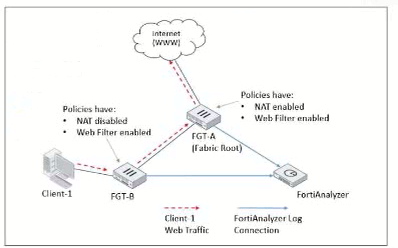
Client-1 is trying to access the internet for web browsing.
All FortiGate devices in the topology are part of a Security Fabric with logging to FortiAnalyzer configured. All firewall policies have logging enabled. All web filter profiles are configured to log only violations.
Which statement about the logging behavior for this specific traffic flow is true?
The study guide explains that in a Security Fabric, traffic logging is not duplicated across FortiGates for the same session: ''Traffic logging for a session ... is always carried out by the first FortiGate that handled it'' and if a FortiGate receives traffic from a peer FortiGate MAC, ''it does not generate a new traffic log for that session.''
For UTM (web filtering) logs, the study guide states: ''When configured, upstream devices complete UTM logging.''
In the illustrated example, it further clarifies the role split: ''All traffic from Client-1 is first received by FGT-B, which creates traffic logs for the initial session... [then] forwarded to FGT-A... [and] FGT-A ... applies web filtering ... and generates the relevant UTM logs as necessary.''
Because web filter profiles are configured to log only violations, web filter (UTM) logs will be generated only when a violation is detected---and per the study guide behavior, that UTM logging is done by the upstream FortiGate (FGT-A). Therefore, only FGT-A will create web filter logs if it detects a violation (Option D).
What is the purpose of playbook trigger variables?
Get access to all 79 verified questions with detailed answers.
Unlock All FCP_FAZ_AN-7.6 Questions