NSE4_FGT_AD-7.6 Exam Questions & Answers
Fortinet NSE 4 - FortiOS 7.6 Administrator • Fortinet
100% money-back guarantee
Sample NSE4_FGT_AD-7.6 Questions
Practice with real exam-style questions, each with the verified correct answer and explanation.
An administrator wanted to configure an IPS sensor to block traffic that triggers the signature set number of times during a specific time period. How can the administrator achieve the objective?
''Rate-based IPS signatures also allows you to detect anomalies, which are unusual behaviors in the network...''
''There are two ways to add predefined signatures to an IPS sensor. One way is to select the signatures individually... The second way to add a signature to a sensor is using filters.''
''You can also add rate-based signatures to block specific traffic when the threshold is exceeded. On the CLI, If you set the command rate-mode to periodical, FortiGate triggers the action when the threshold is reached during the configured Duration time period.''
Technical Deep Dive:
The correct answer is C. Use IPS signatures, rate-mode periodical option.
The guide is explicit that this behavior belongs to rate-based IPS signatures. The question asks for blocking traffic when a signature is triggered a certain number of times within a defined interval. That is exactly what rate-mode periodical does: it evaluates the trigger count over the configured duration window and then applies the configured IPS action when the threshold is met.
Why the other options are wrong:
A is wrong because rate-mode 60 is not the documented syntax or method.
B is wrong because packet logging records packets; it does not implement threshold-based blocking logic.
D is wrong because the guide ties rate-mode periodical to rate-based signatures, not to IPS filters as the mechanism for this threshold behavior.
Operationally, this is used for anomaly-style detection, similar in concept to lightweight rate-based protection. A typical CLI pattern is along these lines:
config ips sensor
edit 'custom-ips'
config entries
edit 1
set rule <signature_id>
set rate-mode periodical
set rate-count <threshold>
set rate-duration <seconds>
set action block
next
end
next
end
This works best when applied only to relevant protocols and signatures, because broad use of rate-based signatures can consume more resources and increase false-positive risk.
Refer to the exhibits.
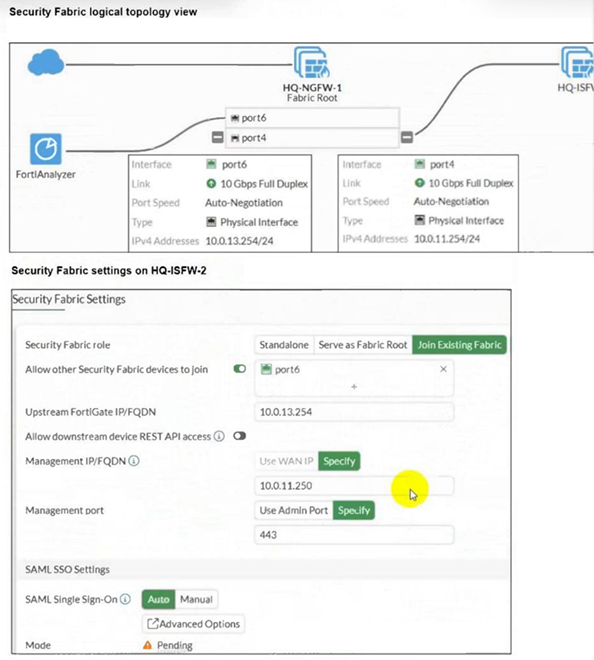
An administrator wants to add HQ-ISFW-2 in the Security Fabric. HQ-ISFW-2 is in the same subnet as HQ-ISFW. After configuring the Security Fabric settings on HQ-ISFW-2, the status stays Pending. What can be the two possible reasons? (Choose two answers)
According to the FortiOS 7.6 Security Fabric documentation and Study Guide, several conditions must be met for a downstream FortiGate to successfully join a Security Fabric.
First, the Upstream FortiGate IP/FQDN configured on the downstream device must point to the IP address of the interface on the upstream device that is listening for fabric connections. In the provided logical topology, the Fabric Root (HQ-NGFW-1) uses port4 with the IP 10.0.11.254 to connect to the internal segmentation firewalls (ISFWs). Since HQ-ISFW-2 is in the same subnet as HQ-ISFW, it is physically and logically connected to the network segment serviced by port4. Therefore, the current configuration of 10.0.13.254 (which is port6, likely the WAN side) is incorrect, and it must be set to 10.0.11.254 (Statement A).
Second, once the downstream device successfully reaches the upstream device, it enters a Pending state. For security purposes, FortiOS does not allow devices to join the fabric automatically; the administrator of the upstream device (in this case, HQ-ISFW or the root) must manually authorize the new device (Statement C) in the Fabric Management console. Until this authorization is granted, the status will remain 'Pending' and no fabric data will be synchronized. Statements B and D are incorrect as SAML settings do not block the initial fabric join, and the management IP should be the local device's IP, not the upstream's IP.
Which three statements about SD-WAN performance SLAs are true? (Choose three.)
In FortiOS 7.6, SD-WAN Performance SLAs are used to measure link quality and influence SD-WAN rule decisions. The following three statements are true.
C . All the SLA targets can be configured.
True
SD-WAN Performance SLAs allow administrators to configure:
Latency
Jitter
Packet loss
Mean Opinion Score (MOS) (for voice)
Threshold values for these metrics are fully configurable per SLA.
This is explicitly documented in the SD-WAN Performance SLA configuration section.
D . They are applied in an SD-WAN rule lowest cost strategy.
True
Performance SLAs are commonly used with the Lowest Cost (SLA-based) strategy.
In this strategy:
FortiGate selects the lowest-cost link that meets the SLA requirements.
If a link violates the SLA, it is excluded from selection.
E . They can be measured actively or passively.
True
FortiOS supports:
Active probing (synthetic probes such as ping/HTTP)
Passive measurement (based on real traffic statistics)
Administrators can choose how SLAs are measured depending on the deployment and requirements.
Why the other options are incorrect
A . They rely on session loss and jitter.
Incorrect
SLAs measure packet loss, latency, and jitter.
Session loss is not an SLA metric in FortiOS.
B . They monitor the state of the FortiGate device.
Incorrect
Performance SLAs monitor link quality, not FortiGate system health or device state.
Which statement correctly describes NetAPI polling mode for the FSSO collector agent?
NetAPI: Polls temporary sessions created on the DC when a user logs on or logs off and calls the NetSessionEnum function on Windows. It's faster than the WinSec and WMI methods; however, it can miss some logon events if a DC is under heavy system load. This is because sessions can be quickly created and purged form RAM, before the agent has a chance to poll and notify FG.
Which three methods are used by the collector agent for AD polling? (Choose three answers)
''As previously stated, collector agent-based polling mode has three methods (or options) for collecting login information. The order on the slide from left to right shows most recommend to least recommended:
* WMI ...
* WinSecLog ...
* NetAPI ...''
Technical Deep Dive:
The correct three AD polling methods are WMI, WinSecLog, and NetAPI. These are the collector-agent polling options FortiGate FSSO uses against Windows domain controllers. WMI is generally the most efficient because the DC returns requested login events directly. WinSecLog polls Windows Security Event Logs and is typically more reliable than NetAPI for not missing recorded logons. NetAPI can be faster, but it is more prone to missing events under load because it depends on temporary session information rather than persistent security logs.
Why the other options are wrong:
DNS reverse lookup is not one of the three AD polling methods. DNS is used by FSSO to resolve workstation names to IP addresses and to track IP changes, but it is not itself a polling method for collecting AD logon events. FSSO REST API is also not one of the documented collector-agent AD polling methods in the study guide.
From an operational standpoint, FSSO login collection and workstation verification are separate functions. The collector agent may still rely on DNS and workstation checks after a login is learned, but the actual AD polling methods remain only WMI, WinSecLog, and NetAPI. On a FortiGate, when troubleshooting FSSO behavior, you would typically validate the collector feed and user cache with commands such as:
diagnose debug authd fsso list
diagnose debug authd fsso server-status
Those commands help confirm whether the users gathered by the collector through one of those three polling methods are reaching FortiGate correctly.
Get access to all 93 verified questions with detailed answers.
Unlock All NSE4_FGT_AD-7.6 Questions