NSE6_FNC_AD-7.6 Exam Questions & Answers
Fortinet NSE 6 - FortiNAC-F 7.6 Administrator • Fortinet
100% money-back guarantee
Sample NSE6_FNC_AD-7.6 Questions
Practice with real exam-style questions, each with the verified correct answer and explanation.
An administrator wants FortiNAC-F to return a group of user-defined RADIUS attributes in RADIUS responses.
Which condition must be true to achieve this?
In FortiNAC-F, theRADIUS Attribute Groupsfeature allows administrators to return customized RADIUS attributes (such as specific VLAN IDs, filter IDs, or vendor-specific attributes) in anAccess-Acceptpacket sent back to a network device. This is particularly useful for supporting 'Generic RADIUS' devices that are not natively supported but can be managed using standard AVPairs.
According to theFortiNAC-F Generic RADIUS Wired Cookbookand theRADIUS Attribute Groups sectionof the Administration Guide, there is one critical prerequisite for this feature to function: theinbound RADIUS request must contain the Calling-Station-ID attribute. The Calling-Station-ID typically contains theMAC addressof the connecting endpoint. Because FortiNAC-F is a host-centric system, it uses the MAC address as the unique identifier to look up the host record, evaluate the associated Network Access Policy, and determine which Logical Network (and thus which Attribute Group) should be applied. If the incoming request lacks this attribute, FortiNAC-F cannot reliably identify the host and, as a safety mechanism, willnot include any user-defined RADIUS attributesin the response. This ensures that unauthorized or unidentifiable devices do not receive privileged access through misapplied attributes.
'Configure a set of attributes that must be included in the RADIUS Access-Accept packet returned by FortiNAC...Requirement: Inbound RADIUS request must contain Calling-Station-Id. Otherwise, FortiNAC will not include the RADIUS attributes.This attribute is used to identify the host and its current state within the FortiNAC database.' ---FortiNAC-F 7.6.0 Generic RADIUS Wired Cookbook: Configure RADIUS Attribute Groups.
Refer to the exhibit.
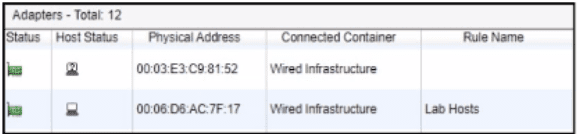
After a successful layer 2 poll, two hosts were learned on the same port The port is a member of the Role-Based Access and Forced Registration groups. The switch has been configured to leverage a single isolation VLAN.
How will FortiNAC-F manage this port?
The correct answer is A. The exhibit shows two adapters learned on the same wired port: one appears as a rogue/unknown host, and the other is associated with the Lab Hosts rule. The port is in both Role-Based Access and Forced Registration. FortiNAC-F state-based control takes precedence over policy-based provisioning, and the study guide states that when a rogue host connects to a port in the Forced Registration group, FortiNAC-F isolates that host by moving it into the registration captive network. The guide also explains that the Isolation network can be used as a single network for abnormal host states while still presenting state-specific portal pages.
Because this is a wired switch port using VLAN-based control, FortiNAC-F cannot put one host on the production VLAN and the other host on the isolation portal VLAN at the same time on the same access port. The VLAN change applies to the port, not independently to each MAC address behind that port. Therefore, the presence of the rogue host on a Forced Registration port causes the port to be provisioned to the isolation network. Option B is technically unrealistic for this access-port scenario. Option C is wrong because two MAC addresses alone do not make the port an uplink; FortiNAC-F uses uplink logic for infrastructure-device MACs, manually marked uplinks, or a threshold such as more than 20 MAC addresses. Option D is unrelated because Access Point Management is not triggered by learning two wired hosts on a port.
Where should you configure MAC notification traps on a supported switch?
In FortiNAC-F,MAC notification traps(also known as MAC Move or MAC Change traps) are essential for achieving real-time visibility of endpoint connections and disconnections. When a device connects to a switch port, the switch generates an SNMP trap that informs FortiNAC-F of the new MAC address on that specific interface. This allows FortiNAC-F to immediately initiate the profiling and policy evaluation process without waiting for the next scheduled L2 poll.
According to theFortiNAC-F Administration GuideandSwitch Integrationdocumentation, MAC notification traps should be configured onall ports except uplink ports. Uplink ports are the interfaces that connect one switch to another or to the core network. Because these ports see the MAC addresses of every device on the downstream switches, enabling MAC notification on uplinks would cause the switch to send a massive volume of redundant traps to FortiNAC-F every time any device anywhere in the downstream branch moves or reconnects. This can overwhelm the FortiNAC-F process queue and degrade system performance.
By only enabling these traps on 'edge' or 'access' ports---where individual endpoints like PCs, printers, and VoIP phones connect---FortiNAC-F receives precise data regarding exactly where a device is physically located. Uplinks should be identified in the FortiNAC-F inventory as 'Uplink' or 'Learned Uplink,' which tells the system to ignore MAC data seen on those specific ports.
'To ensure accurate host tracking and optimal system performance, SNMP MAC notification traps must be enabled on all access (downlink) ports.Do not enable MAC notification traps on uplink ports, as this will result in excessive and unnecessary trap processing. Uplink ports should be excluded to prevent the system from attempting to map multiple downstream MAC addresses to a single infrastructure interface.' ---FortiNAC-F Administration Guide: SNMP Configuration for Network Devices.
An administrator wants each department to create and manage its own contractor accounts but not be able to manage contractor accounts for other departments. What must the administrator configure to limit the sponsor's capabilities?
The correct answer is D. FortiNAC-F limits what a sponsor can create and manage through the administrator profile assigned to that sponsor. The study guide explains that sponsors can be restricted to specific guest or contractor templates and that the Manage Guests settings in the admin profile define whether the sponsor can manage all accounts, no accounts, or only accounts they created. It also states that allowed templates are defined in the admin profile, meaning each department can be given access only to its own contractor template.
The contractor template defines account fields, role values, authentication method, account duration, and related account properties, but it does not by itself restrict what a sponsor can manage. Portal settings control how users interact with the captive portal or kiosk page, not sponsor administrative scope. A user/host profile is used for matching users or hosts in policy decisions; it does not delegate sponsor permissions. For departmental separation, the administrator must create sponsor-specific administrative profiles that allow only the appropriate templates and account-management scope.
As part of a company policy, all end stations must be scanned for compliance each day. The security administrators want to satisfy this requirement without any necessary interaction from the end user. Which two agents can provide that functionality? (Choose two.)
The correct answers are B and C. The persistent agent is the strongest fit because it is installed and stays resident on the endpoint. The study guide states that after deployment, the persistent agent communicates back to FortiNAC-F every 15 minutes and performs scheduled scans in the background, transparent to the end user. That directly satisfies the requirement for recurring compliance scans without user involvement.
The passive agent can also scan Windows domain end stations without end-user interaction. The guide states that the passive agent is deployed through login/logoff scripts and administrative templates, and that passive agent registration can register and scan hosts associated with LDAP or Active Directory users. If enabled, the passive agent scans the host to verify compliance with the appropriate endpoint policy.
Option A is wrong because the dissolvable agent is a run-once agent that requires manual end-user interaction in the captive portal, then removes itself after reporting results. Option D is not the best answer for this requirement because the mobile agent is specifically for Android onboarding and is manually installed; it is not the general solution for daily compliance scanning of all end stations.
Get access to all 60 verified questions with detailed answers.
Unlock All NSE6_FNC_AD-7.6 Questions