NSE6_EDR_AD-7.0 Exam Questions & Answers
Fortinet NSE 6 - FortiEDR 7.0 Administrator • Fortinet
Sample NSE6_EDR_AD-7.0 Questions
Practice with real exam-style questions, each with the verified correct answer and explanation.
Refer to the Exhibit:
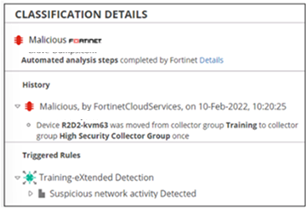
Based on the event shown in the exhibit, which two statements about the event are true? (Choose two answers)
The correct answers are A and B.
The exhibit shows the event classification as Malicious, classified by FortinetCloudServices, and the history states that device R2D2-kvm63 was moved from the Training Collector Group to the High Security Collector Group. This is a Playbook action. The FortiEDR guide explains that after classification changes, the Overview pane displays the history of automatic FortiEDR actions, including Playbook policy-related actions.
The guide specifically lists Move device to High Security Group under Investigation actions in Playbook policies. It states that a checkmark in a classification column means the device is automatically moved to the High Security Collector Group when a security event with that classification is triggered. So the exhibit proves that Playbooks are configured for this event.
The second correct answer is B because the triggered rule is under Training * Extended Detection. The FortiEDR guide states that the eXtended Detection Policy logs events and displays them in the Incidents tab, but no blocking options are provided for this policy.
Option C is wrong because moving a device to the High Security Collector Group is not the same as isolating the device. Isolation would block communication to/from the affected Collector. The exhibit shows a Collector Group move, not isolation.
Option D is wrong because Extended Detection does not block. The guide explicitly says Extended Detection events are logged and displayed, with no blocking options provided.
Refer to the Exhibit:
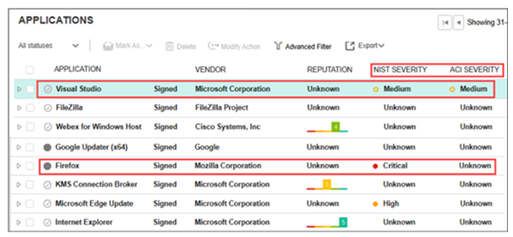
A FortiEDR analyst is prioritizing response efforts. One application has a vulnerability score of Critical but an Unknown ACI rating, while another has a Medium vulnerability score with active ACI evidence of adversary targeting. Which application must be addressed first? (Choose one answer)
The correct answer is D.
The FortiEDR 7.0.0 Administration Guide explains that FortiEDR displays two severity ratings for applications: NIST Severity and ACI Severity. NIST Severity is based on FortiEDR's vulnerability scoring system using the NIST Cybersecurity Framework. ACI Severity, however, is Adversary Centric Intelligence provided by FortiRecon and FortiGuard Threat Analysts, covering dark web, open-source, and technical threat intelligence, including threat actor insights. This helps administrators proactively assess risk, respond faster to incidents, understand attackers, and protect assets.
The guide also states that FortiEDR helps analysts prioritize alerts and incidents using risk factors such as severity of vulnerabilities, relevance of threat intelligence feeds, and severity of affected endpoints, so effort is focused on the most significant organizational risks.
Therefore, the application with Medium NIST severity but active ACI evidence of adversary targeting should be prioritized over an application with Critical NIST severity but Unknown ACI rating, because active adversary-centric intelligence indicates current attacker interest or exploitation relevance. In plain terms: a theoretical critical vulnerability matters, but an actively targeted vulnerability is the fire you put out first.
Option B is tempting but incomplete because it relies only on NIST/CVSS severity. FortiEDR's ACI rating exists specifically to add adversary context to prioritization. Option A is wrong because FortiEDR does not treat all vulnerable applications equally. Option C is wrong because asset criticality can matter, but the guide does not say prioritization depends only on asset criticality.
Refer to the exhibits.
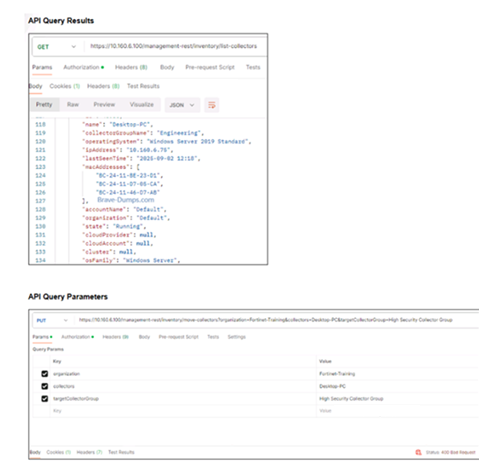
You are attempting to move a collector into the High Security Collector Group for isolation but encounter an error in the API request as shown in the exhibit. To successfully isolate the collector, which API parameter must you correct? (Choose one answer)
The correct answer is A. Set the organization parameter to Default.
From the first exhibit, the API query result for the Collector shows:
Collector name: Desktop-PC
Collector group name: Engineering
Organization: Default
State: Running
But in the second exhibit, the API request is using:
organization = Fortinet-Training
collectors = Desktop-PC
targetCollectorGroup = High Security Collector Group
That organization value is wrong. The Collector belongs to the Default organization, so the API request must reference the Collector's actual organization. Otherwise FortiEDR cannot locate or move that Collector under the organization specified in the request.
The FortiEDR guide confirms that Collector Groups are used to assign different FortiEDR policies to different Collectors, and that Collectors can be moved between groups/organizations in the Inventory workflow. In Hoster view, FortiEDR shows Collectors from all organizations and allows moving Collectors between organizations, but the organization context must match the Collector being managed.
Option B is wrong because the exhibit shows the API request is authorized; the failure is a 400 Bad Request, not an authentication failure. Option C is wrong because the endpoint shown is already a move/update operation using PUT, and the issue is not the HTTP method. Option D is wrong because Engineering is the current Collector Group. The goal is to move the Collector to High Security Collector Group, so changing the target back to Engineering would not isolate or harden the Collector.
You are asked to configure a query to run every 15 minutes, automatically searching for specific registry modifications across all endpoints. Which FortiEDR feature must you configure? (Choose one answer)
The correct answer is C.
The FortiEDR guide explains that Threat Hunting searches across endpoint activity events, including registry activity. It states that Threat Hunting can search based on attributes of files, registry keys and values, network, processes, event log, and activity event types. This fits the requirement to search for specific registry modifications across endpoints.
The guide also explains that after filtering activity events, the query can be saved and defined as a Scheduled Query. It says: ''Scheduled Query: Mark this option to automate the process of detecting threats so that this query is run automatically according to the schedule that you define.'' It also states that a security event is automatically created in the Incidents tab when matches are detected, and notifications can be sent through email, Syslog, and other configured methods.
The guide further states that the Repeat Every/On options define the frequency and schedule when the query runs. Therefore, a 15-minute recurring query is handled through the Scheduled Query capability in Threat Hunting, not Communication Control, policy override, or a manual Playbook trigger.
Strictly speaking, the guide calls this a scheduled query under Threat Hunting saved queries, not a ''communication control rule'' or ''manual query.'' Option C is the intended answer.
A collector attempts to access a known malicious website. FortiEDR is configured for eXtended detection with FortiAnalyzer. What two roles does Fortinet Cloud Services (FCS) perform in this process? (Choose two answers)
The correct answers are C and D.
The guide states that for eXtended Detection Source integration, FortiEDR connects to external systems to collect activity logs. The aggregated data is then sent to Fortinet Cloud Services (FCS), where it is correlated and analyzed to detect malicious indications. Those malicious indications result in security events for eXtended Detection policy rule violations.
For FortiAnalyzer/FortiAnalyzer Cloud specifically, the guide states that this integration is used to correlate data between FortiEDR and the Fortinet Security Fabric and issue eXtended Detection alerts.
Option A is wrong because FCS does not send the original log record to FortiAnalyzer. FortiAnalyzer is the external source whose data is correlated with FortiEDR data. Option B is wrong because OS metadata is collected by the Collector and handled through FortiEDR components; the FCS role here is cloud-side enrichment, correlation, and detection, not sending OS metadata back to the manager.
Get access to all 33 verified questions with detailed answers in our NSE6_EDR_AD-7.0 exam dumps.
Unlock All NSE6_EDR_AD-7.0 Questions