FCP_FSA_AD-5.0 Exam Questions & Answers
Fortinet NSE 5 - FortiSandbox 5.0 Administrator • Fortinet
100% money-back guarantee
Sample FCP_FSA_AD-5.0 Questions
Practice with real exam-style questions, each with the verified correct answer and explanation.
Refer to the exhibit.
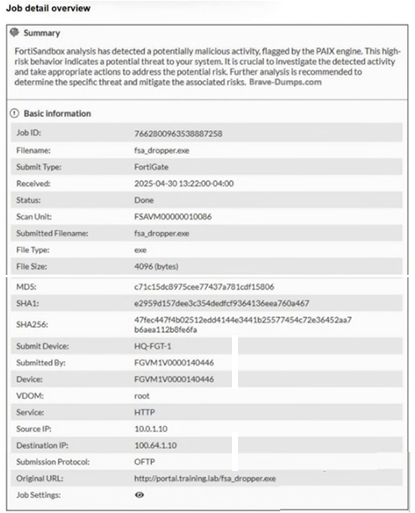
Which two statements about the scanned file are true? (Choose two answers)
The exhibit summary says the file was ''flagged by the PAIX engine'' and describes it as ''high-risk behavior.'' The lab guide also states for a similar file analysis scenario: ''The PAIX engine detected potentially malicious activity... The overall assessment is that there is a high likelihood of malicious activity.'' In addition, the FortiGate integration lab explains that ''FortiSandbox identified the fsa_dropper.exe file as high risk... because the advanced AI engine was able to detect malicious behaviour... at the static scan phase.'' These extracts confirm that the advanced AI / PAIX engine identified the threat, so A is true.
Option D is not supported. The study guide distinguishes high risk from malicious and explains that high risk is a suspicious threat-level rating, not the same as a malicious verdict. It states that FortiSandbox groups results into ratings such as high risk, medium risk, low risk, clean, and malicious, and defines high-risk separately as a serious suspicious rating. Since the exhibit explicitly refers to high-risk behavior, not a malicious verdict, D is false as written. The duplicated B/C options are also not proven by the exhibit text provided.
If your original source intended D to say ''The analysis resulted in a high-risk verdict'' instead of malicious verdict, then the correct pair would be A and D.
Which three actions does FortiSandbox perform when it is integrated with FortiMail for advanced threat protection (ATP)? (Choose three answers)
The Study Guide is explicit about the FortiMail--FortiSandbox workflow. It states: ''On top of file submissions, FortiMail can also submit extracted URLs from emails to FortiSandbox for inspection. FortiMail queues the email while waiting for a verdict. FortiSandbox inspects all submitted files and URLs. FortiSandbox then generates a verdict and sends that verdict in reply to FortiMail. FortiMail uses the verdict to apply the configured action.''
This directly supports D because FortiSandbox analyzes file and URL objects. It supports B because FortiSandbox generates a verdict and returns it to FortiMail. And it supports E because the integrated workflow includes the email being queued during analysis while FortiSandbox is processing the submitted objects. Option C is incorrect because FortiMail is the device that submits the objects to FortiSandbox, not FortiSandbox itself. Option A is also incorrect because updating FortiGuard databases is not one of the three ATP integration actions described for the FortiMail workflow. Therefore, the correct three answers are B, D, and E.
Refer to the CLI configuration below.
set device-authorization -a
How will FortiSandbox authorize new FortiClient devices after this command? (Choose one answer)
The Study Guide explains the default behavior first: ''You must authorize FortiClient EMS on FortiSandbox. FortiSandbox automatically authorizes all FortiClient endpoints managed by an authorized FortiClient EMS.'' It then adds the key point for this question: ''To change the default FortiClient authorization behavior, use the command shown on this slide to authorize FortiClient endpoints using FortiSandbox CLI. By default, FortiClient inherits its authorization status from the managing EMS or FortiGate.''
Because the question specifically shows the CLI command set device-authorization -a, it is asking about the behavior after changing the default. The default inheritance model described in option A applies before the override. After this command, FortiSandbox is set to authorize FortiClient endpoints directly and automatically, which makes C the correct answer. Option B is incorrect because the command is specifically about FortiClient endpoints, not other devices in general. Option D is too broad and does not match the Study Guide's explanation, which is limited to FortiClient authorization behavior.
You are asked to create an 802.3ad interface on FortiSandbox with port 2 and port 4. However, when attempting to make the configuration change, you discover that you cannot select port 4 for the aggregate bonding. What are two reasons for this issue? (Choose two answers)
From the Deployment and System Settings lesson, the Study Guide states:
'Other ports, with the exception of port3, can also be configured as management ports from CLI.'
'You can set additional ports as management port using the CLI command shown on this slide.'
From the Lab Guide (Exercise 4 - Using Inline Scanning):
'FortiGate and FortiSandbox communicate through port 4443. Management or API ports grant access through port 4443.'
'Enter the following command to enable API access on port2: set api-port port2'
Ports that are designated as either administration interfaces or API interfaces cannot be selected for 802.3ad aggregate bonding because:
Option A --- Port 4 configured as an administration interface is reserved for management traffic and cannot be repurposed for link aggregation
Option C --- Port 4 configured as an API interface is dedicated for API communication (port 4443) and is similarly restricted from being used in aggregate bonding configurations
Port 4 in the Lab Guide is specifically referenced as the HA communication and management port, confirming these restrictions apply when special roles are assigned to interfaces.
Refer to the exhibits.
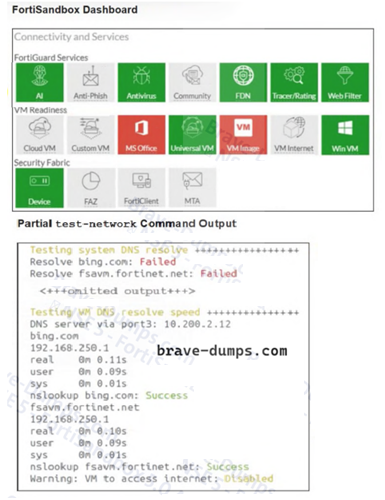
You are unable to download guest VMs on a new FortiSandbox VM. What is the reason for this? (Choose one answer)
From the Scanning and Rating Components lesson, the Study Guide explicitly states:
'VM images are downloaded from FortiGuard, using port1. So, you must ensure FortiSandbox has a default route and internet connectivity for port1.'
The exhibit confirms this --- the test-network output shows:
System DNS resolve: Failed for both bing.com and fsavm.fortinet.net
fsavm.fortinet.net is the FortiGuard VM image download server
This DNS failure on the system side (port1) confirms there is no internet connectivity on port1, preventing VM image downloads. Note that port3 internet shows 'Warning: VM to access internet: Disabled' --- but port3 is only for VM sandboxing traffic, not for downloading VM images.
Get access to all 42 verified questions with detailed answers.
Unlock All FCP_FSA_AD-5.0 Questions